
Using Smarter AI Resources to Customize Smarter’s Sign-in Page

The sign-in page of Smarter’s web console shows a small illustration each day, the Doodle, and two large language models (LLMs) choose and draw it. One is an editor. It decides what each region of the world celebrates today, a national holiday, a festival, a Formula One season. The other is an artist. It draws the decorations, as SVG, the text format that web pages use for vector pictures. Both are ordinary Smarter AI applications, defined in YAML like any other, and the platform prompts them the same way you would.
That last part is the point of this post. Creative work is a good fit for an LLM, and a risky one. A model with good taste will still, now and then, pick something sad, invent a link, or draw outside the lines. So the Doodle is built like a small newsroom. The LLMs make the creative calls. Plain code decides what they may choose from, checks everything they hand in, and a person signs off before anything new is shown.

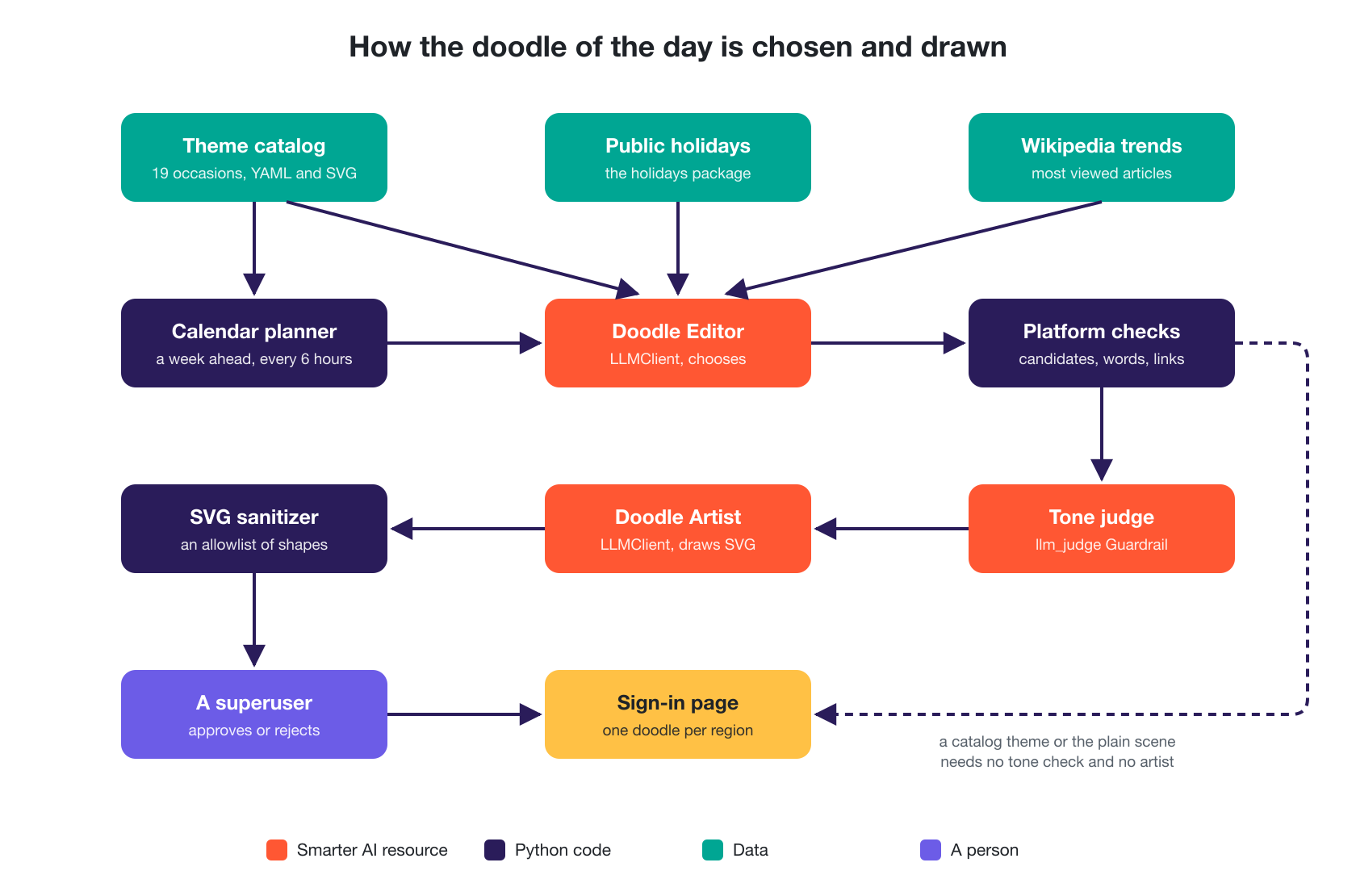
Here is the newsroom, desk by desk.
| Desk | What it is | What it does |
|---|---|---|
| Calendar planner | Python code | Plans each region’s doodle a week ahead, from a catalog of reviewed artwork |
| Doodle Editor | A Smarter LLMClient | Chooses what each region celebrates, from a list of candidates |
| Platform checks | Python code | Checks every choice against the candidates, a list of blocked topics, and the rules for links and captions |
| Tone judge | A Smarter Guardrail | Asks a small LLM whether the occasion is plainly cheerful |
| Doodle Artist | A Smarter LLMClient | Draws the decorations as SVG |
| SVG sanitizer | Python code | Keeps only the shapes of a flat drawing |
| A superuser | A person | Approves or rejects a new drawing |
The scene and the catalog
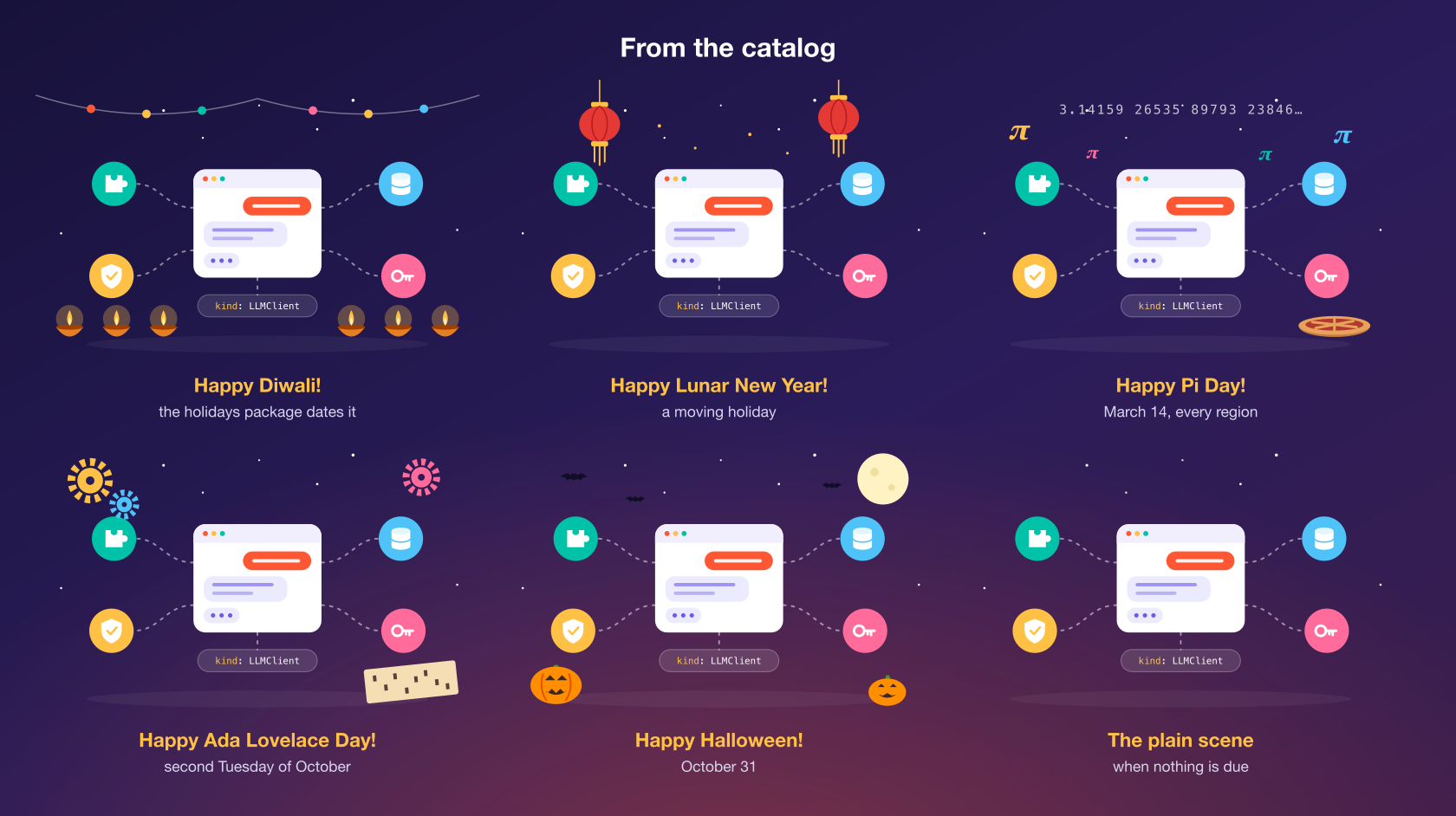
Every doodle starts from the same base scene. It’s a Smarter LLMClient’s chat window, with four colored circles around it for the plugin, guardrail, vector database and secret that an AI application typically uses, and a little label that reads kind: LLMClient. It’s a picture of what Smarter is for. A doodle only adds decorations around it, in the sky, on the ground, or perched on top of the chat window like a hat.
Before any LLM gets involved, there is a catalog of 19 occasions with artwork that was drawn and reviewed ahead of time. Claude Code drew them as SVG when it built the feature. Each occasion is a short YAML file that says what it celebrates, which regions see it, and when it’s due.
slug: pi-day
name: Pi Day
category: science
caption: Happy Pi Day!
alt_text: The digits of pi float above a Smarter LLMClient, beside a freshly baked pie.
link_url: https://en.wikipedia.org/wiki/Pi_Day
priority: 55
regions: ["*"]
schedule:
  kind: fixed
  month: 3
  day: 14
A date can be fixed (Pi Day), the nth weekday of a month (Ada Lovelace Day, the second Tuesday of October), or a country’s public holiday by name. The holidays Python package works out the moving ones, such as Diwali, Lunar New Year and Eid al-Fitr.
The visitor’s browser sends its time zone, nothing more. Smarter maps it to one of 12 regions, such as South Asia or Latin America, so a holiday starts at local midnight and visitors in different places can see different doodles on the same day. No IP address is looked up, and nothing about the visitor is stored.
The rest of the machinery is made of parts Smarter already had. The Doodle is a Django app with a few database tables, a background job that runs every six hours on Celery Beat (the same scheduler as the daily DNS sweep), and a small React app that shows the result, hosted by Django like every page of the console. Django-React Integration explains that pattern, and I won’t repeat it here. A calendar alone could run this. The interesting part is what happens when it can’t.
Why the AI parts are LLMClients
A catalog only celebrates what someone thought to put in it. Japan’s Culture Day, Liberia’s Thanksgiving or the start of a World Cup aren’t in it, and nobody is going to keep a list of every country’s holidays up to date by hand. That’s a judgment call, made fresh every day, about what a general audience of students and teachers would enjoy seeing. It’s a job for an LLM.
The easy way to add one would be a direct call to a model provider’s API from the Doodle’s code. Smarter doesn’t do that. The editor and the artist are LLMClients, which is Smarter’s name for an AI application. An LLMClient is a YAML manifest that names a model, a system prompt (the standing instructions the model reads before every request), and the plugins and Guardrails around it. Here is the editor’s, trimmed.
apiVersion: smarter.sh/v1
kind: LLMClient
metadata:
  name: smarter_doodle_editor
  description: "The editor of the web console's sign-in page doodle, which chooses a holiday or day of recognition to celebrate in each region of the world, from the candidates that the platform gives it."
  version: 1.0.0
spec:
  config:
    prompt:
      staffOnly: true
      appName: Smarter Doodle Editor
      defaultModel: gpt-6-luna
      defaultTemperature: 0.2
      defaultSystemRole: |
        You are the editor of the doodle of the day on the sign-in page of The Smarter Project's web
        console. [...] Your job is to choose, for each region, what the day's doodle celebrates.
  guardrails:
    - json_code_fence_output
    - moderation_output
Making them LLMClients buys a lot for free.
- The prompt is configuration, not code. The editor’s taste lives in its system prompt, in the example manifests repository. Changing what it considers “a joyful, inclusive occasion” is an edit to a YAML file, not a release of the platform.
- Guardrails come along. The editor’s answer goes through OpenAI’s moderation model, and a Guardrail that strips a stray code fence so the answer parses as JSON. The artist’s answer goes through a Guardrail that removes scripts. LLM Guardrails in YAML covers how those work.
- Every prompt is on the record. Each request and answer is written to Smarter’s journal, and its tokens are charged to the account like anyone’s, so the doodle’s running cost is visible next to everything else.
- Anyone on staff can try it by hand. Because it’s an ordinary LLMClient, a staff member can open the editor in the console’s workbench, paste a request, and see what it would choose today.
- Nobody else sees them. Both are staff-only, a setting that hides an LLMClient from everyone but the people who run the platform.
The platform’s own code prompts them exactly as an outside client would, through the chat API, with a throwaway API key that’s deleted when the prompt is done. In prompting.py, that’s three small functions, and the editor’s call is two lines.
with single_use_api_key(smarter_admin_profile(), "doodle_editor") as token_key:
    result = prompt_llmclient(editor, token_key, json.dumps(request_json))
The Doodle is an AI application built on the same platform it decorates. Smarter eats its own cooking.
The editor gets a menu, not a blank page
An LLM asked “what should we celebrate today?” will happily make something up. So the editor never gets an open question. Once for each new day, the planner sends it a JSON document that lists, for every region, exactly what it may choose from. That covers the catalog’s occasions that are due, the region’s other public holidays, and, for today and tomorrow, what the region is reading about on Wikipedia. Here’s a piece of a real request for November 5, from a test platform.
{
  "date": "2026-11-05",
  "artwork_allowed": true,
  "regions": [
    {
      "region": "europe",
      "name": "Europe",
      "catalog": [],
      "observances": [],
      "trends": [
        {
          "id": "it:Campionato_mondiale_di_Formula_1_2026",
          "title": "2026 Formula One World Championship",
          "description": "77th Formula One season",
          "views": 15551,
          "url": "https://it.wikipedia.org/wiki/Campionato_mondiale_di_Formula_1_2026"
        }
      ]
    }
  ]
}
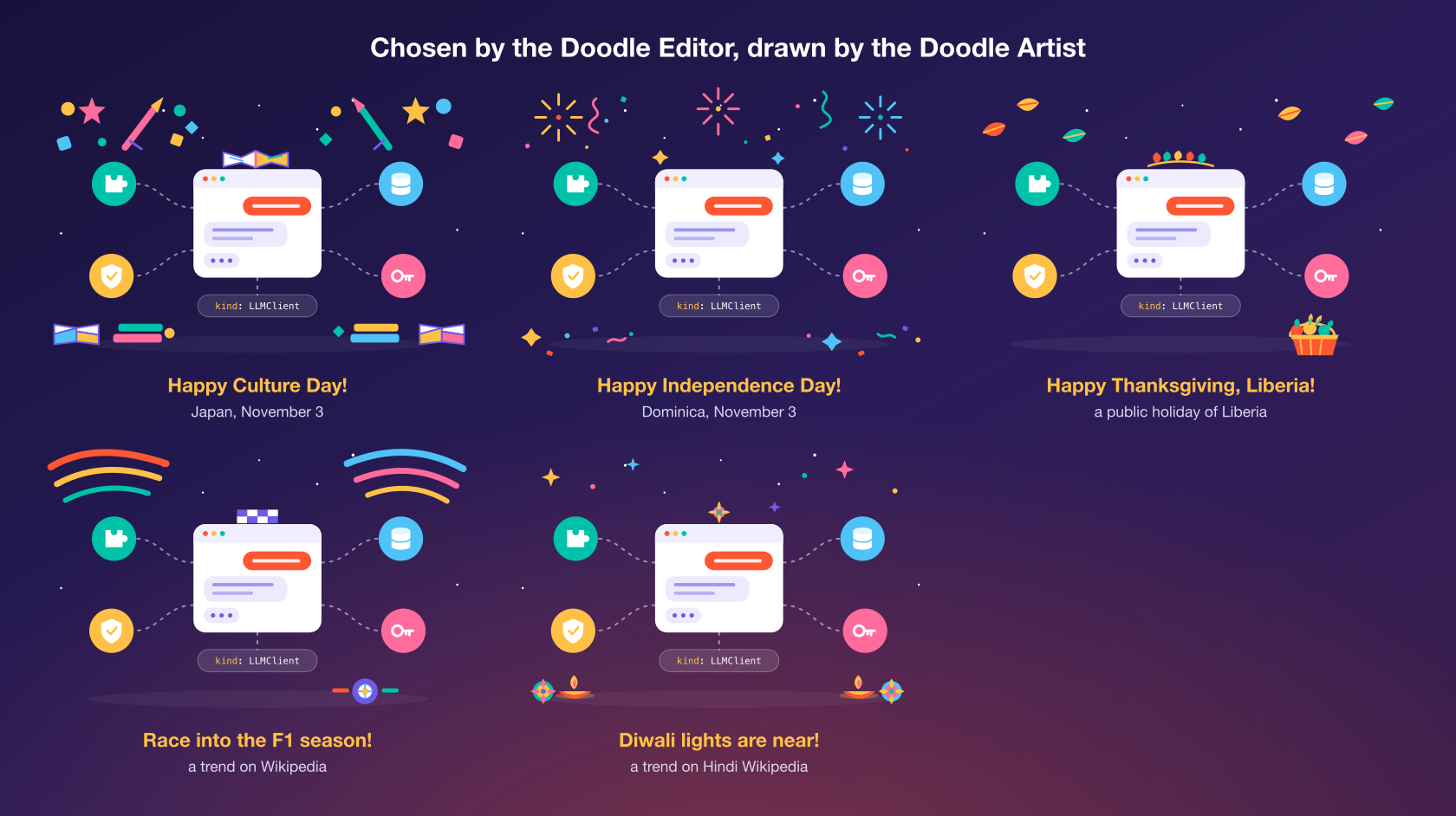
For each region, the editor answers with one of four choices. A catalog theme by its id, one of the region’s holidays, one of its trends, or “default”, the plain scene, which its system prompt calls “always a safe choice”. For a holiday or a trend, which has no artwork yet, it also writes a caption, alt text for screen readers, and a short brief for the artist.
{
  "region": "europe",
  "choice": "trend",
  "id": "it:Campionato_mondiale_di_Formula_1_2026",
  "reason": "The ongoing Formula One season is a widely followed sporting event in the region.",
  "category": "sport",
  "caption": "Race into the F1 season!",
  "alt_text": "Bright racing stripes and a tiny tire decorate the Smarter LLMClient.",
  "subject": "Add cheerful curved racing stripes and a small stylized tire in bright colors, with no logos or text."
}
The reason field is there for the people who review its work, and its reasons are often the most useful part. In the same run it passed on Japan’s Culture Day with “Japan’s Culture Day was two days ago, so the trend is not clearly about today’s date”, which is the kind of call a calendar can’t make. In the run for November 4, it declined Mexico’s Day of the Dead as a trend, because “the Day of the Dead is about remembrance”. That’s the cautious reading its prompt asks for. The catalog does celebrate Día de Muertos, with artwork that was drawn with care and reviewed ahead of time. The editor is told to stay away from anything about remembrance of the dead, and it did.
The system prompt is long, but its most important line is short. “Never choose anything that is not in the request.” The rest of the design makes sure that line doesn’t have to be trusted.
Trends, from Wikipedia
Holidays can be planned a week ahead. A World Cup final can’t. So for today and tomorrow, the editor takes a second look, with each region’s trends. Every day, the Wikimedia Foundation publishes the most viewed articles of each language edition of Wikipedia. It’s free, official and anonymous. Each region reads its own languages (Spanish and Portuguese for Latin America, Hindi and Bengali for South Asia), so the top articles say what that part of the world is paying attention to.
Most of what people read about is unsuitable, though. It’s a person, a death, a crime or the news. So a trend has to clear several filters before the editor ever sees it.
- It must be an article, not the main page or a special page.
- It’s judged in English. Smarter looks up each article’s English label and description on Wikidata, Wikipedia’s structured sister project, so the same checks work for a Japanese or Arabic article.
- It can’t be a person. A description with years of life, such as “(1950–2026)”, or an occupation such as “actor” or “footballer”, is dropped. A doodle never draws a person.
- It must name an occasion. The description has to contain a word such as tournament, festival, eclipse or launch. That’s an allowlist, because a blocklist can’t keep up with the news.
- It can’t have a blocked word (more on those below).
The trends are fetched with the same hardened HTTP client that Smarter’s plugins use, and cached for 12 hours with @cache_results(), so regions that read the same edition share one request.
You can watch this happen yourself, with curl and jq. These three commands are a simplified version of what Smarter does, for Canada, in English. The third checks a short list of occasion words, not every filter above.
First, ask Wikipedia which 25 articles were read the most yesterday, and save their titles.
curl -s "https://wikimedia.org/api/rest_v1/metrics/pageviews/top/en.wikipedia.org/all-access/2026/11/03" \
  | jq -r '[.items[0].articles[:25][].article | gsub("_"; " ")] | join("|")' > titles.txt
Second, ask Wikidata what each of those articles is about, in one short English sentence, such as FIFA World Cup: international association football competition.
curl -s -G "https://www.wikidata.org/w/api.php" \
  --data-urlencode "action=wbgetentities" \
  --data-urlencode "sites=enwiki" \
  --data-urlencode "titles=$(cat titles.txt)" \
  --data-urlencode "props=labels|descriptions" \
  --data-urlencode "languages=en" \
  --data-urlencode "format=json" > articles.json
Third, keep only the articles about an occasion worth a doodle, such as a festival or a tournament, and write them up as the request that the editor receives.
jq '{date: "2026-11-04", artwork_allowed: true, regions: [{region: "ca", name: "Canada", catalog: [],
  observances: [.entities[] | select(.descriptions.en.value // "" | test("festival|tournament|championship|cup|season|holiday|eclipse"; "i"))
    | {id: ("CA:" + .id), name: .labels.en.value, countries: ["CA"]}]}]}' articles.json
On November 4, 2026, that printed one trend, which shows why the editor still gets the last word.
{
  "date": "2026-11-04",
  "artwork_allowed": true,
  "regions": [
    {
      "region": "ca",
      "name": "Canada",
      "catalog": [],
      "observances": [
        {
          "id": "CA:Q139761349",
          "name": "Dancing with the Stars (American TV series) season 35",
          "countries": ["CA"]
        }
      ]
    }
  ]
}
Trust nothing the editor says
Whatever the system prompt says, the platform checks every choice again in editor.py. The editor is told the rules so it rarely breaks them, and the code enforces them so it never matters when it does.
- It must be on the menu. A choice must be one of that region’s candidates, and a holiday or trend only when the region has no catalog theme that day.
- The link is checked. The caption’s link must be a Wikipedia article. For a trend, it’s always the trend’s own article, whatever the editor wrote.
- The caption and alt text must fit. Both must be present and short.
- Blocked topics. Mourning, war, politics, monarchy, accidents, crimes, disasters and a single religion’s holy days are refused. This uses the same language matching as the selectors of Smarter’s plugins. It catches plurals, typos and synonyms from a thesaurus (“bereavement” for “mourning”), but never a word inside another, so “Award” doesn’t match “war”.
A choice that fails is simply ignored, and that region keeps the calendar’s doodle. Nothing breaks.
A tone check by a Guardrail
Word lists have a blind spot. A solemn anniversary or a sad news story often contains no blocked word at all. And moderation models, which look for harmful content, don’t flag sad content. What’s needed is a judge of tone. Smarter already has one kind of resource for exactly this, the llm_judge Guardrail, which asks a small, inexpensive LLM a yes-or-no question about a piece of text. So every occasion that would be drawn goes to one more Smarter AI resource, upbeat_occasion_input.
apiVersion: smarter.sh/v1
kind: Guardrail
metadata:
  name: upbeat_occasion_input
  version: 1.0.0
spec:
  config:
    mode: enforce
    stage: input
    strategy: llm_judge
    judgePrompt: |-
      You decide whether an occasion is right for a small, cheerful illustration that decorates the
      sign-in page of an educational platform, seen by students and teachers around the world.

      The occasion must be plainly fun, upbeat and celebratory [...] When in doubt, it is not right.
    model: gpt-6-luna
    threshold: 0.5
    action: block
The check fails closed. If the judge says no, if it errors, or if the Guardrail doesn’t exist on a platform, nothing is drawn. It’s deliberately strict, and strict has a cost. On one test run it turned down a Diwali trend from Hindi Wikipedia, which is about as cheerful as an occasion gets. That’s the trade I want. A missed festival costs nothing, because the plain scene is shown and Diwali is in the catalog anyway. A cheerful cartoon on the day of a tragedy would cost a lot more.
So a choice passes through two LLMs that don’t share a prompt, and a layer of plain code between them. The editor proposes, the code checks it, and the judge confirms. That’s the newsroom’s copy desk.
The artist draws inside the lines
When the editor picks something the catalog has no artwork for, the Doodle Artist draws it. It gets the occasion’s name, the editor’s brief and a two-letter prefix, and answers with SVG.
SVG is a good medium for an LLM. It’s text, so a language model can write it, and a flat, cartoon style needs only circles, rectangles and simple paths. The hard part is placement, because the decorations must go around the scene, not on top of it. So the artist’s system prompt describes the base scene in coordinates, the way you’d describe a canvas to someone drawing blindfolded.
The doodle is a flat, friendly illustration, 520 by 340, on a dark purple background.
Its base scene, which you never draw, is:
- a white chat window, a rounded rectangle from (185, 105) to (335, 232);
- four colored circles of radius 26, its resources, at (92, 122), (89, 230), (428, 122) and (431, 230);
[...]
You draw only the decorations for one occasion, which go around the scene, never over it: in
the sky (y < 95), on the ground (y > 285, left of x 180 or right of x 340), and on the top
edge of the chat window (a hat or an ornament at about y 105, x 185 to 335).
It’s told the palette, a limit of about 40 shapes, and to never draw people, faces, flags, words or religious symbols. Its temperature is 0.6, higher than the editor’s 0.2, because here a little variety is the point.
The sanitizer
An SVG file can carry more than shapes. It can hold scripts, links, embedded images and CSS that restyles a page. The artist’s output is a model’s output, so it’s treated as untrusted, the same way Smarter’s chat widget treats an LLM’s HTML (DOMPurify and Markdown covers that one). The sanitizer in sanitize.py works from an allowlist, not a blocklist.
- Only shapes survive. Groups, paths, rectangles, circles, ellipses, lines, polygons and one style block are kept, with geometry, color, transform and class attributes. Everything else is removed.
- No way out. Event handlers, links, ids,
url(),javascript:anddata:are stripped, so a drawing can’t load or run anything. - Its CSS stays in its lane. Styles may only animate the drawing’s own prefixed classes, and only their movement and opacity, so a drawing can’t restyle the base scene, let alone the page.
- Size limits. The SVG’s length and number of elements are capped.
The clean decorations are drawn into the base scene, and the page shows the result with an <img> tag, in which a browser runs no scripts and loads nothing anyway. It’s two locks on the same door. The SVG is stored under a hash of its content, so its URL never changes and browsers can cache it for a year.
A person has the last word
The LLMs propose, and a person decides. A drawing the artist made is saved as proposed, and visitors keep seeing the calendar’s choice until a superuser approves it. In the Django admin, Preview the week shows a grid of every region’s doodle for every planned day, each with its caption, who chose it, the editor’s reason, and an Approve and a Reject button. A superuser can also replace any day’s doodle by hand, and neither the planner nor the editor will touch that day again.
Every prompt to the editor is kept too, as a Doodle Editor Run with what it was asked, what it answered, and which of its choices the platform refused and why. When something odd shows up on the sign-in page, the paper trail says how it got there.
The AI editor, the AI artwork, the trends and the credit line each have a switch, and each can be turned off on its own. One switch, auto-approve, lets drawings go live without review, and it’s off by default. On a Smarter platform without the example manifests, the editor and artist don’t exist, and the calendar quietly does the whole job.
When an AI application did choose or draw the day’s doodle, the page says so, under the caption. “Chosen by a Smarter AI application”, or “Drawn by a Smarter AI application”, with a Learn how link to this post. Credit where it’s due.
Takeaways
If you want an LLM to do creative work in your own application, these are the parts that matter, in rough order of payoff.
- Give it a menu, not a blank page. List what it may choose from, and check that the answer is on the list. Most of the risk disappears right there.
- Always offer a safe choice. “Default” is a perfectly good answer, and the prompt says so. A model that’s allowed to pass is less likely to stretch.
- Re-check everything in code. The system prompt states the rules so the model rarely breaks them. The code enforces them so it doesn’t matter when it does.
- Use a second, different model as a judge for what code can’t check, such as tone, and make it fail closed.
- Treat generated markup as untrusted, and clean it with an allowlist.
- Ask for a reason with every choice. It costs a sentence, and it’s the first thing you’ll read when something looks wrong.
- Keep a person in the loop for anything new, and keep the record of what was asked and answered.
- Make the AI parts configuration. Because the editor, the artist and the judge are Smarter resources, their prompts, models and Guardrails change with a YAML edit, and they come with logging, cost accounting and access control already in place.
Closing thoughts
The Doodle is a small, cheerful feature, and that’s why it’s a good example. The stakes are low enough to let LLMs make real creative decisions every day, and visible enough that every one of those decisions has to be right, on a page everyone sees before they sign in. The design that makes that work isn’t clever. It’s a newsroom. Editors pick, artists draw, the copy desk checks, and someone signs off before it goes to print. The LLMs just happen to sit at two of the desks. 🎨