
DOMPurify and Markdown: Rendering LLM Output as Untrusted HTML in an Embeddable Chat Widget

Smarter‘s embeddable chat widget treats every reply from the LLM as untrusted input. It renders the reply’s Markdown with marked, turns raw HTML into visible text, allows links and images only from URLs that match a short rule, and passes the result through DOMPurify before it reaches the page. Diagrams drawn by Mermaid are sanitized a second time. This post describes that pipeline, why it is needed even though the widget lives in a shadow DOM, and what it costs.
The widget is the @smarter.sh/ui-chat React package, and the <smarter-chat> custom element built from it, which anyone can drop into a web page with one script tag. The post on embedding it in an HTML page covers the how. This one covers the part that the site owner never sees, and depends on completely.
Why LLM output is untrusted
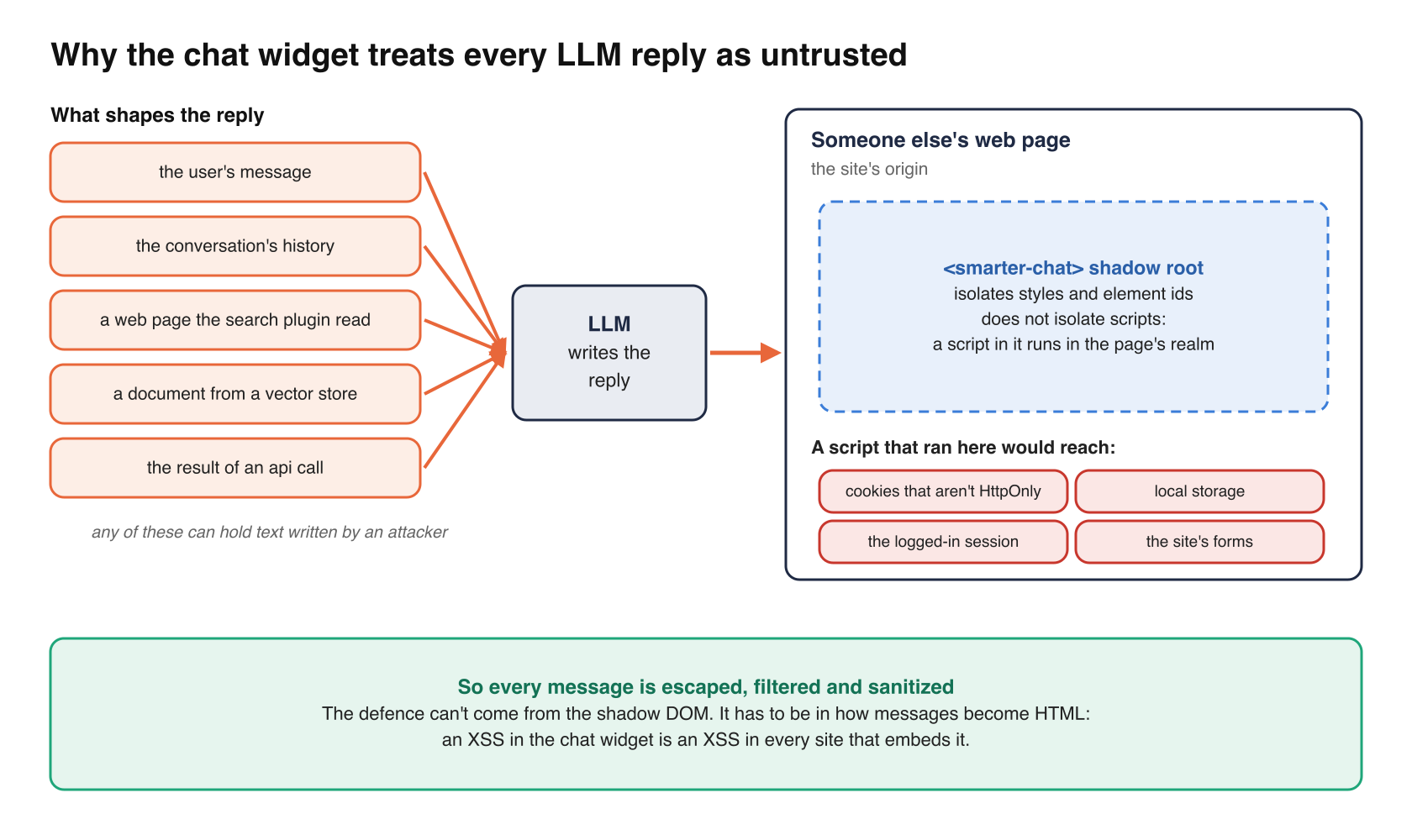
It is tempting to think of the model’s reply as the application’s own output, like a template the developer wrote. It isn’t. An LLM’s reply is shaped by everything that went into its context, such as the user’s message, the conversation’s history, a web page the search plugin read, a document from a vector store, the result of an API call. Any of those can contain text written by someone who wants the model to say something specific. If the model can be persuaded to write <img src=x onerror=...>, and the widget turns that into DOM, the attacker’s script runs.
Where it runs is what makes this serious. The widget is embedded on someone else’s website, so a script in a chat message runs with that website’s origin, which means its cookies that aren’t HttpOnly, its local storage, its logged-in session, its forms. An XSS in the chat widget is an XSS in every site that embeds it.
A shadow DOM is a style boundary, not a security boundary
The custom element renders the chat in its own shadow root, in element.ts.
connectedCallback(): void {
  let shadow = this.shadowRoot;
  if (!shadow) {
    shadow = this.attachShadow({ mode: "open" });
    const css = embedCss();
    applyCss(shadow, css);
    hoistFontFaces(css, this.ownerDocument);
  }
  ...
}
Its docstring says what that is for, “so that the website’s css can’t change the chat, and the chat’s css can’t change the website”. That is the right reason, and the only one. A shadow root isolates styles and element ids. It does not isolate scripts. A <script> or an event handler inside a shadow root runs in the page’s JavaScript realm, with the page’s origin, exactly as if it were in the light DOM. So the shadow DOM changes nothing about XSS, and the defense has to be in how messages become HTML.
The pipeline
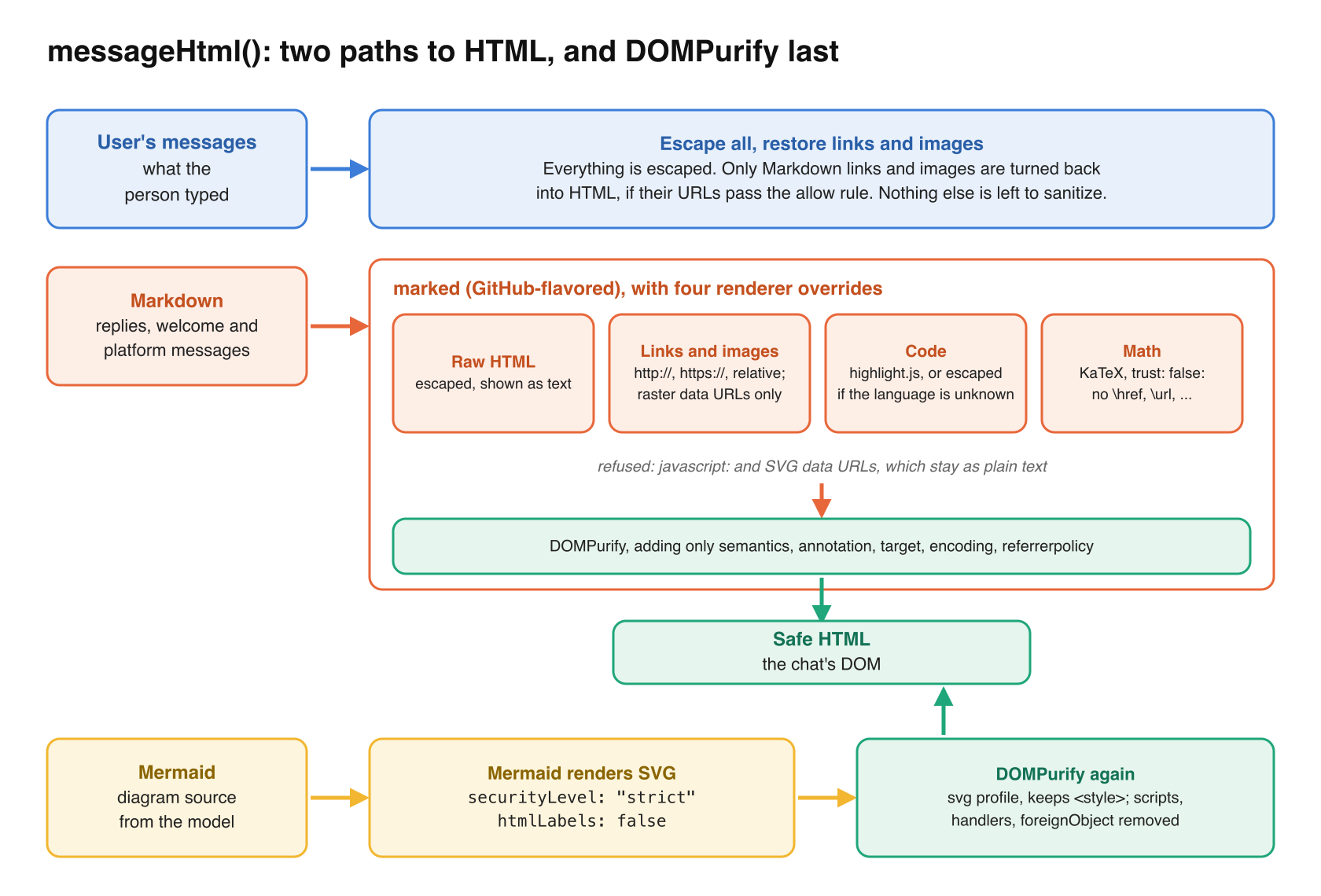
Messages are HTML strings, because the chat UI kit that displays them takes HTML. Every message passes through one function, messageHtml() in messages.ts, and there are two paths through it.
The user’s own messages
What the user typed is escaped, all of it, and then only Markdown links and images are turned back into HTML, if their URLs match the rule below. Nothing else the user types becomes markup, so there is nothing left for a sanitizer to do.
Everything else
The assistant’s replies, the welcome message and the platform’s own messages are Markdown, rendered by marked with GitHub-flavored Markdown and line breaks, then sanitized. Four overrides in the renderer do most of the work before the sanitizer ever sees the HTML.
markdown.use({
  renderer: {
    // raw html is displayed as text.
    html({ text }: Tokens.HTML | Tokens.Tag): string {
      return escapeHtml(text);
    },
    link({ href, tokens }: Tokens.Link): string {
      ...
      const content = this.parser.parseInline(tokens);
      return urlRegex.test(href) ? anchor(escapeHtml(href), content) : content;
    },
    image({ href, text }: Tokens.Image): string {
      return imageUrlRegex.test(href) ? linkedImage(escapeHtml(href), text) : text;
    },
    code({ text, lang }: Tokens.Code): string {
      return codeBlockHtml(text, lang);
    },
  },
});
Raw HTML is text. Markdown allows inline HTML, and marked passes it through by default. Here it is escaped, so a reply that contains <img src=x onerror="alert(1)"> displays those characters, and nothing else happens.
Links and images follow an allow rule. A URL must be http://, https:// or relative to the page. An image may also be a base64 data URL of a raster format (PNG, JPEG, GIF or WebP), because some tools return generated images that way. SVG data URLs are refused, since SVG can carry script. Anything else, javascript: first among them, stays as plain text. The link’s label is shown, and nothing is clickable. Links open in a new tab with rel="noopener noreferrer", and images are requested with referrerpolicy="no-referrer".
Code is escaped by the highlighter. Code blocks go through highlight.js, or are escaped when the language is unknown.
Math can’t link. LaTeX is typeset by KaTeX with trust: false, so \href, \url, \includegraphics and \htmlClass are off. The source comment puts it plainly, “math is text, and cannot link or add markup”.
Then the whole result goes through DOMPurify, with as few additions to its defaults as the features need.
function sanitize(html: string): string {
  return DOMPurify.sanitize(html, {
    ADD_TAGS: ["semantics", "annotation"],
    ADD_ATTR: ["target", "encoding", "referrerpolicy"],
  });
}
The extra tags keep KaTeX’s MathML annotation, which screen readers read. The extra attributes keep the new-tab links, the MathML encoding and the image referrer policy. Nothing that can run a script is added. This is defense in depth in the plain sense. The renderer is written not to produce dangerous HTML, and the sanitizer assumes it might anyway, because marked, its extensions and the highlighter are all large pieces of code that someone else maintains.
Mermaid, sanitized twice
Mermaid is where the most care went, because a diagram’s source comes from the model, and Mermaid’s own job is to turn text into SVG markup. In mermaid.ts, it is initialized like this.
mermaid.initialize({
  startOnLoad: false,
  securityLevel: "strict",
  htmlLabels: false,
  theme: "neutral",
  themeVariables: THEME_VARIABLES,
});
securityLevel: "strict" makes Mermaid encode HTML tags in the diagram’s text and disables click interactions. htmlLabels: false draws labels as SVG text rather than as HTML inside a foreignObject, which removes the place where HTML would have lived in the first place. Then the SVG that Mermaid returns is sanitized again with DOMPurify’s SVG profile before it is inserted.
export function sanitizeSvg(svg: string): string {
  return DOMPurify.sanitize(svg, { USE_PROFILES: { svg: true, svgFilters: true }, ADD_TAGS: ["style"] });
}
The <style> element is kept so that the diagram keeps its colors. Scripts, event handlers and foreignObject are removed, and a test renders a diagram and asserts that none of them survive. Mermaid is also loaded only when a message first contains a diagram, so most chats never download it.
Tests that read like a threat model
The behaviors above are pinned by unit tests in messages.test.ts, whose names are worth reading on their own, such as “escapes html, so that a message cannot inject markup or scripts”, “does not link javascript: urls”, “does not display svg data urls, or javascript: urls, as images”, “escapes the alt text and the url, so that an image cannot inject markup”. One of them, for the assistant’s Markdown path.
it("displays raw html as text, and does not link or display unsafe urls", () => {
expect(convertMarkdownToHTML('<img src=x onerror="alert(1)">')).toBe(
"<img src=x onerror="alert(1)">",
);
expect(convertMarkdownToHTML("[click](javascript:alert(1))")).toBe("click");
expect(convertMarkdownToHTML("")).toBe("x");
});
A test like that is the cheapest insurance against the most likely regression, which is not an attacker, but a well-meant change to the renderer that adds a feature and quietly widens what gets through.
How much it matters
On a scale of one to ten, I’d put this at 9. The surface is every reply, on every page of every site that embeds the widget, and the input is text that an attacker can influence without ever touching the chat, by planting it where a plugin will read it. An XSS there is not contained to Smarter. It belongs to the site owner who trusted the script tag.
Cost. Small. DOMPurify adds a few tens of kilobytes to the bundle and a fraction of a millisecond per message. Mermaid, the large dependency, is loaded only on demand.
User experience. Two visible tradeoffs. A reply that writes HTML outside a code fence displays the tags as text rather than rendering them, which is occasionally ugly and always safe. And links and images that don’t match the rule appear as plain text, so an LLM that emits an unusual URL scheme gets a label and no link.
Stability. Neutral to positive. A diagram that Mermaid can’t render stays as its code block, and an image that fails to load is replaced with its description, so a bad reply degrades to text rather than to a broken widget.
Admin burden. It is ongoing and specific, because the sanitizer and the libraries in front of it have to stay current. Markdown renderers, KaTeX and Mermaid have each had security fixes in their histories, and a widget that’s embedded on other people’s sites inherits every one. Keeping the dependency updates flowing, and keeping the tests above passing, is the job.
Takeaways
- Treat an LLM’s reply as user input, because it is shaped by inputs you don’t control.
- Don’t count on a shadow DOM for script isolation. It isolates styles.
- Escape raw HTML in Markdown rather than allowing it through to the sanitizer.
- Put links and images behind a URL allow rule, and refuse SVG data URLs.
- Run DOMPurify last, over everything, with the smallest set of additions your features need.
- Run Mermaid with
securityLevel: "strict"andhtmlLabels: false, and sanitize its SVG output again. - Name your tests after the attack they prevent.
Closing thoughts
Is it worth it? There isn’t really a choice. A chat widget that renders Markdown from a language model and runs on third-party pages has to treat that Markdown as hostile. What’s worth copying is the layering. The renderer is written to produce only safe HTML, the sanitizer assumes it failed, and the one feature that generates markup on its own, Mermaid, gets both treatments. None of the layers is clever, which is the point.