
Your First AI Application With Smarter, Part 4: Querying a SQL Database With a SqlPlugin

A Smarter SqlPlugin gives a language model a SQL query that it can run, with values that it chooses, against a database that you connect it to. In Part 3, Stanley, Stackademy’s course advisor, learned to look courses up through a REST API. He can find the AI courses and the ones within a budget, but he still can’t answer one of the questions students ask most, which is what to take before a course. That needs the whole chain of prerequisites, one course leading to the next, and no single API call returns it. In this part, he gets a second tool, one SQL query that walks the chain in a single trip to the database.
Meet the course database
Every Smarter platform has Stackademy’s course database, so that this tutorial works on your laptop. It’s a MariaDB database named stackademy, on the database server that the Quick Start runs as smarter-mariadb, with one table that matters here.
CREATE TABLE courses (
  course_id       int NOT NULL AUTO_INCREMENT,
  course_code     varchar(10) NOT NULL,
  course_name     varchar(100) NOT NULL,
  description     varchar(255) NOT NULL,
  cost            decimal(8,2) NOT NULL,
  prerequisite_id int DEFAULT NULL,
  PRIMARY KEY (course_id)
);
Each course names at most one prerequisite, by its course_id. Machine Learning requires Artificial Intelligence, which requires Algorithms, and so on back to a course that requires nothing. A database user named stackademy_catalog, whose password is stackademy_catalog, may read the courses table, and nothing else. Like Part 3’s API key, it’s a published demonstration password.
Walk the chain in one query
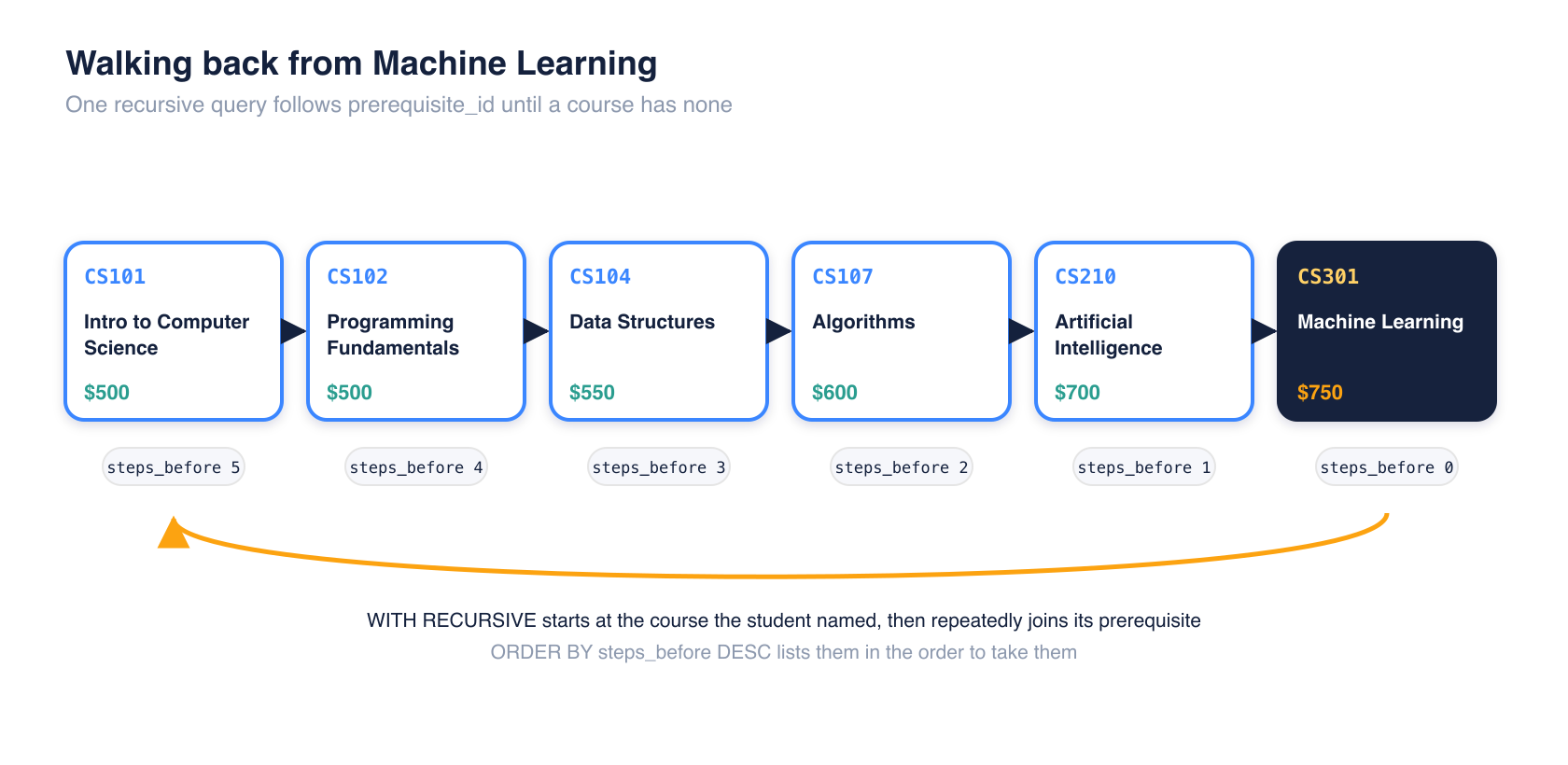
A recursive query starts at the course a student names, then joins its prerequisite, then that course’s prerequisite, until it reaches a course that has none. MariaDB, MySQL 8 and PostgreSQL all support it, as WITH RECURSIVE.
WITH RECURSIVE chain AS (
  SELECT course_id, course_code, course_name, cost, prerequisite_id, 0 AS steps_before
  FROM courses
  WHERE course_name LIKE CONCAT('%', 'Machine Learning', '%')
  UNION ALL
  SELECT p.course_id, p.course_code, p.course_name, p.cost, p.prerequisite_id, chain.steps_before + 1
  FROM courses p
  JOIN chain ON p.course_id = chain.prerequisite_id
)
SELECT course_code, course_name, cost, steps_before
FROM chain
ORDER BY steps_before DESC;
Run as stackademy_catalog, it returns the six courses in the order to take them.
course_code  course_name                       cost    steps_before
CS101        Introduction to Computer Science  500.00  5
CS102        Programming Fundamentals          500.00  4
CS104        Data Structures                   550.00  3
CS107        Algorithms                        600.00  2
CS210        Artificial Intelligence           700.00  1
CS301        Machine Learning                  750.00  0
Through the course catalogue API, the same answer would take five calls, one per course, each waiting for the last. The query is what Stanley will run. The only thing that changes from question to question is the course’s name, and that’s the value the model will choose.
Store the password in a Secret
Work in the stackademy-advisor folder from Part 2. Save this as catalog-db-password.yaml, and apply it.
apiVersion: smarter.sh/v1
kind: Secret
metadata:
  name: catalog_db_password
  description: The password of stackademy_catalog, the read-only user of Stackademy's course database.
  version: 1.0.0
spec:
  config:
    value: stackademy_catalog
smarter apply -f catalog-db-password.yaml
Connect to the database with a SqlConnection
Save this as catalog-db.yaml.
apiVersion: smarter.sh/v1
kind: SqlConnection
metadata:
  name: catalog_db
  description: Read-only connection to Stackademy's course database.
  version: 1.0.0
spec:
  connection:
    dbEngine: django.db.backends.mysql
    hostname: smarter-mariadb
    port: 3306
    database: stackademy
    username: stackademy_catalog
    password: catalog_db_password
    authenticationMethod: tcpip
    useSsl: false
    timeout: 30
dbEngine names the kind of database, here MySQL or MariaDB, and hostname, port and database say where it is. password is the Secret’s name, as apiKey was in Part 3’s ApiConnection. For your own database, connect as a user that can read only what your plugins need. The next section shows why. Apply it.
smarter apply -f catalog-db.yaml
Write the query into a SqlPlugin
Save this as course-prerequisites.yaml.
apiVersion: smarter.sh/v1
kind: SqlPlugin
metadata:
  name: course_prerequisites
  pluginClass: sql
  description: Lists every course that a student must take before a given course, in the order to take them, with their prices.
  version: 1.0.0
spec:
  connection: catalog_db
  sqlData:
    sqlQuery: >
      WITH RECURSIVE chain AS (
        SELECT course_id, course_code, course_name, cost, prerequisite_id, 0 AS steps_before
        FROM courses
        WHERE course_name LIKE CONCAT('%', {course_name}, '%')
        UNION ALL
        SELECT p.course_id, p.course_code, p.course_name, p.cost, p.prerequisite_id, chain.steps_before + 1
        FROM courses p
        JOIN chain ON p.course_id = chain.prerequisite_id
      )
      SELECT course_code, course_name, cost, steps_before
      FROM chain
      ORDER BY steps_before DESC;
    parameters:
      - name: course_name
        type: string
        description: The name of the course that the student wants to take, or part of it, e.g. Machine Learning.
        required: true
    testValues:
      - name: course_name
        value: Machine Learning
    limit: 20
  selector:
    directive: always
  prompt:
    provider: openai
    model: gpt-6-luna
    systemRole: >
      When a student asks what to take before a course, look up its prerequisites.
It’s the query from above, with {course_name} where the course’s name was. Each {name} in sqlQuery is filled in with the parameter of that name. The rest is shaped like Part 3’s ApiPlugin. parameters are the tool’s arguments, testValues gives each one a value to test with, and limit is the most rows that the query may return to the model. This time the parameter is required, because the query means nothing without a course. Validate it and apply it.
smarter validate -f course-prerequisites.yaml
smarter apply -f course-prerequisites.yaml
What a model can put in a query
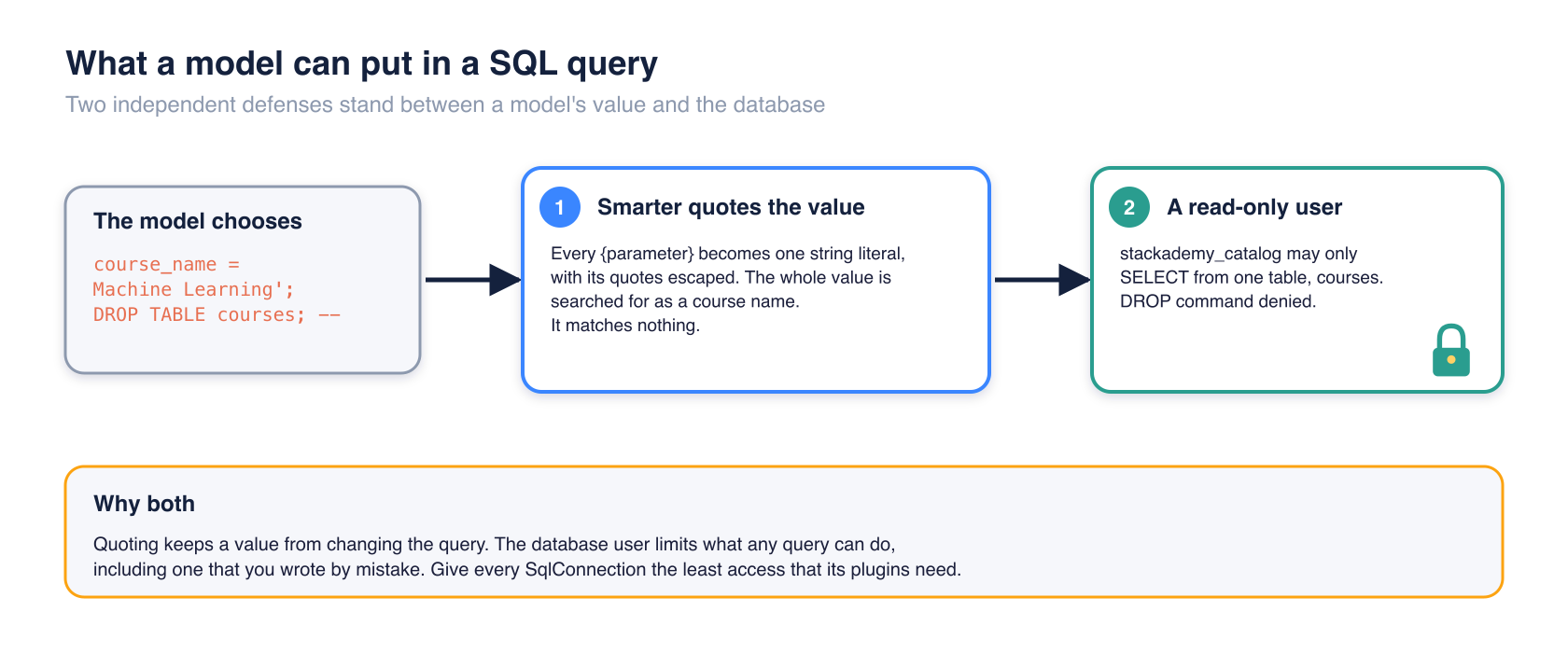
A model chooses the value of course_name, and a model can be talked into choosing almost anything, including Machine Learning'; DROP TABLE courses; --. Two things stop that from doing harm, and they don’t depend on each other.
First, Smarter never pastes a value into the query as it is. It turns each value into one SQL string literal, with its quotes escaped, so a value can’t end the string and start a statement of its own. That value becomes a search for a course whose name contains all of it, quotes and semicolons included. I ran exactly that against the database, and it matched nothing.
matches
0
Second, the connection’s user can only read one table. I tried the DROP directly, as stackademy_catalog, with no Smarter in between.
ERROR 1142 (42000) at line 1: DROP command denied to user 'stackademy_catalog'@'127.0.0.1' for table `stackademy`.`courses`
Quoting keeps a value from changing a query. The database user limits what any query can do, including one that you wrote by mistake. Rely on both.
Give Stanley his second tool
Add course_prerequisites to the plugins in course-advisor.yaml, and change its version to 1.3.0.
  plugins:
    - course_catalog
    - course_prerequisites
Apply it, and commit the three new files.
smarter apply -f course-advisor.yaml
git add .
git commit -m "Stanley looks up prerequisites in the course database"
Ask Stanley what comes first
Open Stanley in the workbench and ask What should I take before Machine Learning? Here’s his answer.
Before Machine Learning, take these courses in order.
1. Introduction to Computer Science, $500 2. Programming Fundamentals, $500 3. Data Structures, $550 4. Algorithms, $600 5. Artificial Intelligence, $700
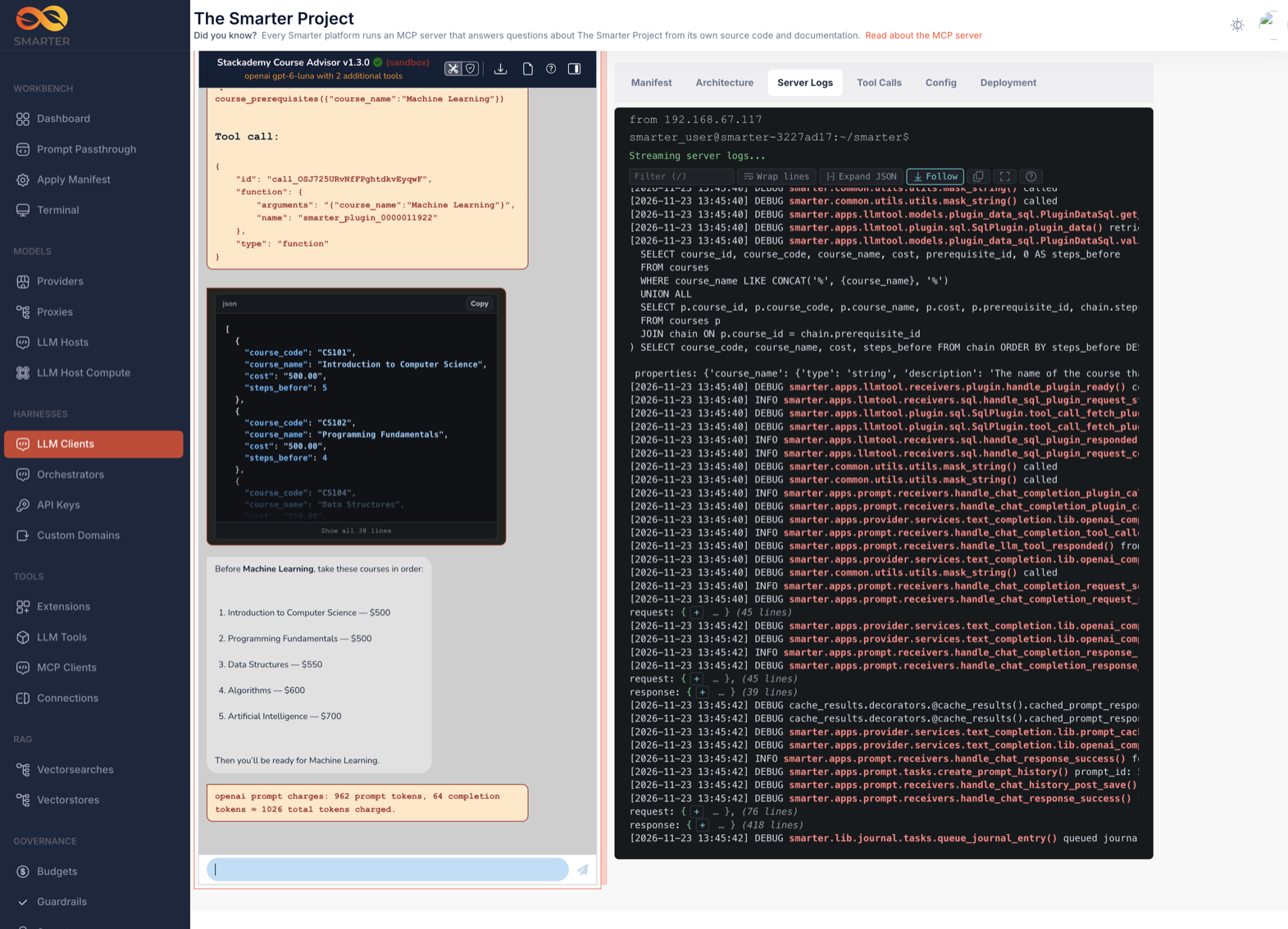
The Console shows that Smarter offered the model both tools, and that it chose the new one.
openai called this tool: course_prerequisites({"course_name":"Machine Learning"})
Now ask something that takes a little arithmetic. I’ve already finished Data Structures. What’s left before I can take Machine Learning, and how much will it cost me?
Since you’ve completed Data Structures, you still need Algorithms ($600) and Artificial Intelligence ($700) before Machine Learning. That’s $1,300 total.
The query returned the same six courses as before. The model worked out which of them the student had already taken, and added up the rest. That’s the division of labor to aim for. The database does what databases are good at, which is finding exactly the right rows, and the model does what models are good at, which is reading a question and explaining the answer.
Two tools, one application
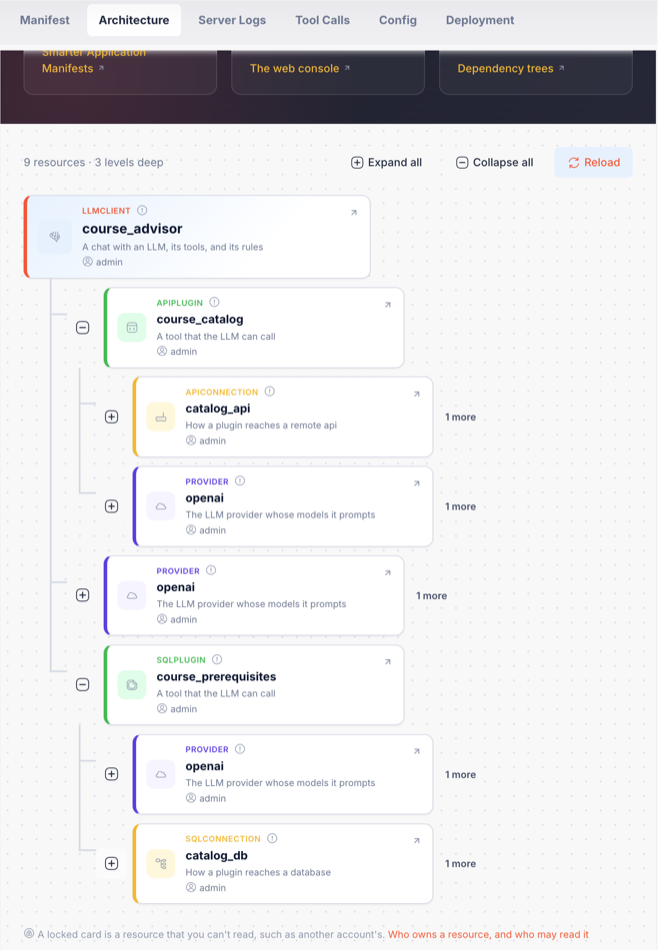
Stanley now has two tools, and the model chooses between them on every question, from their descriptions. That’s why a plugin’s metadata.description says plainly what it’s for, and what it isn’t. Both tools are offered with every prompt, because both selectors say always. Each tool’s definition is sent to the model with every prompt, and every token of it is charged, so an application with many tools can offer each one only when a prompt mentions its search terms, with directive: search_terms.
What’s next
Stanley answers from a REST API and a SQL database now, with credentials that he never sees and a database user that can’t change anything. In Part 5, he gets guardrails, so that he refuses what he shouldn’t answer, and keeps personal data out of his prompts, whatever a student types.