
Your First AI Application With Smarter, Part 3: Calling a REST API With an ApiPlugin

A Smarter ApiPlugin gives a language model a REST API that it can call, by describing the API in a YAML manifest, with no code. In Part 2, Stanley, Stackademy’s course advisor, moved into a file under version control, and he still had to admit that he didn’t know which courses Stackademy offers. In this part, he learns to look them up. Three new manifests give him Stackademy’s course catalogue API, with its API key kept in a Secret that the model never sees, and one more line in his own manifest lets him use it.
Meet the course catalogue API
Every Smarter platform serves Stackademy’s course catalogue at /api/v1/demos/stackademy/course-catalogue/, so that this tutorial works on your laptop without any outside service. It’s an ordinary REST API. A GET returns Stackademy’s courses as JSON, filtered by three optional query parameters, description for a word that the course’s description contains, max_cost for the most a student wants to pay, and course_id. It’s protected by an API key, sent as a bearer token. Try it.
curl -H "Authorization: Bearer stackademy_catalog_api_key" \
  "http://localhost:9357/api/v1/demos/stackademy/course-catalogue/?description=AI"
[
    {
        "course_id": 20,
        "course_code": "CS210",
        "course_name": "Artificial Intelligence",
        "description": "Introduction to AI concepts and techniques.",
        "cost": 700.0,
        "prerequisite_id": 7
    },
    {
        "course_id": 36,
        "course_code": "CS316",
        "course_name": "AI for Robotics",
        "description": "Applying AI techniques to robotics.",
        "cost": 850.0,
        "prerequisite_id": 21
    }
]
The real answer has four courses. Without the token, the API refuses.
{"detail":"Authentication credentials were not provided."}
stackademy_catalog_api_key is a published key for a demonstration API, so it’s safe to print here. Your own APIs’ keys aren’t, and the rest of this part keeps this one out of sight anyway, as if it were real.
Four manifests, one application
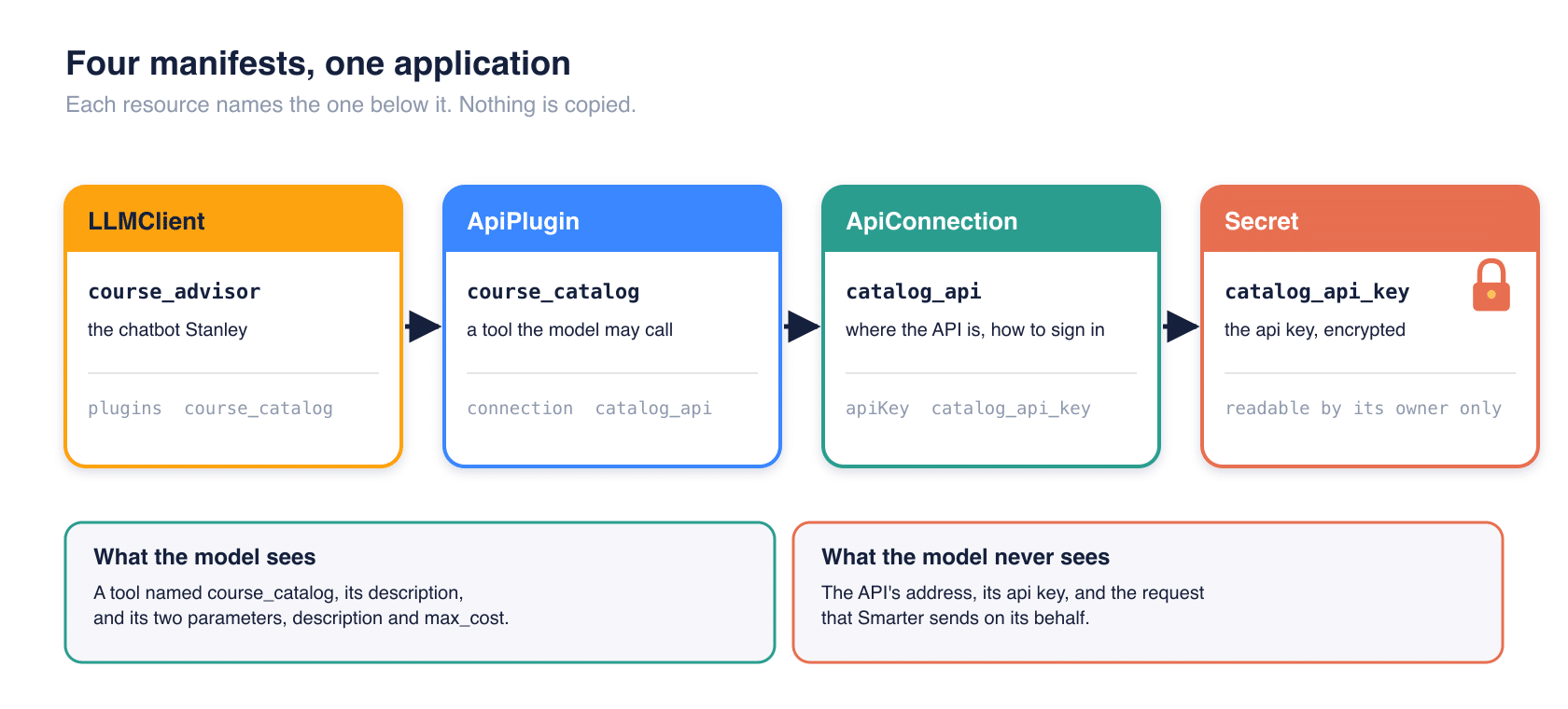
Smarter splits the job into three resources, each with its own manifest, and each one names the next.
- A Secret holds the API key, encrypted.
- An ApiConnection says where the API is and how to sign in to it, by naming the Secret.
- An ApiPlugin describes one thing that the model may do with the API, a tool, by naming the connection.
Stanley’s manifest then names the plugin. Splitting them this way means that one connection can serve many plugins, one secret can be rotated without touching anything that uses it, and each piece can be owned and shared on its own. Save each manifest below in the stackademy-advisor folder from Part 2.
Store the key in a Secret
Save this as catalog-api-key.yaml.
apiVersion: smarter.sh/v1
kind: Secret
metadata:
  name: catalog_api_key
  description: The api key of Stackademy's course catalogue api.
  version: 1.0.0
spec:
  config:
    value: stackademy_catalog_api_key
Apply it.
smarter apply -f catalog-api-key.yaml
Smarter encrypts the value as it stores it, and nobody gets it back. Ask for the Secret, and you see this.
smarter describe secret catalog_api_key -o yaml
spec:
  config:
    expiration_date: null
    value: '********_key'
Only its owner and their account’s administrators can even describe it. Other resources use it by name, and Smarter decrypts it only at the moment it makes a request.
A Secret’s manifest holds its value in plain text, so treat the file like a password. This one is a public demonstration key, so it can go in git with the rest. For a real key, apply its manifest and keep the file out of your repository, by adding its name to .gitignore.
Say where the API is with an ApiConnection
Save this as catalog-api.yaml.
apiVersion: smarter.sh/v1
kind: ApiConnection
metadata:
  name: catalog_api
  description: Stackademy's course catalogue api.
  version: 1.0.0
spec:
  connection:
    baseUrl: http://localhost:9357
    authMethod: token
    apiKey: catalog_api_key
    timeout: 30
baseUrl is the API’s address, here your own platform. authMethod: token sends the key as a bearer token, as curl did. apiKey is the Secret’s name, not the key itself, and timeout is how many seconds Smarter waits for an answer. Apply it.
smarter apply -f catalog-api.yaml
Describe the tool with an ApiPlugin
Save this as course-catalog.yaml.
apiVersion: smarter.sh/v1
kind: ApiPlugin
metadata:
  name: course_catalog
  pluginClass: api
  description: Looks up courses in Stackademy's course catalogue, by subject and by price.
  version: 1.0.0
spec:
  connection: catalog_api
  apiData:
    endpoint: /api/v1/demos/stackademy/course-catalogue/
    method: GET
    parameters:
      - name: description
        type: string
        description: A subject that the course's description mentions.
        required: false
        enum:
          - AI
          - mobile
          - web
          - database
          - network
          - neural networks
      - name: max_cost
        type: number
        description: The most that the student wants to pay for a course, in US dollars.
        required: false
    testValues:
      - name: description
        value: AI
      - name: max_cost
        value: 1000
  selector:
    directive: always
  prompt:
    provider: openai
    model: gpt-6-luna
    systemRole: >
      You are a student advisor at Stackademy. Look courses up in the course
      catalogue before you answer.
This is the manifest that matters most, because the model reads it.
metadata.descriptionis the tool’s description. The model reads it to decide whether the tool can help with a question, so write it for the model, plainly, and say what the tool is for.connectionnames the ApiConnection, andapiData.endpointandmethodcomplete the request.parametersbecome the tool’s arguments. Each one’sdescriptiontells the model what to put in it. Anenumlimits a parameter to a list of values, which keeps the model from searching for subjects that the catalogue doesn’t use. Smarter sends the parameters as the query string of the GET request.testValuesgives a value for every parameter, so that Smarter can test the plugin. Every parameter needs one, or applying the manifest fails.selectordecides when the model is offered the tool.alwaysoffers it with every prompt. A platform with hundreds of tools can offer each one only when a prompt mentions its search terms instead, because every tool that’s offered costs tokens.prompt.systemRoleis added to Stanley’s system prompt whenever the tool is offered, so that the instructions for using a tool travel with the tool.
Validate it first, then apply it.
smarter validate -f course-catalog.yaml
smarter apply -f course-catalog.yaml
Give the tool to Stanley
Add two lines to the end of course-advisor.yaml, under spec, and change its version to 1.2.0.
  plugins:
    - course_catalog
Apply it, and commit all four files.
smarter apply -f course-advisor.yaml
git add .
git commit -m "Stanley looks courses up in the catalogue api"
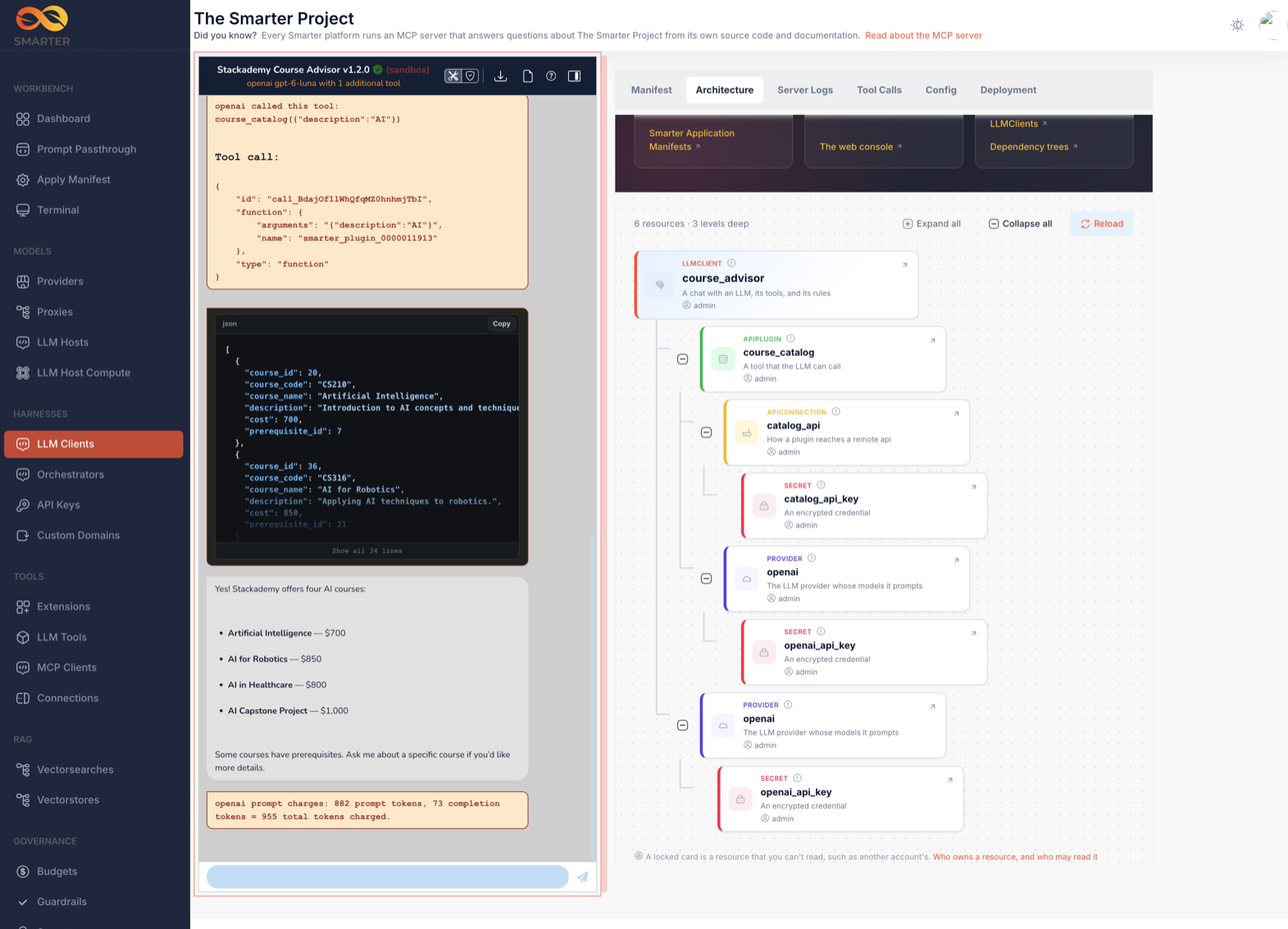
The workbench’s Console draws what Stanley is made of now, in its Architecture tab, as a card for each resource.
Ask Stanley again
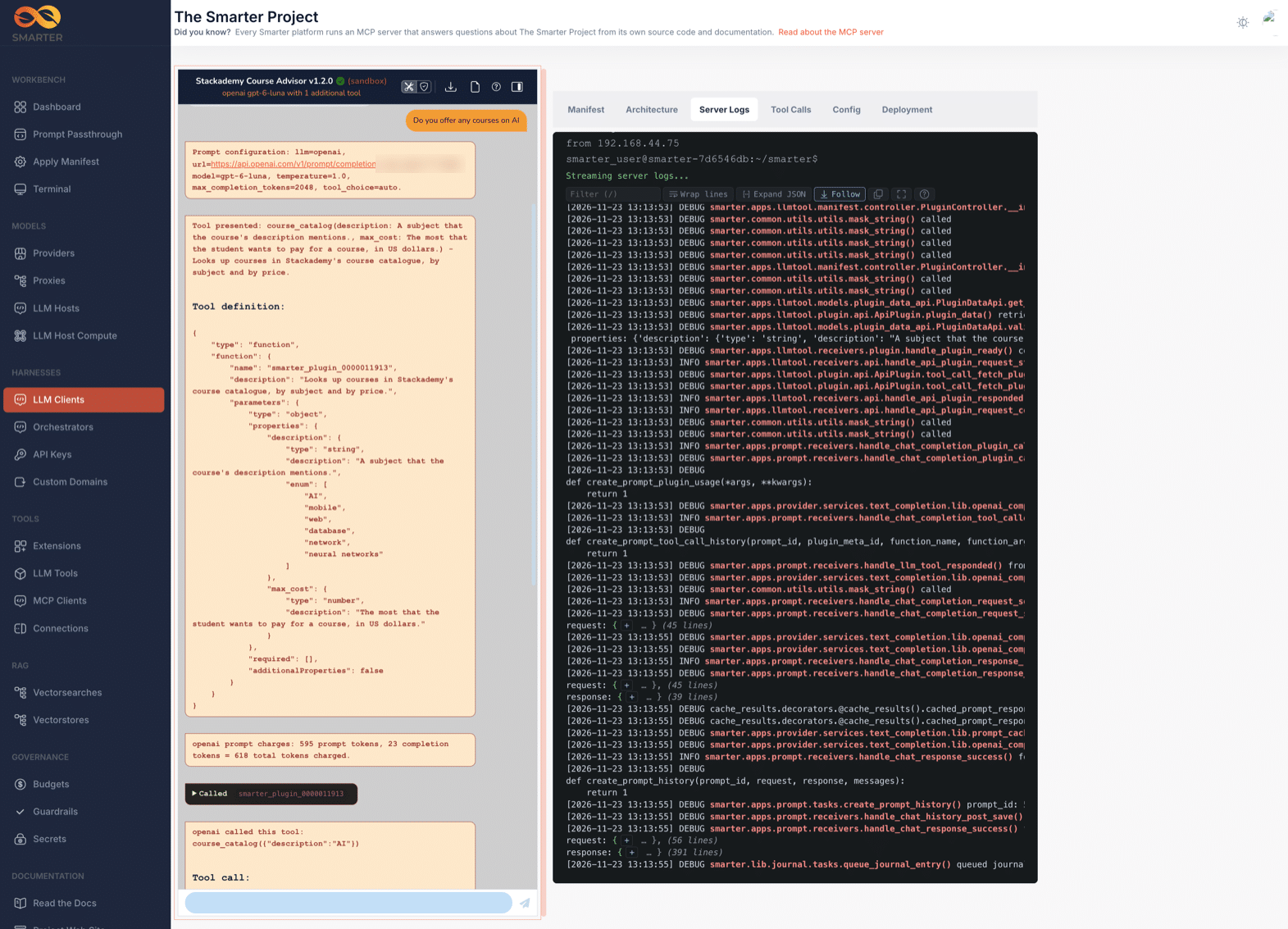
Open Stanley in the workbench and click Do you offer any courses on AI?, the same question that he couldn’t answer in Part 1. This time, he answered like this.
Yes! Stackademy offers several AI courses.
– Artificial Intelligence (CS210), $700 – AI for Robotics (CS316), $850 – AI in Healthcare (CS319), $800 – AI Capstone Project (CS405), $1,000
Some courses have prerequisites. I can help you compare options or check which ones might suit your experience.
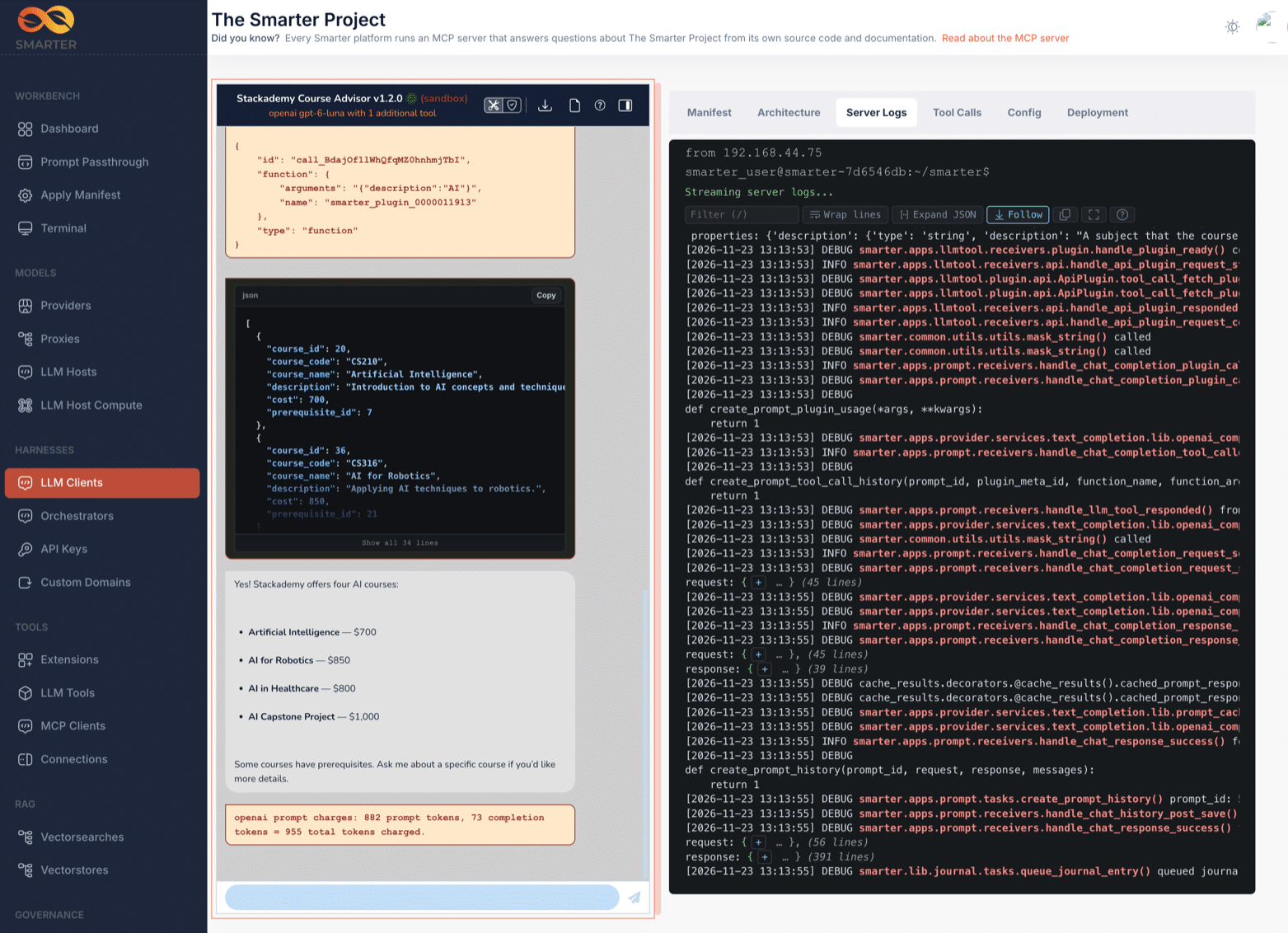
Every course and price is right. The Console shows how he got them. First, Smarter offered the model the tool.
Tool presented: course_catalog(description: A subject that the course's description mentions., max_cost: The most that the student wants to pay for a course, in US dollars.) - Looks up courses in Stackademy's course catalogue, by subject and by price.
Then the model asked for it, with an argument that it chose from the question.
openai called this tool: course_catalog({"description":"AI"})
Now click My budget is $1,000. What courses can I take? The model chooses the other parameter this time, course_catalog({"max_cost":1000}), and answers from the courses that cost $1,000 or less, with their prerequisites.
What just happened
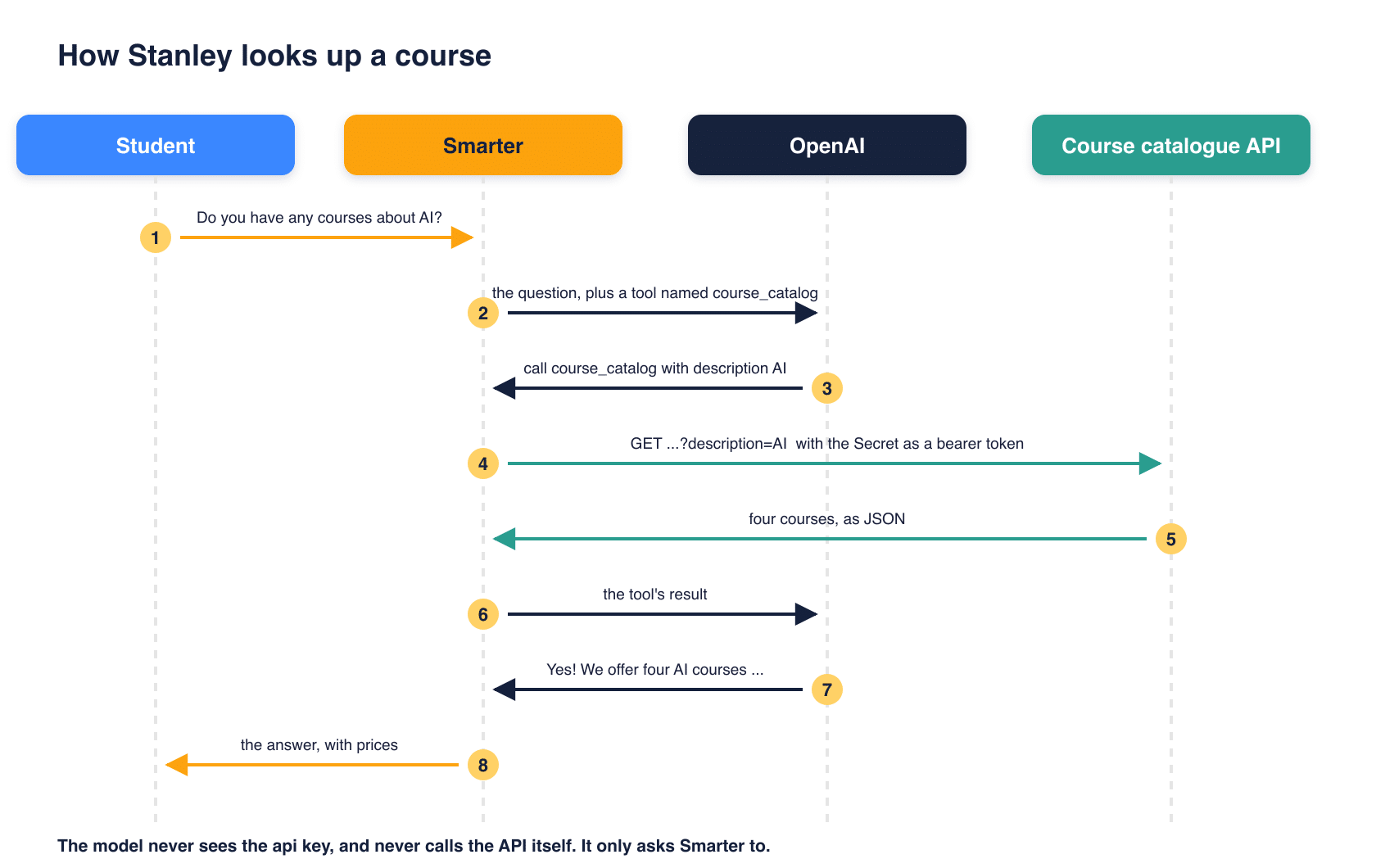
The model never called the API. It couldn’t, because it had neither the API’s address nor its key. It saw a description of a tool, decided that the tool would answer the question, and asked Smarter to call it with description set to AI. Smarter built the request from the plugin and the connection, added the key from the Secret, called the API, and gave the model the JSON that came back. The model wrote the answer from that. This is what’s called tool calling, or function calling, and it’s how every AI application reaches data that its model was never trained on.
The model saw a tool’s name, its description and its two parameters. It never saw the API’s address, its key, or the request that Smarter sent for it. A model can only ask for what a manifest allows, and only with the values that the manifest allows.
If Stanley still says he doesn’t know
Look in the Console for the Tool presented line. If it isn’t there, the model was never offered the tool. Check that course-advisor.yaml lists course_catalog under plugins, that you applied it, and that smarter get apiplugins lists the plugin. If the tool was presented but the model didn’t call it, make its description say more plainly what it’s for. If the model called it and got an error, the Console shows the error, which is usually a wrong baseUrl or endpoint, or a Secret with the wrong value.
What’s next
Stanley looks courses up for himself now, through a REST API, with a key that he never sees. In Part 4, he gets a second tool, a SqlPlugin that queries Stackademy’s course database directly, so that he can answer questions that no single API call covers, like what to take before Machine Learning.