
v0.33 – v0.34 Release: From the Workbench to a Live URL

v0.30 to v0.32 were about the people who use the web console. v0.33 and v0.34, released between October 17 and 19, are about the prompt engineer’s path from a first prompt to a deployed LLMClient. You can now see the server logs of the exact prompt you just sent, edit an LLMClient’s manifest without leaving the chat, see every resource it is built from, and find out what to do after smarter deploy. Along the way, deployed LLMClients became reachable at their own URLs on real platforms, which several of them were not.
| Change | What it means for you |
|---|---|
| A rebuilt workbench | The Prompt Engineer’s Workbench is a React app of the platform, with a Console of six tabs beside the chat, namely Manifest, Architecture, Server Logs, Tool Calls, Config and Deployment. |
| Architecture tab | An LLMClient drawn as the tree of resources it is built from, each a card that opens that resource’s manifest. |
| Deployment tab | What the deployed URL is, how to put the chat on WordPress, Drupal, Shopify, React or any web page, and how to protect it with API keys. |
| Server logs per prompt | The Prompt Passthrough and the workbench show only the log records of your own prompt or chat session, not everything your user logged. |
| Deployed LLMClients work | Routing, anonymous prompts and hostnames with underscores are fixed, and a browser that opens the URL gets a page instead of a 405. |
| Prompt Passthrough | A redesigned provider card and response card, and two new templates, MCP Server and RAG. |
The Prompt Engineer’s Workbench, rebuilt
The workbench used to be Smarter Chat’s own app, built from its separate repository. Its Console showed the LLMClient’s manifest editor and deployment page as web console pages inside iframes, held together with frame exceptions and a messaging protocol. In v0.34 the workbench is a React app of the platform itself. It imports the chat from the @smarter.sh/ui-chat library and puts the Console beside it, with a separator you can drag.
The Console’s tabs follow a prompt engineer’s work, left to right.
- Manifest is the web console’s manifest editor. Change the LLMClient, save, and the chat reloads with the new configuration. Before v0.33 you had to leave the workbench to do this.
- Architecture shows the LLMClient’s tree of resources (see below).
- Server Logs is selected when the Console opens. It shows only the records of the current chat session.
- Tool Calls and Config are the diagnostic views of each prompt.
- Deployment says what to do with the deployed URL (see below).
Each tab loads its data the first time you open it. Your layout is remembered, as before.
See what an LLMClient is made of in the Architecture tab
An LLMClient is built from other resources, such as its Provider, its plugins, MCPClients and Guardrails, its Custom Domain and API key, and beneath them the Connections and Secrets those use. Each one is declared in its own manifest, but the web console never showed how they fit together, or where to edit each one.
The Architecture tab draws that tree. Each resource is a card with its icon, kind, name, owner and a one-line description of what it does for the LLMClient. The name opens the resource’s manifest page in a new tab, where you can edit it, and a second link opens the kind’s documentation.
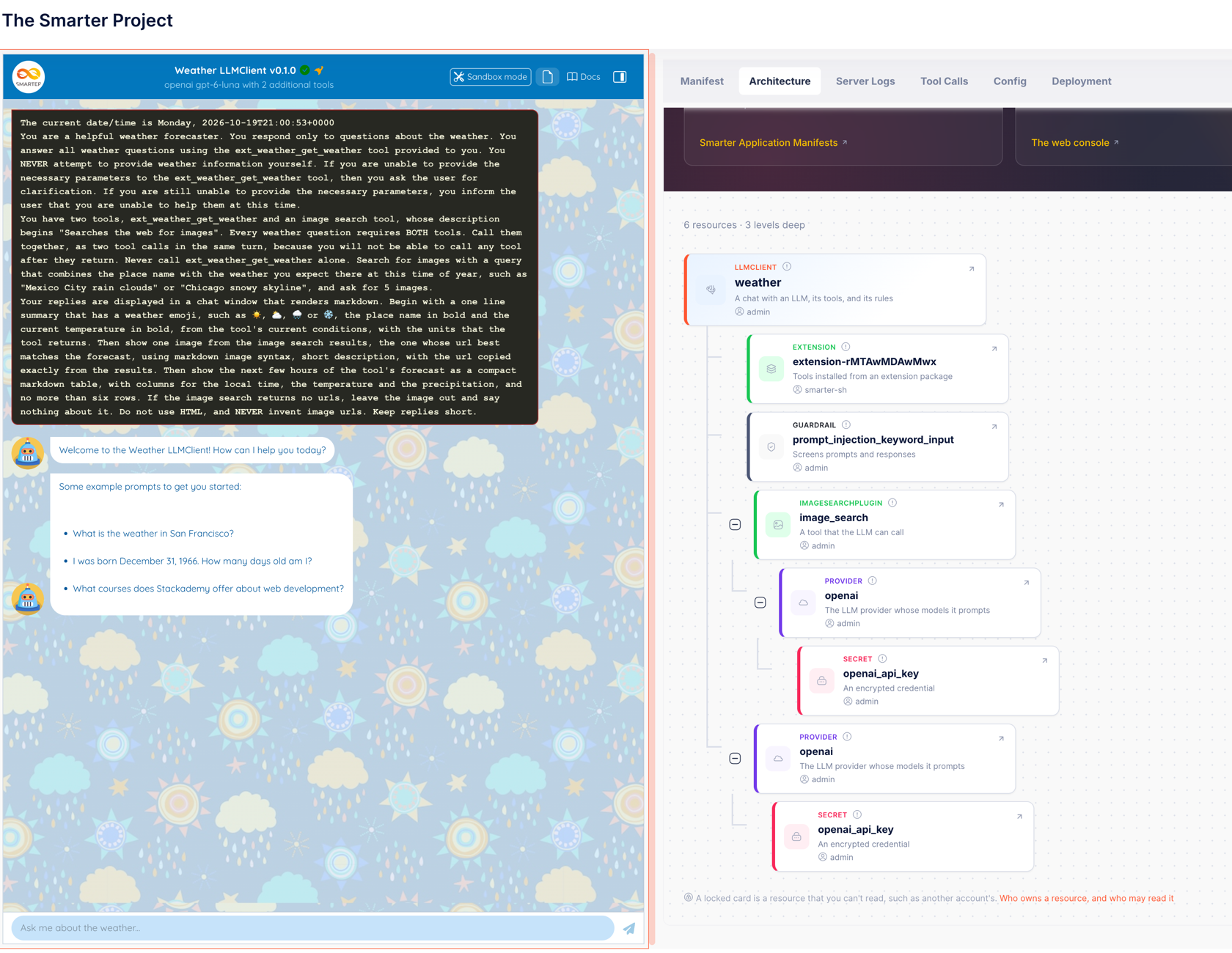
- Locked resources are those you may not read. Each is shown as a locked card, with only its kind and record locator.
- Navigation is in the toolbar, which counts resources and levels, collapses or expands every branch, and reloads the tree after you change a manifest in another tab.
- Next steps fill the gaps. An LLMClient with no Guardrail, no tools or no styles gets a section for each one that is missing. Each section explains the idea, links to the console page that lists what is available, and gives an excerpt to paste into the manifest. A section disappears once the LLMClient has what it suggests.
The excerpts use resources that initialize_platform already adds, so they work as pasted. For example, here are two built-in Guardrails that call no LLM.
spec:
  guardrails:
    - pii_redaction_input
    - prompt_injection_keyword_input
For tools, the tab compares Plugins, Extensions and MCPClients side by side, what each is, where it runs and when to choose it, with an example of each, namely the everlasting_gobstopper sample plugin, the calculator Extension and the deepwiki MCPClient.
The tree comes from a new dependency tree that every resource kind can now produce. It is the opposite of the dependencies list in a manifest’s status, which lists what a resource uses, rather than what uses it.
📖 Record locators and dependency trees · LLMClient documentation
After you deploy, the Deployment tab
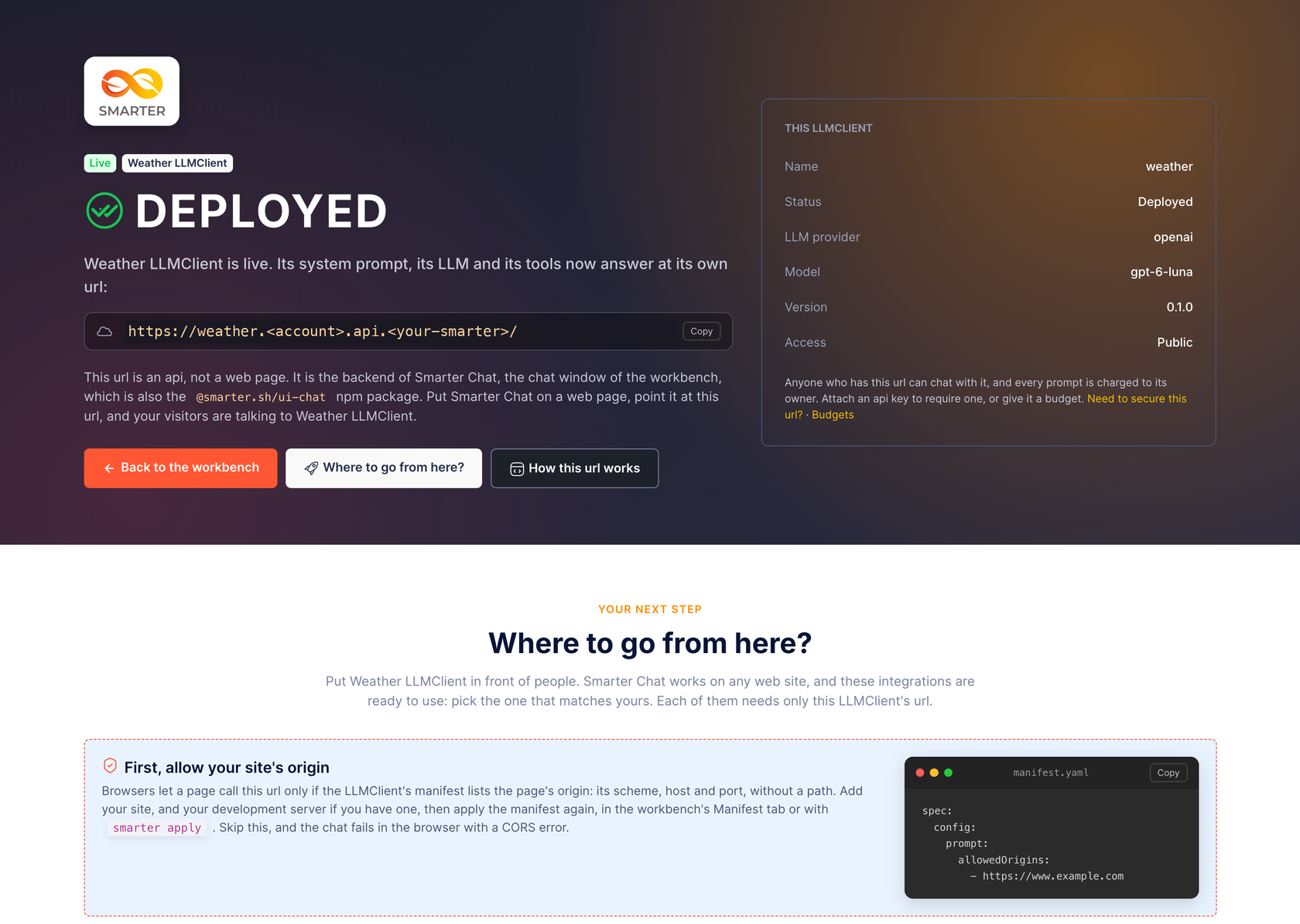
A prompt engineer who deployed an LLMClient for the first time had nowhere to learn what to do next. The Deployment tab answers that, in the workbench, where the work happens.
- Deployed, or not yet. The tab says which, and shows the URL with a copy button. An LLMClient that isn’t deployed yet shows the URL it will have, and the
smarter deploy llmclientcommand. - What the URL is. It is an API, the backend of Smarter Chat, with two endpoints,
/config/and/prompt/, JSON in and out. The tab shows a workingcurlcommand for each, using the LLMClient’s own first example prompt. - Where to go from here. Cards for WordPress, Drupal, Shopify, React from npm and plain HTML, each filled in with this LLMClient’s URL, and a warning about
allowedOrigins, the most common first failure. - Securing the URL. Create an API key, attach it to the LLMClient or detach it, right in the tab. A new key’s secret is shown once. The tab also says plainly that a key in a web page is not a secret. On a public site, the protection comes from a key per site,
allowedOriginsand a Budget. - Chat sessions. What a session key is, who creates and keeps it, and the four steps to build a front end of your own.
- Ownership. The tab names the LLMClient’s owner. A user who doesn’t own it gets a guide to cloning it and working on the copy.
For any web page, the snippet is Smarter Chat’s embed script.
<script src="https://cdn.jsdelivr.net/npm/@smarter.sh/ui-chat@0/dist/embed.js"
  data-chatbot="https://<your-llmclient-url>/" async></script>
And here it is for a React app.
import { SmarterChat } from "@smarter.sh/ui-chat";
import "@smarter.sh/ui-chat/dist/ui-chat.css";
import "katex/dist/katex.min.css";

export default function Chat() {
  return (
    <div style={{ height: 600 }}>
      <SmarterChat apiUrl="https://<your-llmclient-url>/" showConsole={false} />
    </div>
  );
}
A page at the deployed URL
Opening a deployed LLMClient’s URL in a browser used to answer 405 Method Not Allowed, with no hint of how to call it. With the enable_llmclient_endpoints_page waffle switch on, a browser now gets a public version of the same page, with the LLMClient’s name, description and model, the curl commands, and its manifest. It never shows the owner or the API keys. The switch is off by default, and the page is meant for setting up a front end before production. Turn it off before going live.
python manage.py waffle_switch enable_llmclient_endpoints_page on
📖 Embedding Smarter Chat · API keys
Server logs for your own prompt
The web console’s server logs were a separate page, which streamed every log record of your user. To debug one prompt, you had to switch pages and pick its records out of everything else. Worse, in Smarter Chat, a prompt’s own records, such as plugin selection, the LLM requests and the plugin calls, never reached the stream at all, because the prompt runs while its response streams, after the request’s log context was gone.
Now it works like this.
- Prompt Passthrough has a Server Logs tab beside Request and Response. Each SEND gets its own request ID, and the tab shows only that request’s records.
- The workbench’s Server Logs tab shows only the records of the current chat session. A new chat starts with an empty log.
- The viewer scrolls in both directions, wraps lines on request, filters, copies, goes full screen, and collapses long blocks of JSON, such as a prompt’s request and response, with an Expand JSON button. Keyboard shortcuts follow k9s, less and vim; press
?to list them.
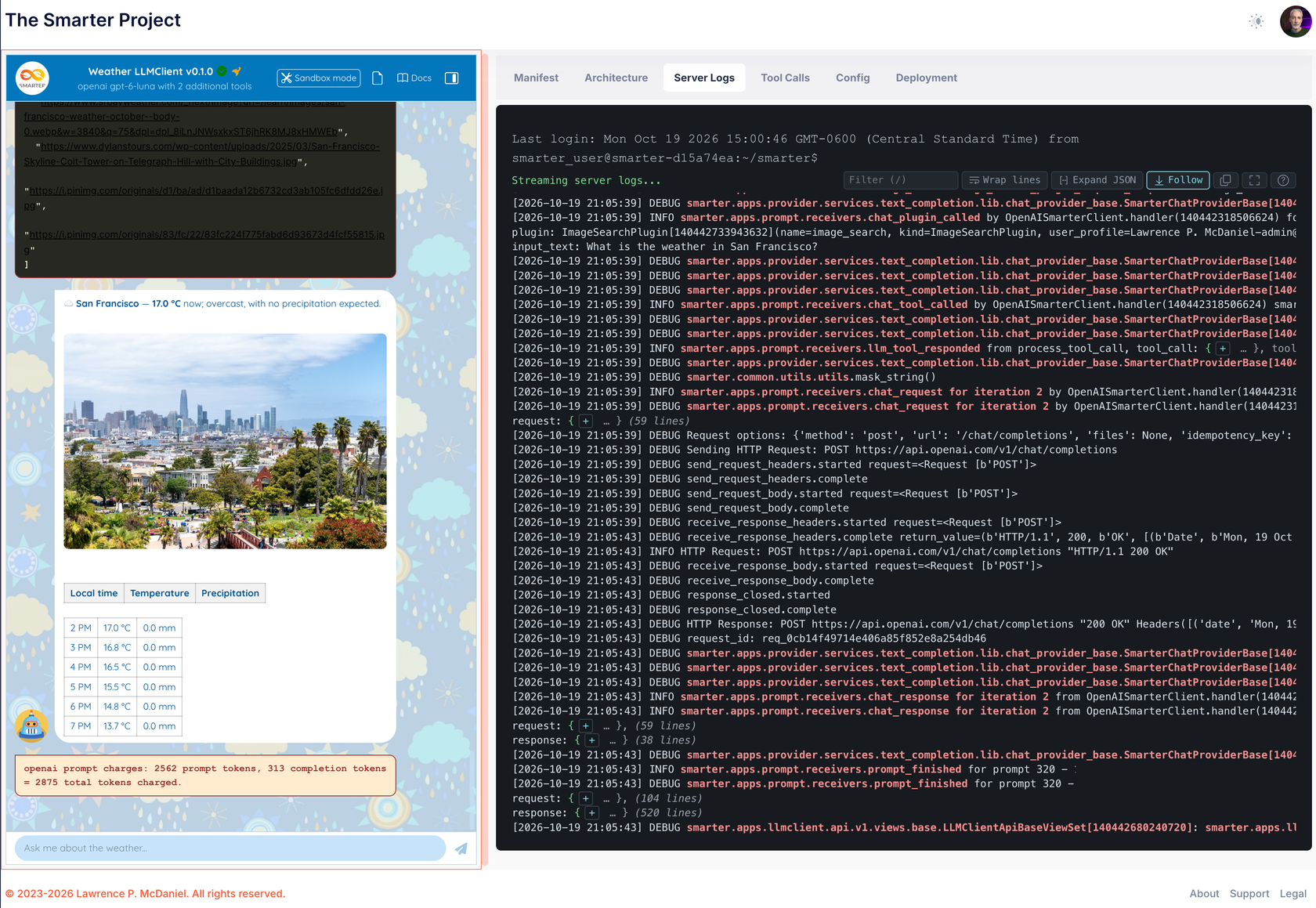
The narrowing is safe, because records are filtered only within your user’s own channel, so a request ID or session key cannot expose another user’s records.
Plugins also report more of what they do. SqlPlugin, ApiPlugin, ImageSearchPlugin and SkillPlugin now each log when a request starts, responds, fails and completes, with its duration, whether the result came from the cache, and whether the remote service accepted the plugin’s credentials. Extension tool calls are logged too, which they never were.
Deployed LLMClients, reachable at last
Several defects stacked up between a deployed LLMClient and its own URL, and on a platform with a platform subdomain, which is every real one, they made the URL unusable. v0.33 fixed them one at a time.
- Routing. Requests to a deployed LLMClient’s host were matched against the wrong domain, so they fell through to the web console and redirected to the dashboard, and
/config/and/prompt/answered 400. - Console links on LLMClient hosts. Once routing worked, every page on an LLMClient’s host answered 500, because the page tried to build web console links against the LLMClient’s own, much smaller set of URLs.
- Names with underscores. An LLMClient such as
stackademy_sqlis served atstackademy-sql.<account>.api.<your-smarter>, but its host was parsed back to the namestackademy, which matched nothing. - Anonymous prompts. An LLMClient without an API key is meant to be public, but an anonymous POST to
/prompt/answered 404, and once that was fixed, 500, because the Provider was looked up for the anonymous user. Anonymous prompts now run, and are charged, as the LLMClient’s owner, and the Provider is read as the owner. - Describe with an API key. Describing an LLMClient with an API key attached failed with a 400, both in the CLI and in the manifest editor.
describenow returns the key’s name, so its output can be applied again unchanged.
Prompt Passthrough, redesigned
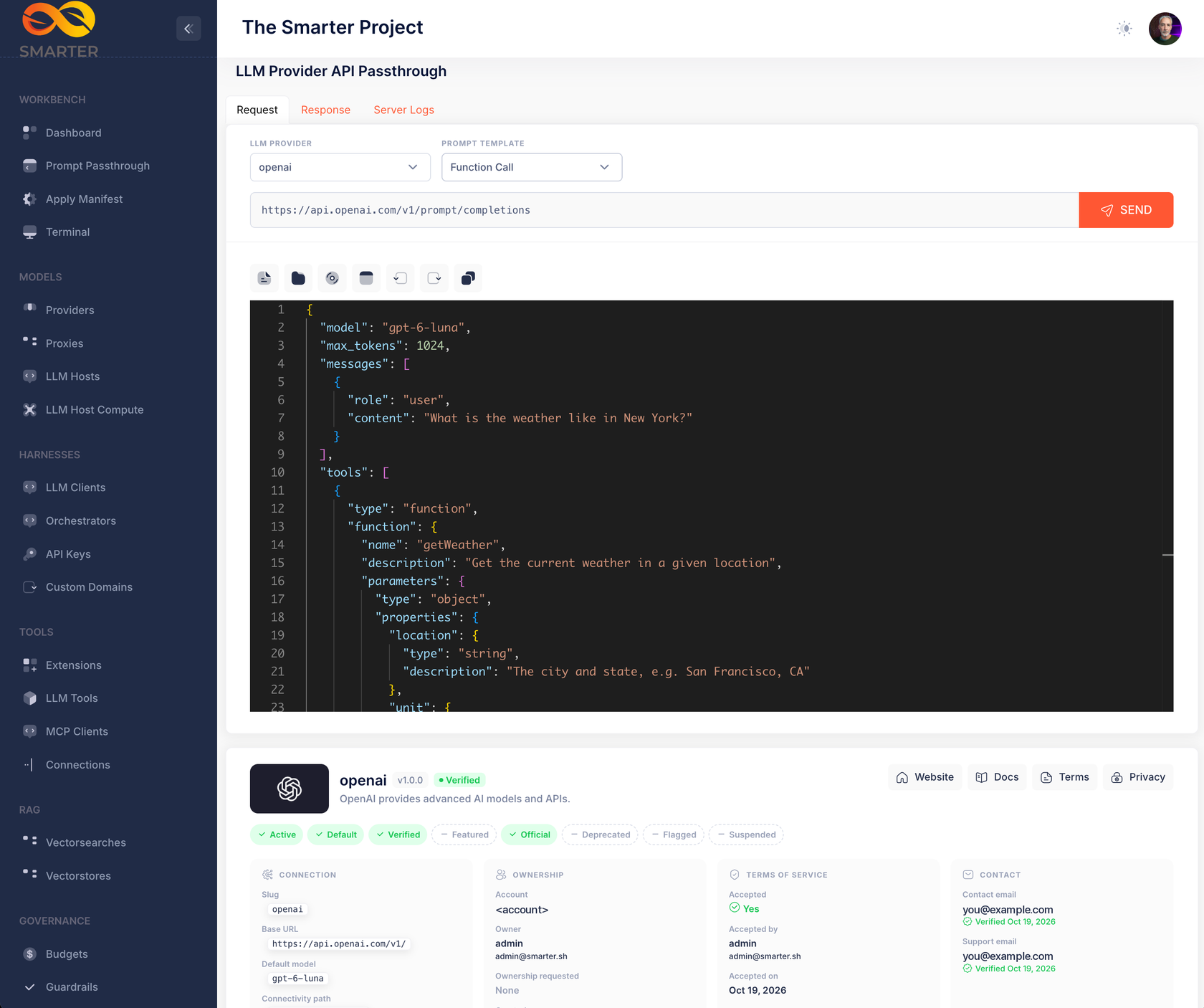
- The provider card shows the logo on a dark tile, because most providers publish white logos that were invisible before, along with the name, version, a status badge, links to the provider’s website, docs, terms and privacy policy, and its flags as colored chips. A provider without an API key no longer breaks the card.
- The response card shows the HTTP status, the elapsed time and the response size, with Copy JSON and Download buttons. On success, a Reply panel shows the assistant’s text or tool calls, the model, the finish reason and the token counts. On failure, an Error panel shows Smarter’s error and a folded stack trace that reads with real line breaks.
- Errors you can see. A response that isn’t JSON, and a request that never reaches the server, are now shown instead of leaving the page unchanged.
- New templates. MCP Server asks about The Smarter Project through the platform’s built-in MCP server, and RAG answers from fictitious accounts payable vouchers in the system prompt. Hello World is now a three-message conversation.
- Prompt Passthrough moved up to second place in the sidebar’s Workbench section.
Web console improvements
- A sidebar in sections. The flat Resources list is now grouped into Models (Providers, Proxies, LLM Hosts, LLM Host Compute), Harnesses (LLM Clients, Orchestrators, API Keys, Custom Domains), Tools (Extensions, LLM Tools, MCP Clients, Connections), RAG (Vectorsearches, Vectorstores) and Governance (Budgets, Guardrails, Secrets).
- Extensions for everyone, read-only. The Extensions pages were for superusers only, so other users could not see which Extensions their account may use. Every user now sees the Extensions available to their account, without settings, Secrets or install buttons.
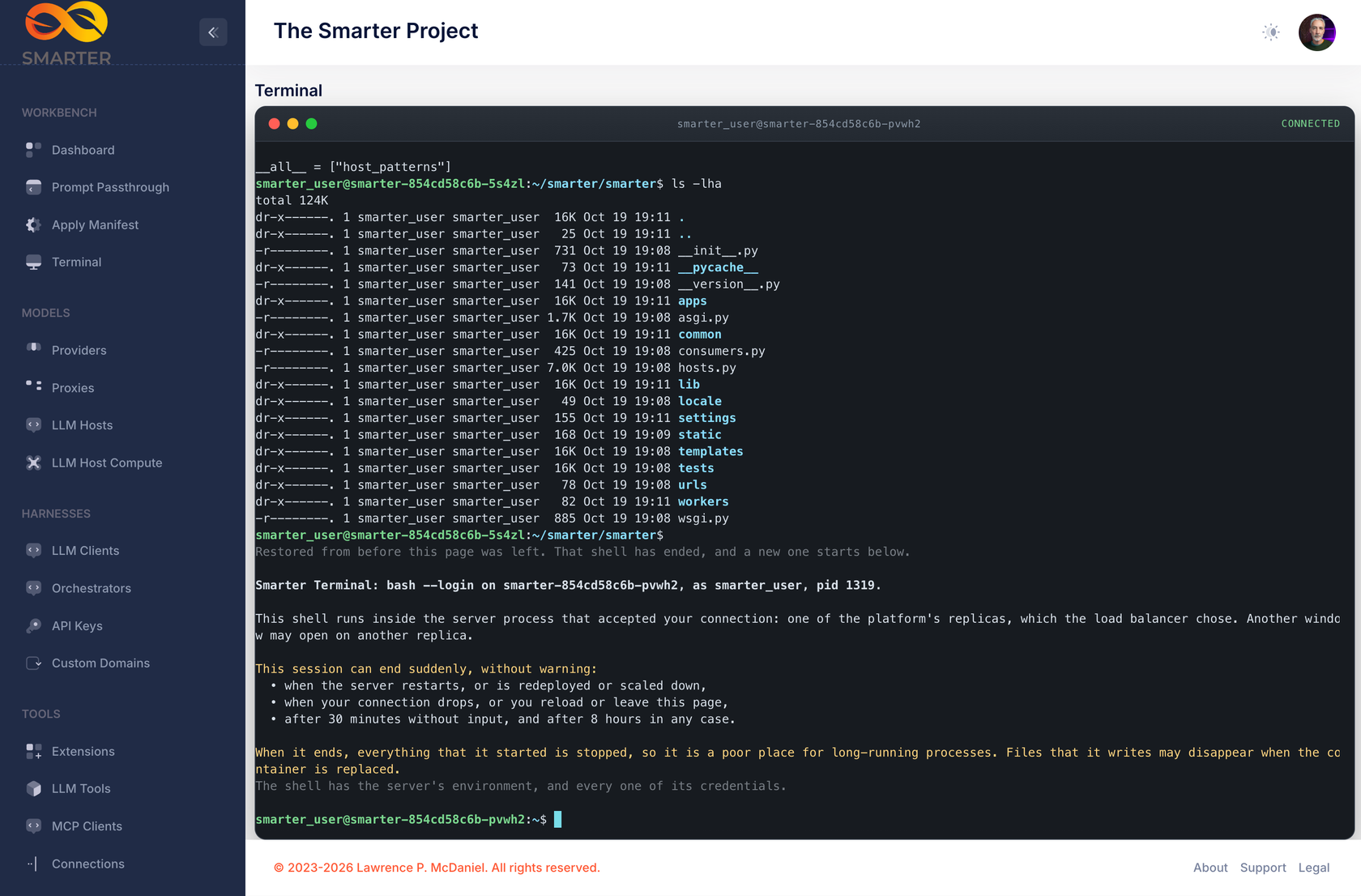
- A real terminal for superusers. The old Server Logs window is now a bash shell in the server’s container, for teaching a class the running platform from the inside. It is for superusers only, and off unless
SMARTER_ENABLE_WEB_CONSOLE_TERMINALis true, because the shell runs with every credential the server has. Sessions end after 30 minutes idle or 8 hours in any case. - Tool messages name plugins by their own names, such as
stackademy_api, instead of a generated function name. - Dialogs focus their default button, so Enter runs OK or Close. The error pages focus Return Home.
- The language menu no longer wraps “Português (Brasil)” onto two lines.
Fixes and operations
- The Stackademy API example never worked. Its tool calls went to a path that didn’t exist and got a 404. Its course catalogue is now served at
/api/v1/demos/stackademy/course-catalogue/, protected by the example Connection’s API key, and both Stackademy LLMClients are deployed with the other examples. A newverify_stackademycommand sends each one a real prompt and fails unless the plugin was called and the LLM answered. - The example
smarterLLMClient is removed. It was written as sales copy, and The Smarter Project has nothing to sell. Its websearch plugin stays, as a sample. - The config API is lighter. Smarter Chat calls it on every page load and after every prompt. The diagnostic parts are now built only when the workbench asks for them with
verbose=true. On a 63-message session, the default response went from 120 KB and 23 queries to 32 KB and 8 queries. - The database backup emails its result, with the backup’s name, size and S3 location, and checks that the upload has the right size before it reports success. It now runs on
debian:stable-slim, because Debian Bullseye’s security repository has gone away and the old image failed to build. - The welcome email no longer makes claims the platform doesn’t support, and is signed by the platform’s technical contact, a new
SMARTER_BRANDING_PRIMARY_CONTACTsetting. sitemap.xmllists only the 14 pages an anonymous visitor can read. Ten of its old entries didn’t exist or were redirects.- Quieter logs. Warnings that were not faults are gone from every prompt and from the init job, and a client disconnecting mid-request no longer logs an asyncio error with a long traceback.
- A duplicate date line at the start of the system prompt, for threads without a system message, is removed.
- The Deployment page’s integration cards use brand icons, and three of its messages no longer lose text inside angle brackets such as
<YOUR-API-KEY>.
Upgrading
- Example commands are renamed. Every
add_builtin_<kinds>command is nowadd_example_<kinds>, anddeploy_builtin_llmclientsisdeploy_example_llmclients. New commands areadd_example_secrets,add_example_connections,add_example_llmclientsandadd_example_tools, which replacesadd_plugin_examples.create_stackademyis nowverify_stackademy, which only verifies. If you call any of these from your own scripts, update them. An unknown--usernamenow exits with code 1 for all of them. The Helm init job already uses the new names. - The example
smarterLLMClient is not deleted from existing installations. Delete it by hand from the web console or with the CLI if you don’t want it. A deployed one also loses its DNS record. - The endpoints page is behind the
enable_llmclient_endpoints_pagewaffle switch, off by default. - The terminal needs
SMARTER_ENABLE_WEB_CONSOLE_TERMINAL=true. It is the only feature flag that defaults to off. WebSockets cross your ingress for the first time if you turn it on. - Optional settings.
SMARTER_GITHUB_API_TOKENauthenticates the GitHub API requests that fetch SkillPlugins’ skills, which anonymous requests can exhaust. The token needs no scopes.SMARTER_BRANDING_PRIMARY_CONTACTnames who signs the welcome email. - Server Logs in the Prompt Passthrough and the workbench appear only while the platform’s server logs are enabled.
- SDKs. The chat API’s config endpoint gains an optional
verboseparameter and two declared metadata fields. The change is backward compatible; update the Python, Node.js and Go SDKs to pick them up. manage.py initialize_platformnow adds the example Secrets, Connections, tools and LLMClients in dependency order, deploys both Stackademy LLMClients, and verifies them with a real prompt. A failing step no longer stops the steps after it.
What’s next
That brings the announcements up to date with v0.34.1.
The full list of changes is in the v0.33 changelog and the v0.34 changelog. To try the release, start with the documentation, or browse the code on GitHub.