
How Smarter’s Kubernetes-Style Annotations Trace Every Resource to Its GitHub Commit

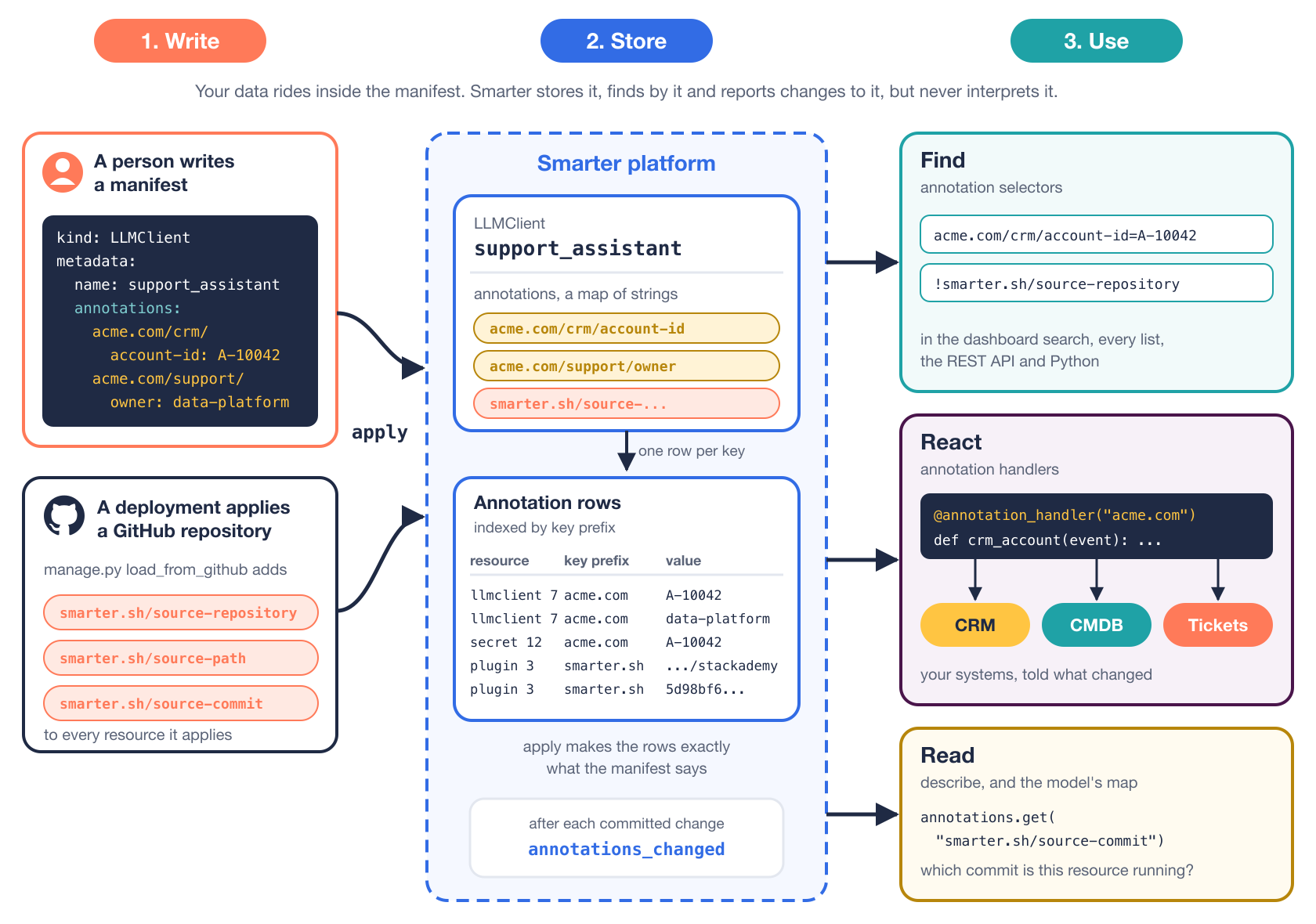
SAM annotations are how Smarter connects its resources to the other systems in your organization. SAM, the Smarter Application Manifest, is the YAML format that declares every Smarter resource (LLMClients, Plugins, Secrets, Guardrails and the rest), and its metadata.annotations work the way annotations work in Kubernetes. They’re a map of keys to strings, with the key’s DNS prefix naming the system that owns it, and Smarter never interprets them. Smarter stores them as indexed rows, finds resources by them with the same selector syntax as Kubernetes label selectors, and calls your code when one changes.
That combination is a complete integration surface. A team that runs a CRM, a CMDB, a finance system or a ticket queue can tie Smarter resources to its own records without forking Smarter, adding a column to its database or waiting for a release. The data travels inside the manifest, through apply, code review and version control, like everything else about the resource.
This post shows how annotations work through one integration that every Smarter platform already runs, which is GitHub. Each deployment of Smarter applies the manifests of two GitHub repositories, and annotates every resource it creates with the repository, the file and the commit it came from. Once you see how that works, the pattern for your own systems is the same.
Here’s the whole picture before the details. People and pipelines write annotations into manifests, Smarter stores them as rows it can query, and other software finds resources by them, reacts when they change, or simply reads them.
What an annotation is
Here’s an LLMClient’s metadata with three annotations, from the manifest docs.
metadata:
  name: support_assistant
  annotations:
    acme.com/crm/account-id: A-10042
    acme.com/finance/cost-center: "4410"
    acme.com/compliance/reviewed: "true"
The rules follow Kubernetes closely, so they’ll look familiar.
- A key has an optional DNS prefix,
acme.com, then a name. Use a domain that your organization controls, and every key you invent is safe from collisions with anyone else’s. - Smarter allows several slash-separated segments in the name (
crm/account-id), where Kubernetes allows one. Every segment is at most 63 characters. - Values are strings. An unquoted YAML
trueor4410is converted to the string that was written, and lists and maps are rejected. - All of a resource’s annotations together are limited to 256 KiB, as in Kubernetes.
- The prefix
smarter.shand its subdomains belong to the platform, askubernetes.iobelongs to Kubernetes.
Tags are the other piece of metadata on every resource, and the difference is worth stating. A tag says which group a resource belongs to, and holds no value. An annotation attaches data to the resource, usually data that some other system will read.
Apply makes them exactly what the manifest says
smarter apply treats annotations the way kubectl apply does. The resource’s annotations become exactly those of its manifest, so a key that the manifest no longer has is removed. The manifest is the single source of truth, and re-applying it is always safe.
Selectors find resources by them
Each annotation is stored as a row of its own, with its key’s prefix in an indexed column, so finding resources by annotation is a query, not a scan. The selector syntax is that of Kubernetes label selectors.
| Requirement | Matches the resources whose annotation |
|---|---|
acme.com/crm/account-id | exists, with any value |
!acme.com/crm/account-id | doesn’t exist |
acme.com/crm/account-id=A-1 | has the value A-1 |
acme.com/crm/account-id!=A-1 | doesn’t exist, or has another value |
The same selectors work in three places. The get endpoint of the REST API takes them as a repeatable annotation query parameter, every list page of the web console has a selector box, and the dashboard’s search box searches every kind of resource at once.
curl -X POST -H "Authorization: Token $SMARTER_API_KEY" \
  "https://platform.example.com/api/v1/cli/get/LLMClient/?annotation=acme.com/crm/account-id=A-10042&annotation=!acme.com/archived"
A selector answers “which resources are tied to this record of mine?” from any of those places, for any kind.
The worked example, GitHub provenance
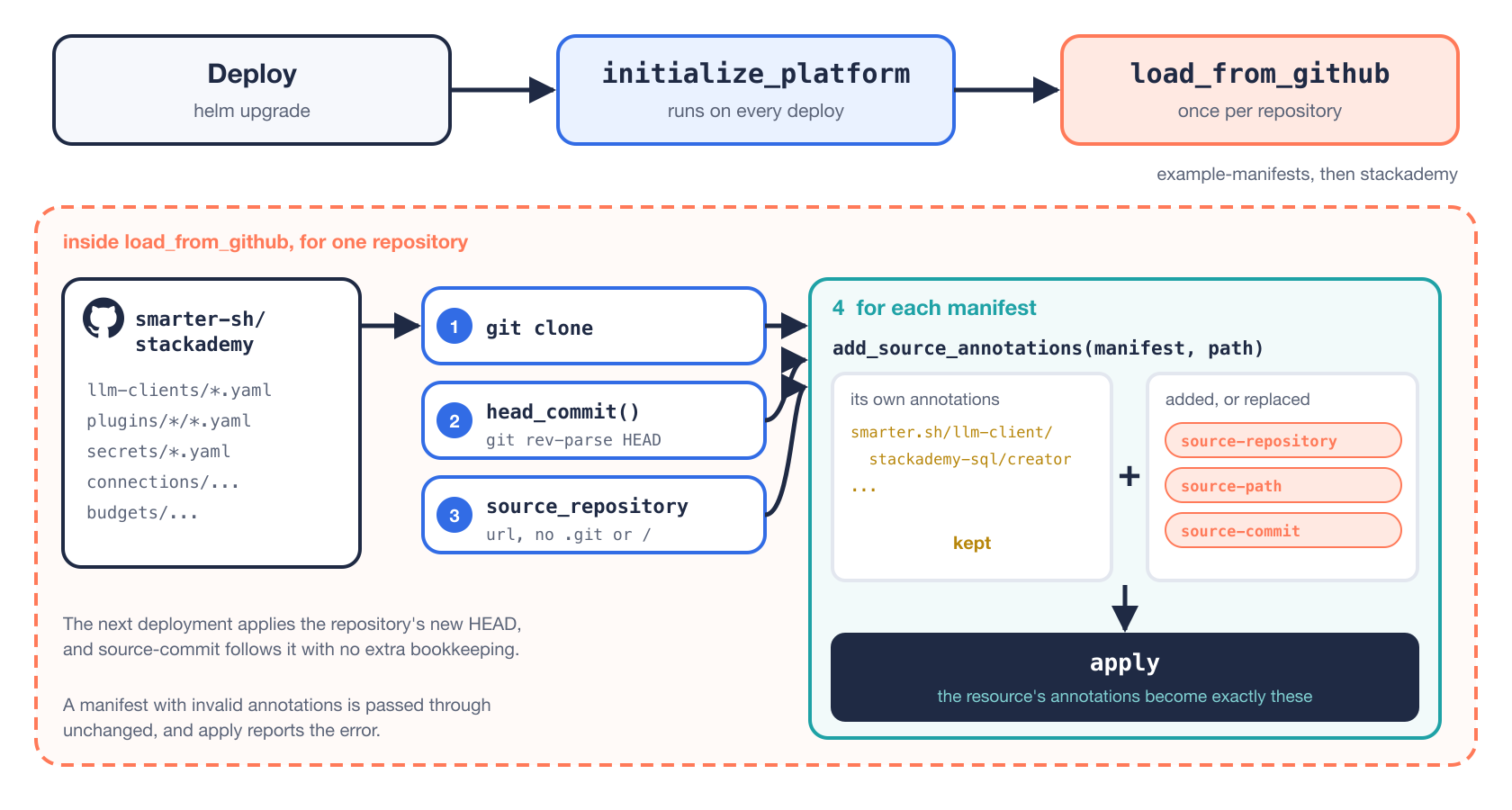
Every Smarter platform ships with example resources. On each deployment, manage.py initialize_platform runs manage.py load_from_github, which clones a repository and applies every manifest in it. It does this for two repositories, smarter-sh/example-manifests, a library of examples for every kind of resource, and smarter-sh/stackademy, a complete demo application with its own LLMClients, Plugins, Secrets, a database Connection and a Budget.
That raises three questions that anyone operating a platform will eventually ask.
- Which of these resources did a person create, and which came from a repository?
- What did a given repository install, so that I can review it, or remove it?
- Which commit is this resource running, and is it the latest?
Without provenance, the answers live in someone’s memory. With it, they’re a selector away.
Three annotations on every resource
load_from_github adds three annotations to each manifest before applying it, as Flux and Argo CD annotate the Kubernetes objects they apply from git.
| Annotation | Value |
|---|---|
smarter.sh/source-repository | The repository, e.g. https://github.com/smarter-sh/stackademy |
smarter.sh/source-path | The manifest’s file in it, e.g. llm-clients/stackademy-sql.yaml |
smarter.sh/source-commit | The commit that was applied |
The keys use the reserved smarter.sh prefix, because the platform writes them. They’re defined once, in smarter/lib/annotation/const.py, next to the other annotation constants rather than inside the command, so any later code that applies manifests from git uses the same keys.
The work happens in add_source_annotations(), trimmed here.
def add_source_annotations(self, manifest: SmarterDictType, path: str) -> SmarterDictType:
    manifest = copy.deepcopy(manifest)
    metadata = manifest.get("metadata")
    if not isinstance(metadata, dict):
        return manifest
    try:
        annotations = normalize_annotations(metadata.get("annotations"))
    except SmarterAnnotationError as e:
        logger.debug("%s.add_source_annotations() left %s as it is: %s", logger_prefix, path, e)
        return manifest
    annotations.update(self.source_annotations(path))
    metadata["annotations"] = annotations
    return manifest
It merges rather than replaces. Stackademy’s LLMClients already carry annotations of their own, and those are kept.
metadata:
  name: stackademy_sql
  annotations:
    smarter.sh/llm-client/stackademy-sql/creator: QA Team
    smarter.sh/llm-client/stackademy-sql/release-date: "2024-06-15"
After a deployment, smarter describe on that LLMClient shows both sets together.
metadata:
  name: stackademy_sql
  annotations:
    smarter.sh/llm-client/stackademy-sql/creator: QA Team
    smarter.sh/llm-client/stackademy-sql/release-date: "2024-06-15"
    smarter.sh/source-repository: https://github.com/smarter-sh/stackademy
    smarter.sh/source-path: llm-clients/stackademy-sql.yaml
    smarter.sh/source-commit: 5d98bf61cb1460adf762815e98a7de0fe4dd0e5b
Here’s the whole path, from a deployment to the annotations on each resource.
Small decisions that make the values usable
A few details decide whether provenance is something you can query or just something you can read.
The repository URL is normalized, without a trailing slash or .git, so one repository always has exactly one value to select on, however its URL was written in the configuration.
@property
def source_repository(self) -> str:
    url = self.url.rstrip("/")
    return url[: -len(".git")] if url.endswith(".git") else url
The commit comes from git rev-parse HEAD on the fresh clone. If git can’t tell, the command logs a warning and annotates the resource without the commit. Provenance is useful, but it isn’t worth failing a deployment over.
A manifest whose own annotations are invalid is passed through unchanged, so that apply reports the error through the same path it always does, rather than the annotation code inventing a second way to fail.
And because apply makes a resource’s annotations exactly those of its manifest, every deployment rewrites all three. The commit annotation follows the repository forward on its own, with no separate bookkeeping to drift out of date.
The two selectors that matter
With those annotations in place, the operator’s questions become two selectors, typed into the dashboard’s search box.
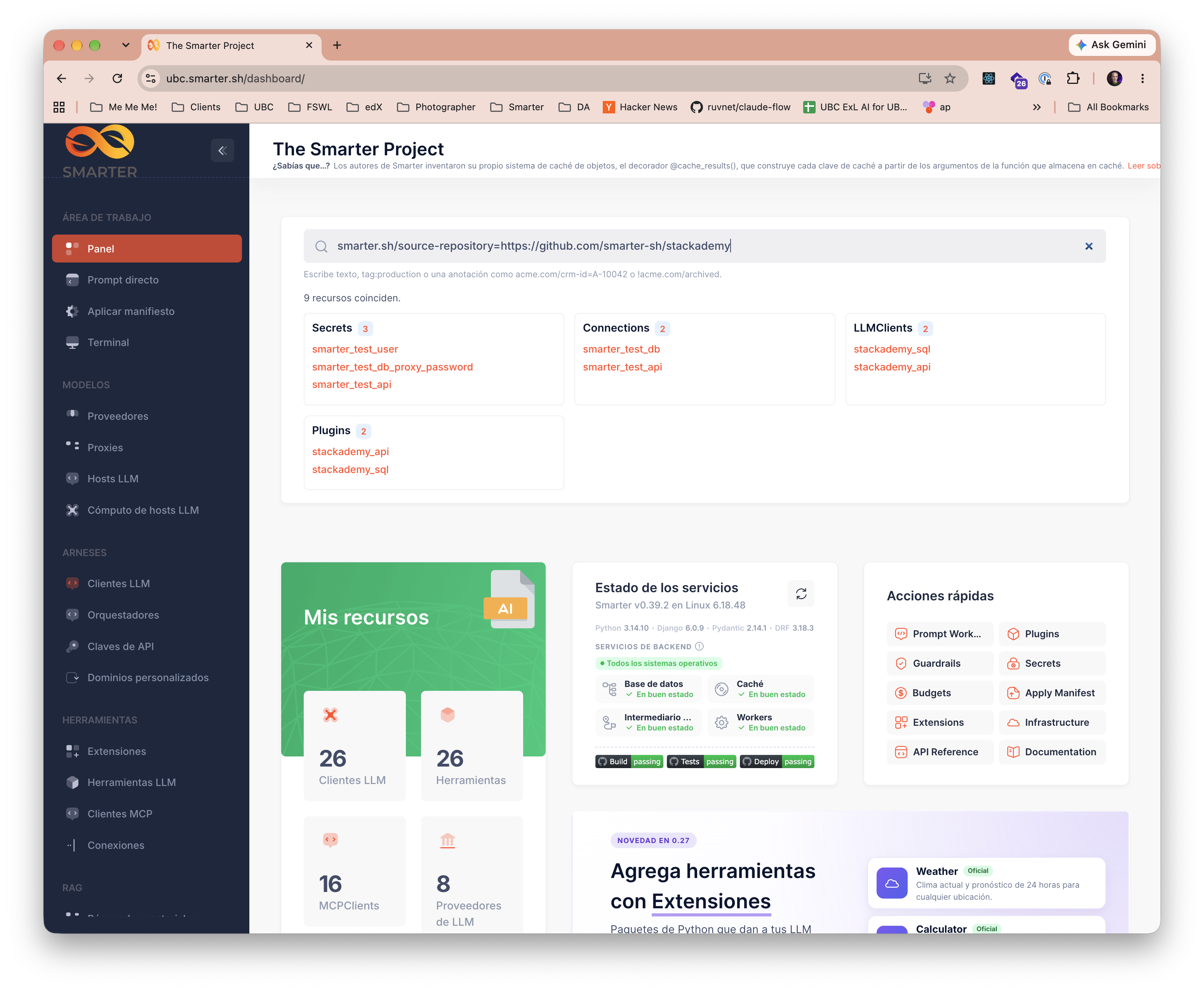
The first finds everything that Stackademy installed, across every kind of resource.
smarter.sh/source-repository=https://github.com/smarter-sh/stackademy
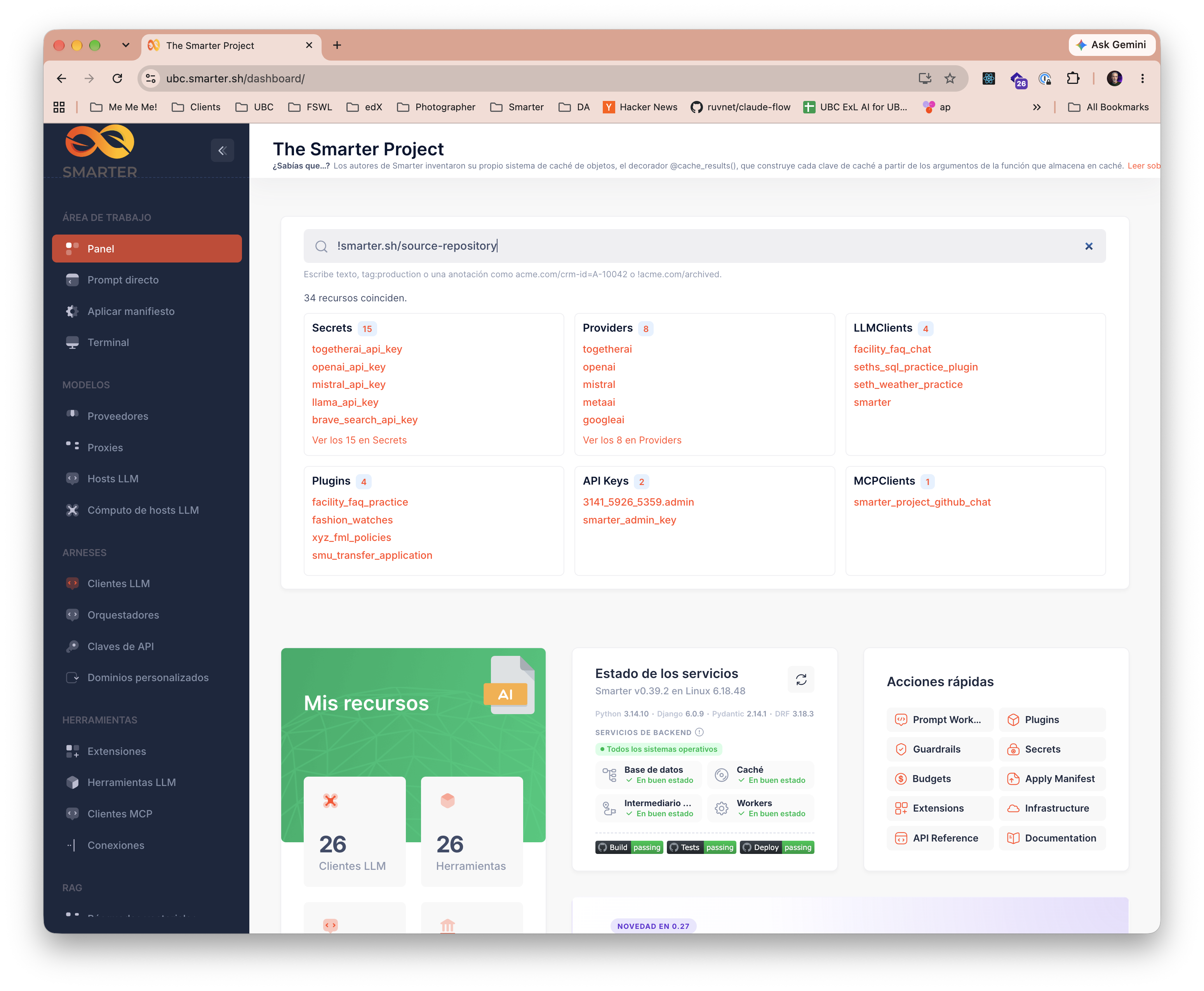
The second finds everything that people created themselves, which is everything without a source repository.
!smarter.sh/source-repository
The answer to “which commit is live?” is on each resource, in smarter.sh/source-commit, to compare with git ls-remote on the repository. The same selectors work from the REST API, so a CI job can make that comparison for every resource a repository installed.
Reacting to changes
Finding resources covers half of an integration. The other half is being told when something changes, and Smarter has two ways to do that.
Annotation handlers
An annotation handler is the Smarter counterpart of a Kubernetes controller that watches an annotation. Your Django app registers a function for a DNS prefix that it owns, and Smarter calls it once for each annotation with that prefix that’s added, changed or removed on any resource, including when the resource is deleted. This is the CRM example from the docs.
from smarter.lib.annotation.handlers import AnnotationEvent, annotation_handler

from .tasks import link_crm_account, unlink_crm_account


@annotation_handler("acme.com")
def crm_account(event: AnnotationEvent) -> None:
    if event.change.key != "acme.com/crm/account-id":
        return
    if event.change.action == "removed":
        unlink_crm_account.delay(event.model_label, event.object_id, event.change.old_value)
    else:
        link_crm_account.delay(event.model_label, event.object_id, event.change.new_value)
Three properties make handlers safe to build on. They run after the database transaction commits, so they never act on a change that was rolled back. An exception in one is logged and isolated, so a bug in your integration can’t break apply or anyone else’s handler. And they fire only on changes, so re-applying an unchanged manifest a hundred times calls your handler zero times.
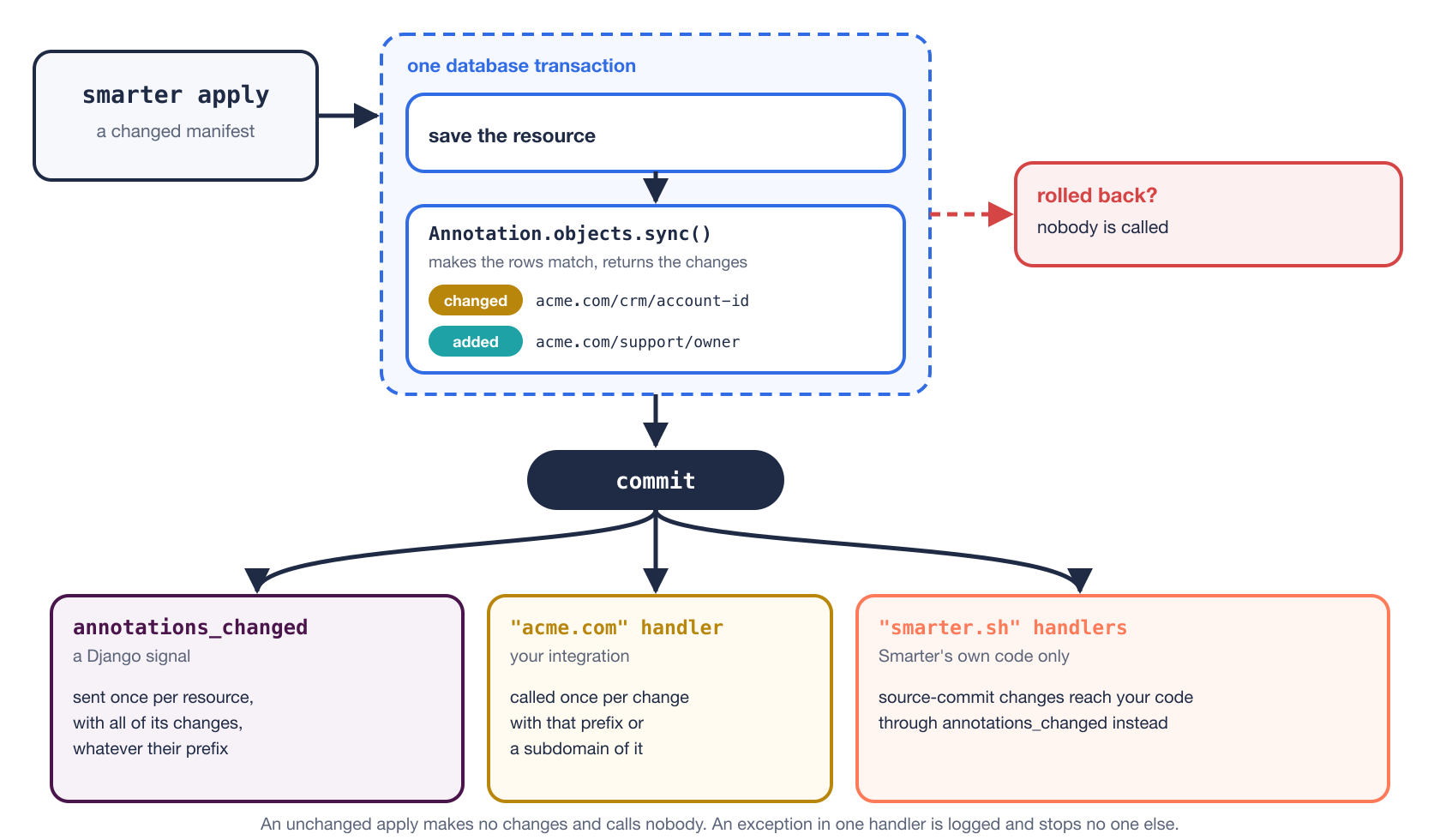
Only Smarter’s own code may handle the smarter.sh prefix. An integration that wants to watch the provenance annotations, for example to post to a channel whenever a deployment moves a resource to a new commit, connects a receiver to the annotations_changed signal instead. It’s sent once per resource, after the commit, with the list of that resource’s changes, whatever their prefix.
Querying from Python
Inside Smarter, every resource’s model has an annotations property and a few helpers, documented in the developer reference.
from smarter.lib.annotation.models import Annotation
from smarter.lib.annotation.selectors import filter_by_annotations

llmclient.annotations.get("acme.com/crm/account-id")

LLMClient.with_annotation("acme.com/crm/account-id", "A-10042")

filter_by_annotations(LLMClient.objects.with_read_permission_for(user), ["acme.com/crm/account-id=A-10042"])

Annotation.objects.with_key("acme.com/crm/account-id", "A-10042").resources()
The last line returns every Smarter resource, of any kind, tied to one CRM account. That cross-kind query is what the GitHub example uses to collect everything a repository installed, and what a CMDB integration uses to show every AI resource attached to a business service. Note that with_annotation() and resources() don’t check permissions. When you answer a user, filter a queryset that does, as filter_by_annotations() does above.
Designing your own
The GitHub example generalizes to any system of record. Pick a domain you control as the prefix, decide which records your keys point at, and let the people who write manifests declare the association in the same file that defines the resource.
Some patterns that fit naturally are listed below.
- Ownership.
acme.com/support/owner: data-platform-team, read by a receiver ofllmclient_deployedthat opens a ticket in that team’s queue. - Cost allocation.
acme.com/finance/cost-center: "4410", synced to a finance system by a handler whenever it changes. - Records elsewhere.
acme.com/crm/account-idoracme.com/cmdb/service-id, linking a resource to the record that mirrors it. - Provenance. Your own pipeline’s equivalent of
smarter.sh/source-commit, if you apply manifests from git with something other thanload_from_github.
Two rules keep annotations safe. Don’t put credentials in them, since they’re plain text that anyone who can describe the resource can read. Store a credential in a Smarter Secret, and annotate the resource with the Secret’s name if your integration needs to find it. And treat a missing annotation as normal. Not every resource will carry your keys, so ignore the ones that don’t, and validate the values of the ones that do.
Because Smarter never interprets an annotation’s value, an annotation means whatever the software that reads it decides it means, and no Smarter release will change that. That’s the property that lets your integration and the platform evolve independently.
Takeaways
- Put integration data in the manifest, not in a side table. It then travels through review, version control and
applywith the resource it describes. - Own a prefix. A DNS domain you control makes your keys collision-free, and lets an annotation handler receive exactly your changes.
- Normalize values you’ll select on, as
load_from_githubdoes with repository URLs, so one thing always has one value. - Let apply semantics do the bookkeeping. When every apply rewrites the annotations, a commit annotation stays current with no extra code.
- Answer questions with selectors. “What did this repository install?” and “What did people create by hand?” are one line each, in the console, the API or Python.
- React in handlers, after commit. They’re isolated, transactional and fire only on change.
Closing thoughts
Provenance is the kind of feature nobody asks for until the day they need it, usually while trying to work out whether a resource is safe to delete. Building it took three annotation keys and a few short methods in the command that applies manifests, because annotations already did the storing, the querying and the change notification. That’s the test I’d apply to any extension point. When the platform’s own features are built on it, it’s probably good enough for yours.