One Image, Laptop to Production: The Case for Smarter on Docker and Kubernetes

Smarter runs on Docker everywhere and on Kubernetes in production. Those two choices, recorded as ADR-002 and ADR-003, are what let one Docker image go from a developer’s laptop to a large organization’s production Kubernetes cluster without a rewrite, a port or a second build. This post lays out the case for Docker and Kubernetes, covering the problems they solve, how they solve them, and why they suit large organizations.
The problem starts with the fact that an LLM platform is not one program. Smarter is a web server and REST API, two Celery workers with different jobs, a scheduler, a database and a cache. And that’s only what runs all the time. When someone deploys an LLMClient, the platform creates a hostname, a DNS record, an Ingress and a TLS certificate for it. When someone launches an open-weight model, it adds a GPU node to the Kubernetes cluster, downloads the weights and starts an inference server. So the platform doesn’t just run on infrastructure. It manages infrastructure, as part of its ordinary work.
That’s a hard thing to install, upgrade and operate, and it gets harder in the kind of organization that Smarter is designed for, one with a platform team, a security team, a change board, several environments, and several hundred people who expect the thing to be up on Monday morning. Every one of those people needs to agree on what “Smarter” is, and on how it behaves in each environment.
The idea underneath both choices is simple. The Docker image is the unit of agreement. The same image runs on a developer’s laptop and on a production cluster. Everything that differs between the two is configuration, and Kubernetes is both where Smarter runs and the API that Smarter drives.
The two decisions at a glance
| Problem | What answers it |
|---|---|
| Four processes with different jobs, one codebase | One Docker image; each process is the same image with a different command |
| “It works on my machine” | The machine is the image, with the same OS, Python, drivers and tools in every environment |
| Different settings in development, staging, production | Environment variables only, validated by one Pydantic Settings class |
| Load that varies by the hour | Kubernetes HorizontalPodAutoscalers on the web server and the worker |
| Upgrades without downtime | Rolling updates, health probes and a PodDisruptionBudget |
| Initializing a new environment | One command, manage.py initialize_platform, run by Docker or by a Helm Job |
| Per-LLMClient hostnames, certificates and GPU nodes | The Kubernetes API, driven by the platform through one infrastructure service |
| Several environments on shared infrastructure | One Kubernetes namespace per environment |
One image, four processes
Smarter’s Dockerfile builds a single image in stages. They add a slim Python 3.14 base, the system packages, kubectl, the MariaDB connector, the AWS CLI, a non-root user, a virtual environment with the Python requirements, the application code, the compiled translations and the collected static files, including the React apps of the web console. The last line runs the web server.
FROM collect_assets AS serve_application
WORKDIR /home/smarter_user/smarter
USER smarter_user
CMD ["uvicorn", "smarter.asgi:application", "--host", "0.0.0.0", "--port", "9357", "--workers", "2"]
That CMD is only a default. In docker-compose.yml, the web server, the operational worker, the infrastructure worker and the scheduler are all the same image, smarter, started with different commands.
smarter-worker:
  image: smarter
  command: celery -A smarter.workers.celery.app worker --concurrency=4 --loglevel=info -Q default_celery_task_queue -E

smarter-worker-infrastructure:
  image: smarter
  command: celery -A smarter.workers.celery.app worker --concurrency=4 --loglevel=info -Q infrastructure_celery_task_queue -E -n infrastructure@%h

smarter-beat:
  image: smarter
  command: celery -A smarter.workers.celerybeat beat --loglevel=info
This is the first natural advantage of a container. It packages the whole runtime, not just the code. The Python version, the MariaDB client library that a database driver compiles against, the kubectl binary that deploys an LLMClient, the NLTK data that a plugin’s selector uses. All of it is in the image, and all of it is identical wherever the image runs. A bug that reproduces in the image reproduces everywhere, and a bug that doesn’t, doesn’t. That one property is worth more than any amount of setup documentation. 😬
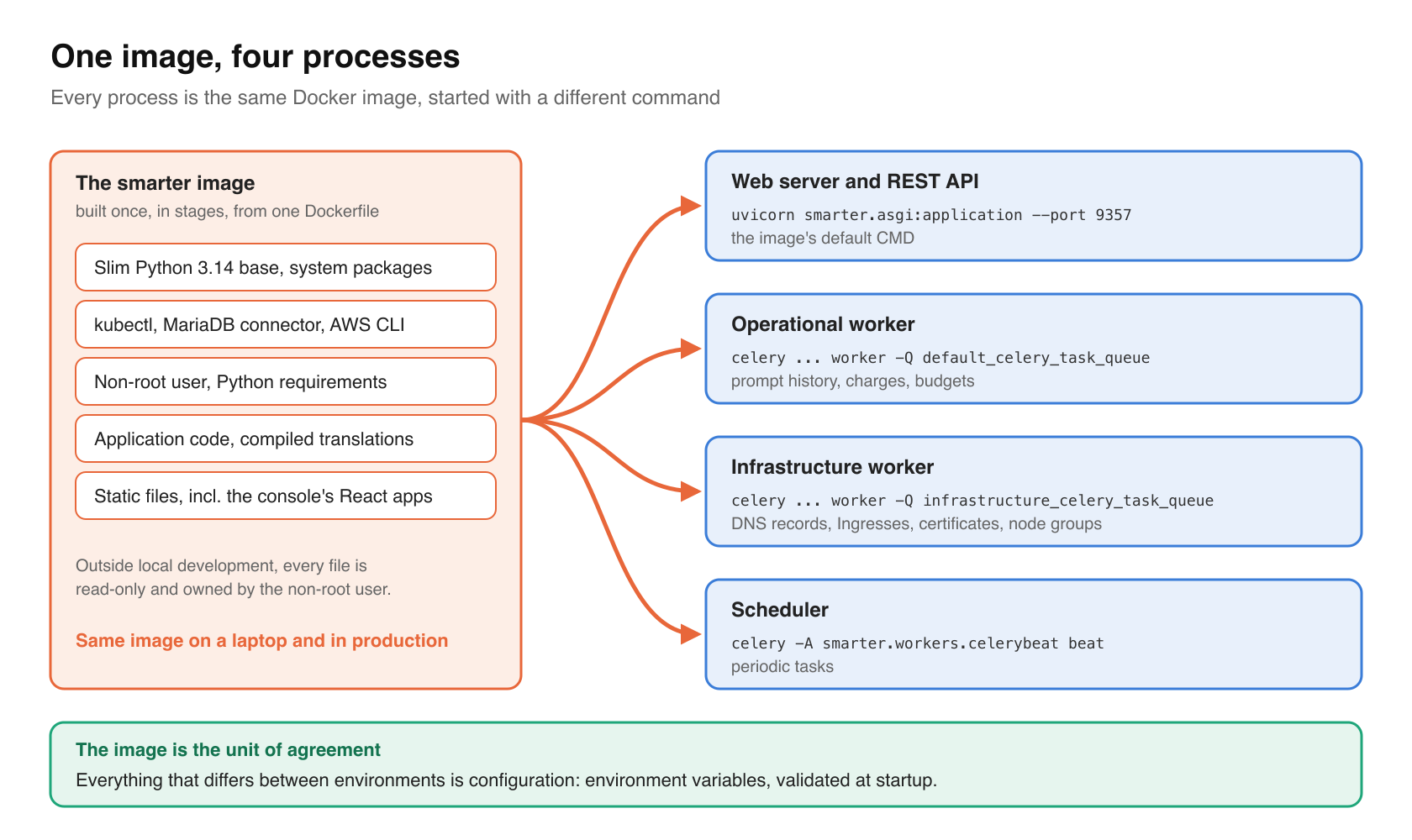
The image also carries some of its own security. Outside local development, a build stage makes every file read-only and owned by a non-root user.
RUN if [ "$ENVIRONMENT" != "local" ] ; then chown -R smarter_user:smarter_user /home/smarter_user/ && \
  find /home/smarter_user/ -type f -exec chmod 400 {} + && \
  find /home/smarter_user/ -type d -exec chmod 500 {} + && \
  ...
A security team reviews one artifact, with one bill of materials, and the thing it approved is byte for byte the thing that runs.
The image is the unit of agreement. Everything else in this post depends on that.
Configuration is the only difference
If the image is the same everywhere, then everything that varies has to come from outside it. Smarter follows the Twelve-Factor App methodology (ADR-004), so configuration lives in environment variables, never in files baked into the image, and never in code branches like if production:.
All of those variables pass through one place, smarter.common.conf.Settings (ADR-007), a Pydantic Settings class that reads the environment, validates every value, derives the rest, and exposes the result as an immutable singleton, smarter_settings. A mistyped boolean or a missing secret fails when the process starts, with a message that names it, rather than at 2 a.m. in the first request that happens to need it.
In Docker, the variables come from a .env file. In Kubernetes, they come from the env map of the Helm chart’s values.yaml, which every Deployment renders into its pods.
env:
  {{- range $key, $value := .Values.env }}
  - name: {{ $key }}
    value: {{ $value | quote }}
  {{- end }}
From helm/charts/smarter/templates/deployment-app.yaml.
Some settings are derived rather than set. smarter_settings.environment_namespace turns the platform’s name, its subdomain and its environment (alpha, beta, next or prod) into the Kubernetes namespace that environment runs in, so code never hard-codes one.
For an operator, this means the complete difference between two environments is a list of key-value pairs that can be diffed, reviewed and kept in a secrets manager. There’s no second build for staging, and no special image for production.
What Kubernetes adds
Docker answers “what runs”. Kubernetes answers “how many, where, and what happens when something goes wrong”. The Smarter Helm chart runs the same four processes as docker-compose.yml, as Deployments, and adds what a single machine can’t provide.
It scales
The web server and the operational worker each have a HorizontalPodAutoscaler. The web server’s scales on CPU, and optionally on memory.
spec:
  minReplicas: {{ .Values.hpa.minReplicas | default 2 }}
  maxReplicas: {{ .Values.hpa.maxReplicas | default 25 }}
  metrics:
    - type: Resource
      resource:
        name: cpu
        target:
          type: Utilization
          averageUtilization: {{ .Values.hpa.targetCPUUtilizationPercentage | default 75 }}
From templates/hpa-app.yaml.
This works because the pods are stateless. Every bit of state lives in the database, in Redis or in the cloud, so any pod can answer any request, and Kubernetes can add or remove pods without asking the application’s permission. Each uvicorn worker also caps its concurrent requests (app.limitConcurrency) and answers 503 above that, so an overloaded pod sheds load instead of running out of memory while the autoscaler catches up.
Scaling isn’t only about the web server. Smarter’s Celery work runs on two queues, on purpose (ADR-030). The infrastructure queue carries the slow tasks that create DNS records, Ingresses, certificates, node groups and databases. The operational queue records prompt history, charges and budgets. They’re separate Deployments, so a backlog of certificate verifications can never delay the bookkeeping of a prompt, and each can be sized for its own job.
It stays up
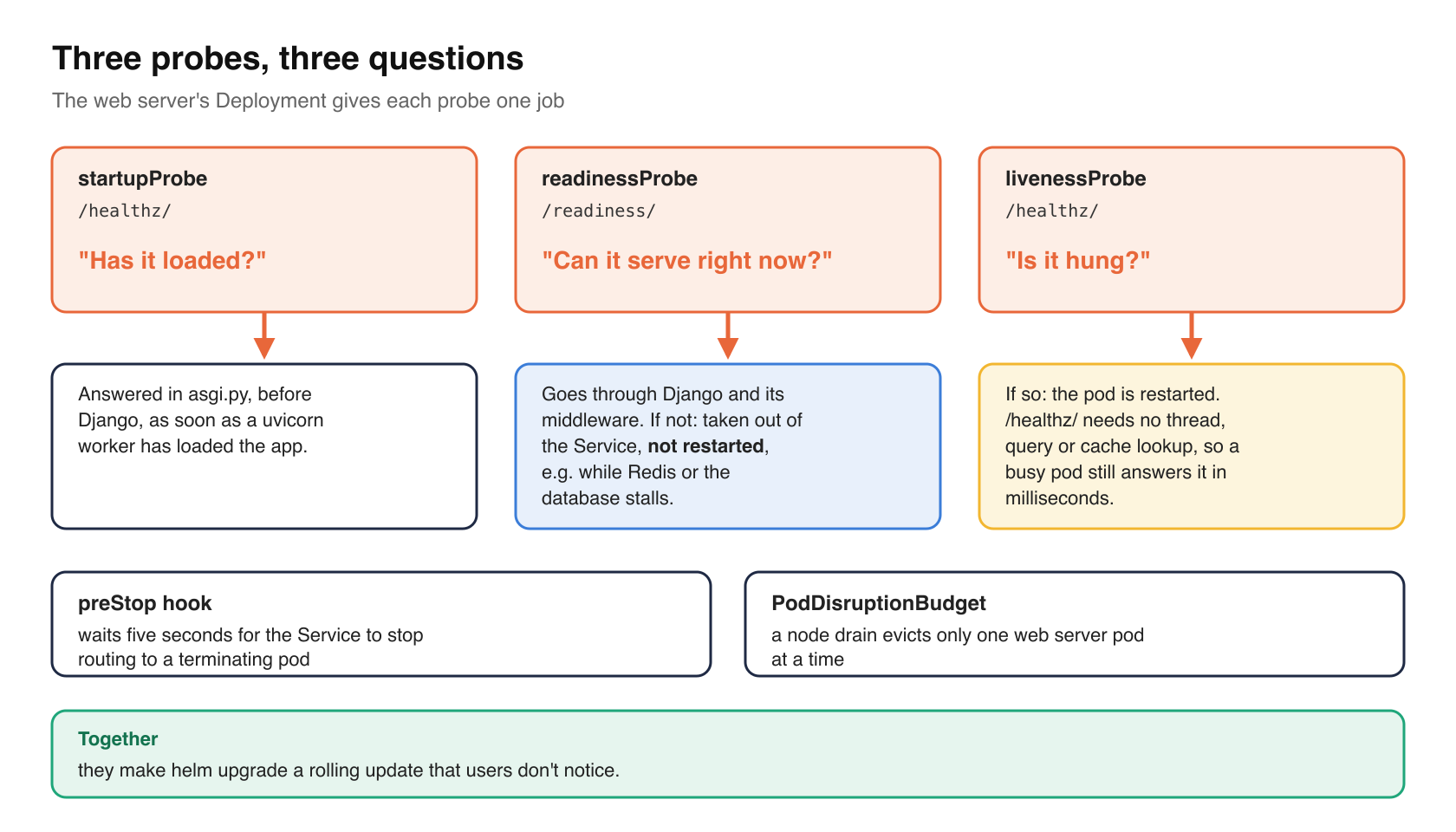
The web server’s Deployment has three probes, each with a different question to answer.
# - startupProbe: /healthz/ is answered in asgi.py, before Django (see
#   smarter.lib.django.healthz), as soon as a uvicorn worker has loaded the app.
# - readinessProbe: /readiness/ goes through Django and its middleware, so the pod takes
#   traffic once it can serve it, and is taken out of the service, not restarted, while
#   it can't, e.g. while its Redis or database stalls.
# - livenessProbe: restarts a pod whose process is hung. /healthz/ needs no thread, query
#   or cache lookup, so a busy pod still answers it in milliseconds.
The distinction matters. A pod whose database is briefly slow isn’t broken, and restarting it would make things worse. Readiness takes it out of rotation, and liveness restarts it only if the process itself has hung. A preStop hook waits five seconds for the Service to stop routing to a terminating pod, and a PodDisruptionBudget lets a node drain evict only one web server pod at a time. Together, they make helm upgrade a rolling update that users don’t notice.
It initializes itself the same way
A new environment needs a database, migrations, seed data, example resources and built-in LLMClients. Smarter keeps all of that in one management command, manage.py initialize_platform, and nowhere else. Locally, make docker-init runs it in the smarter-app container. In Kubernetes, a Helm hook runs it in a Job after every install and upgrade.
run python manage.py migrate
# initialize_platform does all of the platform's initialization, and this Job adds none of its
...
run python manage.py initialize_platform
From templates/job-init.yaml.
Because both paths call the same command, a fresh laptop and a fresh production namespace end up in the same state. initialize_platform is also idempotent, so you can run it as many times as you want. On a new environment it creates everything; on an existing one it creates only what’s missing and leaves the rest alone. That’s what makes it safe for Helm to run it on every upgrade, and safe for an operator to run it again by hand. The Job then emails its whole log, credentials redacted, to the platform’s administrator. A nightly CronJob backs up the database to S3 and emails its result the same way.
Kubernetes scales, heals, upgrades and initializes the four processes, with objects that any Kubernetes administrator already knows how to read.
Kubernetes as an API that Smarter drives
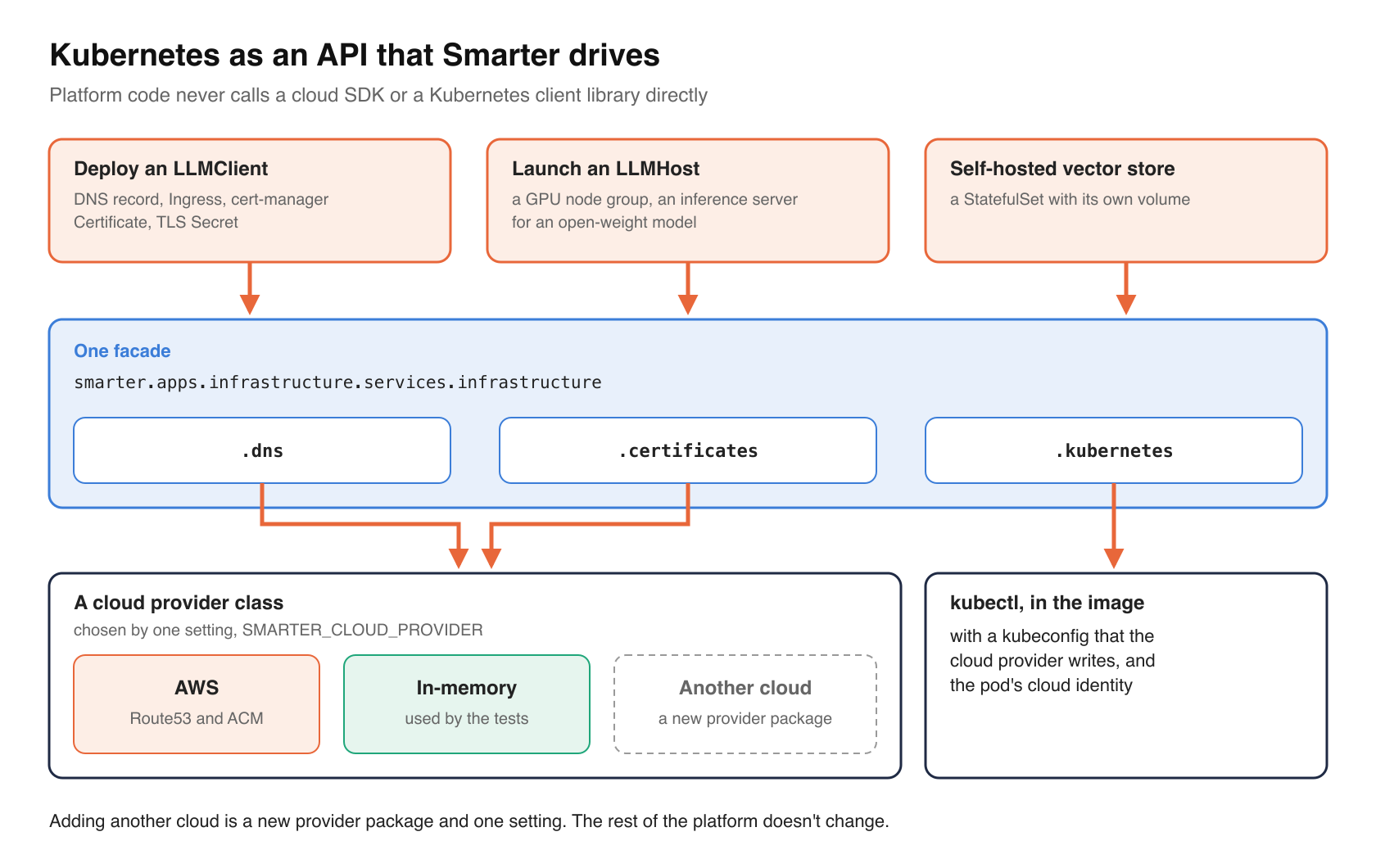
Most web applications run on Kubernetes and never talk to it. Smarter talks to it constantly, because several of its resources are Kubernetes resources underneath.
- Deploying an LLMClient creates a DNS record, an Ingress, a cert-manager Certificate and a TLS Secret, then verifies each one. Every deployed LLMClient gets its own hostname and certificate. See Deploying an LLMClient.
- Launching an LLMHost runs an open-weight model from Hugging Face, with vLLM or another inference engine, on a node group that Smarter adds to the cluster for it, and removes when no model needs it any more.
- A self-hosted vector store runs as a StatefulSet with its own volume.
None of this code calls a cloud SDK or a Kubernetes client library directly. It goes through one facade, smarter.apps.infrastructure.services.infrastructure.
from smarter.apps.infrastructure.services import infrastructure

zone, created = infrastructure.dns.get_or_create_zone("example.com")
certificate_id, _ = infrastructure.certificates.get_or_create_certificate("example.com")
infrastructure.kubernetes.apply_manifest(manifest)
From the docstring of smarter/apps/infrastructure/services/__init__.py.
The Kubernetes service runs kubectl, which is in the image, with a kubeconfig that the cloud provider writes and the cloud identity of the pod. DNS and certificates belong to a cloud provider class, which today is AWS (Route53 and ACM), plus an in-memory provider that the tests use. Adding another cloud is a new provider package and one setting, SMARTER_CLOUD_PROVIDER. The rest of the platform doesn’t change.
From the user’s side, an LLMHost looks like any other Smarter resource.
smarter apply -f qwen3-0.6b.yaml
smarter deploy llmhost qwen3_0_6b
smarter describe llmhost qwen3_0_6b
That’s not a coincidence. Smarter’s manifests and its CLI deliberately follow kubectl (ADR-024), with apiVersion, kind, metadata, spec, status, and the verbs apply, get, describe, delete. An operator who manages Kubernetes all day already knows how to manage Smarter, and the platform is built on the very system whose model it borrows.
Kubernetes is where Smarter runs, and also what Smarter controls. Picking it twice is half the reason it was worth picking once.
Why this suits a large organization
Smarter is community open source, and anyone can run it on a laptop. But its design choices make the most sense in a large organization, where the hard problems are coordination, review and operations, more than writing code. Here’s what the Docker and Kubernetes choices give that kind of user.
- It fits the platform team they already have. Most large organizations already run Kubernetes, or have decided to. Smarter arrives as an OCI image and a Helm chart, published on Artifact Hub, which is exactly the shape that team already installs, monitors and patches. There’s no bespoke installer or proprietary appliance to learn.
- Every artifact is reviewable. The image, the chart and the values file are text or content-addressed, versioned and diffable. A change board can see precisely what changes between two releases, and security can scan the image once and know what will run.
- Environments are cheap and isolated. Each environment is a namespace named
<platform name>-<platform subdomain>-<environment>. Alpha, beta, next and production can share one cluster. With smarter-infrastructure’s enhanced security turned on, each namespace denies all traffic by default, and network policies admit only the pods that carry Smarter’sapp.kubernetes.io/application-grouplabel. A team that wants its own sandbox gets a namespace, not a new set of servers. - Availability is the cluster’s job. Autoscaling, health probes, rolling updates and disruption budgets are standard Kubernetes, configured in the chart. The organization’s existing on-call practices, dashboards and alerts apply unchanged.
- Data and models can stay inside the perimeter. An LLMHost runs open-weight models on the organization’s own cluster, with endpoints reachable only inside it unless the manifest asks for an Ingress. For workloads that can’t send prompts to a third-party API, that’s the difference between “yes” and “not allowed”.
- Cost follows use. GPU node groups are added when an LLMHost launches and removed when nothing needs them. The web server scales down at night. Nobody pays for a GPU that sits idle over the weekend. 🤩
- It doesn’t lock them in to Smarter. Everything Smarter runs is a standard Kubernetes object, with standard labels. If an organization stops using Smarter, it deletes a namespace.
The pathway from laptop to production
The most useful property of this design, in practice, is that there’s one path from first look to production, and each step is the previous one plus a little more infrastructure. The image never changes along the way.
| Step | What runs | Where it runs |
|---|---|---|
| 1. Evaluate | The published image from Docker Hub, with smarter-deploy‘s docker-compose.yml | A laptop with Docker Desktop |
| 2. Develop | The image built from source, with make init once, then make build && make run | A developer’s laptop |
| 3. Provision a cluster | smarter-infrastructure‘s Terraform for a VPC, an EKS cluster, Traefik, cert-manager, DNS, storage and email | The organization’s AWS account |
| 4. Install | helm upgrade --install of the Smarter chart, with the organization’s values | A namespace on that cluster |
| 5. Promote | The same image, through alpha, beta, next and production namespaces | The same cluster, or several |
Step 1 takes minutes and needs nothing but Docker. A prompt engineer can try LLMClients, plugins and manifests without anyone’s permission, on a machine where nothing is reachable from the internet.
Step 2 is the same thing, built from source, with the web console on http://localhost:9357.
Steps 3 and 4 are where an organization’s platform team takes over, using its own tools. The Helm chart installs from an OCI registry.
helm upgrade --install smarter oci://ghcr.io/smarter-sh/charts/smarter \
  --version <chart-version> \
  --namespace <your-namespace> \
  --create-namespace \
  --values values.yaml
Step 5 is just as ordinary. In Smarter’s own repository, the deploy workflow maps each long-lived branch to an environment, alpha to alpha, beta to beta, next to next, and main to production. Each deploy checks that the image exists in the registry before it touches the cluster, then runs helm upgrade into that environment’s namespace.
What doesn’t happen at any step is a rewrite, a port or a second build. The thing a developer ran on Tuesday is the thing production runs on Friday, with different environment variables.
The trade-offs
These choices cost something, and an organization should know what before it adopts them.
First, Docker is mandatory. ADR-002 rules out any other way to build or run Smarter, so every contributor and every evaluator needs Docker installed, and a laptop with enough memory for six containers, including a database and a cache.
Second, Kubernetes is a large system, and Smarter doesn’t hide it. An organization without Kubernetes experience will need some before it runs Smarter in production. That’s a fair price for the operating model above, but it is a price.
Third, production is AWS EKS today. ADR-003 makes EKS the supported platform, and AWS is the only cloud provider class that’s implemented. The chart itself is standard Kubernetes and the infrastructure layer is built for other clouds, but someone has to write the Azure or Google Cloud provider before those are supported.
Fourth, a container runs with whatever credentials it’s given. A Docker environment that holds real AWS credentials and a kubeconfig for a real cluster will create real DNS records and real Ingresses when someone deploys an LLMClient on a laptop. The Smarter on Kubernetes guide explains how to keep a local environment self-contained.
Takeaways
If you’re building a platform of your own, here’s what to take from this, in rough order of payoff.
- Ship one image, and make every process a different command on it. The fewer artifacts there are, the fewer things anyone has to agree on.
- Put every difference between environments in environment variables, and validate them all in one place when the process starts.
- Keep pods stateless, so that scaling and healing are the cluster’s problem, not the application’s.
- Give each probe one question. Startup asks “has it loaded?”, readiness asks “can it serve right now?”, liveness asks “is it hung?”.
- Keep initialization in one idempotent command, and call it from every environment, rather than spreading it across a Makefile, a chart and a CI script.
- Separate slow infrastructure work from fast operational work, on different queues and different workers.
- If your application manages infrastructure, reach it through one facade, so that tests can fake it and another cloud can be added without touching the rest of the code.
Closing thoughts
Docker and Kubernetes aren’t exciting choices, and that’s the point. They’re the choices a large organization’s platform team has already made, and they turn a complicated system into artifacts and objects that people in many roles can read, review and operate without learning anything specific to Smarter. The image is the unit of agreement, configuration is the only difference, and the cluster is both where Smarter runs and what it builds on. That leaves Smarter’s own code free to concentrate on what it’s actually for, which is LLM applications, declared in manifests, running at whatever scale the organization needs.