
Six High-Impact Uses of Claude Code

It’s common knowledge that Claude Code is good at troubleshooting. Paste in a stack trace or describe the unexpected behavior, and it reads the code, forms a theory, tests it and usually finds the cause. I use it that way every day on Smarter. But that isn’t where the biggest productivity gains are.
The biggest gains are in work that is important, tedious and checkable, meaning work that every team knows it should do, that people put off because it’s tedious, and that an agent can verify for itself. Here are six such uses, in order of impact.
| Use | On Smarter |
|---|---|
| 1. Test coverage | 97% for Python and 96% for React, kept there by every change |
| 2. Commit messages | A full body on every commit, saying what was wrong, what changed and how it was tested |
| 3. Large refactoring jobs | One convention applied across hundreds of call sites, in one reviewable commit |
| 4. Server log reviews | Every deploy’s log read in full, for silent failures, leaks and waste |
| 5. Language translations | English, Spanish, French and Brazilian Portuguese, kept complete with every change |
| 6. Front end design | Dashboard widgets built from the existing Keen Bootstrap theme |
Test coverage is first by a wide margin, because it’s what makes the other five safe to hand to an agent.
1. Test coverage
High coverage is what turns an agent from a helper into something you can delegate to. With a test suite that exercises 97% of the Python and 96% of the React code, I can ask Claude Code for a change that touches 162 files, a new translation pipeline or a redesigned dashboard, and know within minutes whether anything broke. Without that suite, every one of those changes would need a line-by-line review by a human, and most of them wouldn’t be worth the risk. Coverage decides what you can confidently delegate.
Claude runs the tests itself
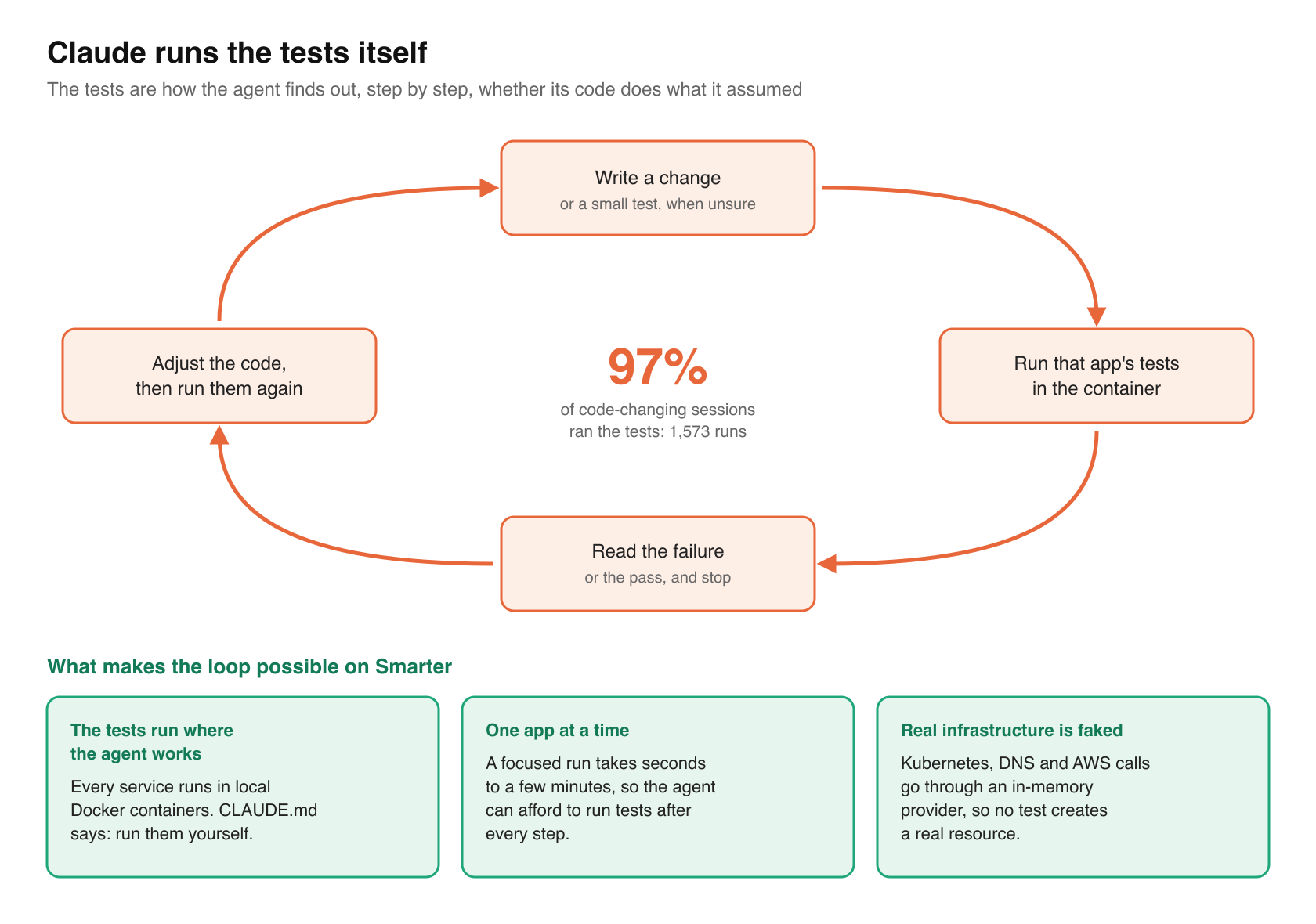
The tests aren’t only a safety net at the end. They’re how Claude Code finds out, step by step, whether its code does what it assumed. It writes a change, runs the tests for that app in the container, reads the failure, adjusts, and runs them again. When it isn’t sure how a piece of code behaves, it writes a small test and lets the result answer the question, rather than reasoning its way to a guess.
The transcripts bear this out. Across three weeks of sessions, measured in an earlier post, Claude Code ran the unit tests in 97% of the sessions that changed source code, 1,573 times in all, and read test modules in 95% of them. The tests are its main source of feedback.
Three things make that possible on Smarter.
- The tests run where the agent works. Every service runs in local Docker containers, and Smarter’s CLAUDE.md tells the agent to run the tests itself, in the container, after every change, and never to ask a human to run them.
- Tests can run one app at a time. A focused run takes seconds to a few minutes, so the agent can afford to run tests after every step.
- Real infrastructure is faked. The local containers hold live cloud credentials, so every Kubernetes, DNS and AWS call in a test goes through an in-memory provider. An infrastructure safety skill says how. The agent can run anything in the suite without creating a real resource.
Claude keeps coverage high
Coverage stays high because the bar is written into the agent’s instructions. CLAUDE.md asks for at least 90% per Django app, and 95% where that takes moderate effort. So every change Claude Code makes arrives with its tests, and its commit message says which tests ran and which didn’t.
The tests also check the shape of a change, not just its result. A list api test asserts that a page’s query count doesn’t grow with its number of rows. A shared test mixin sorts every list by every column it offers, in both directions. A translation test fails if any message in any language is untranslated. Each of those turns a rule into something the agent can check on its own, on every change.
2. Writing commit messages
Every commit Claude Code writes on Smarter has a full body that says what was wrong, what changed and where, how it was tested, and what was left undone. Those bodies average about 530 words. This is the start of a typical one, from b89c79281.
fix(react): add a refresh button to the top of every list view

The web console's resource list pages had no way to reload a list on
demand. To see changes made elsewhere, for example by smarter apply from
the cli, another browser tab or a Celery task, a user had to reload the
whole page. [...]
And the end, which says exactly what was and wasn’t verified.
Not verified by hand in a browser. The infrastructure resource list keeps
its existing Refresh button, unchanged.
Commit bodies are Claude’s research tool
Good commit messages are good practice for any team. For an agent, they’re also a research tool. Claude Code runs git log, git show or git blame in 73% of the sessions that change source code. Commit history answers the one question that code can’t. Why is it like this?
So a commit body is a note from the agent to its future self. When a fix needs to explain itself, it cites the commit that introduced the code by hash and subject, and says what that commit assumed. When a test fails, the agent reads the history of the code under test to decide whether the code or the test is wrong.
Why it’s worth delegating
A thorough body means going back over the whole diff, recalling why each change was made, checking which tests actually ran, and being honest about what was skipped. At the end of a long change, that’s the last thing a person wants to do. Claude Code does it on every commit, at the same depth and in the same format, following a commit skill that says what a body must contain. It prints the command for me to run rather than committing on its own, which is a hard rule.
3. Large refactoring jobs
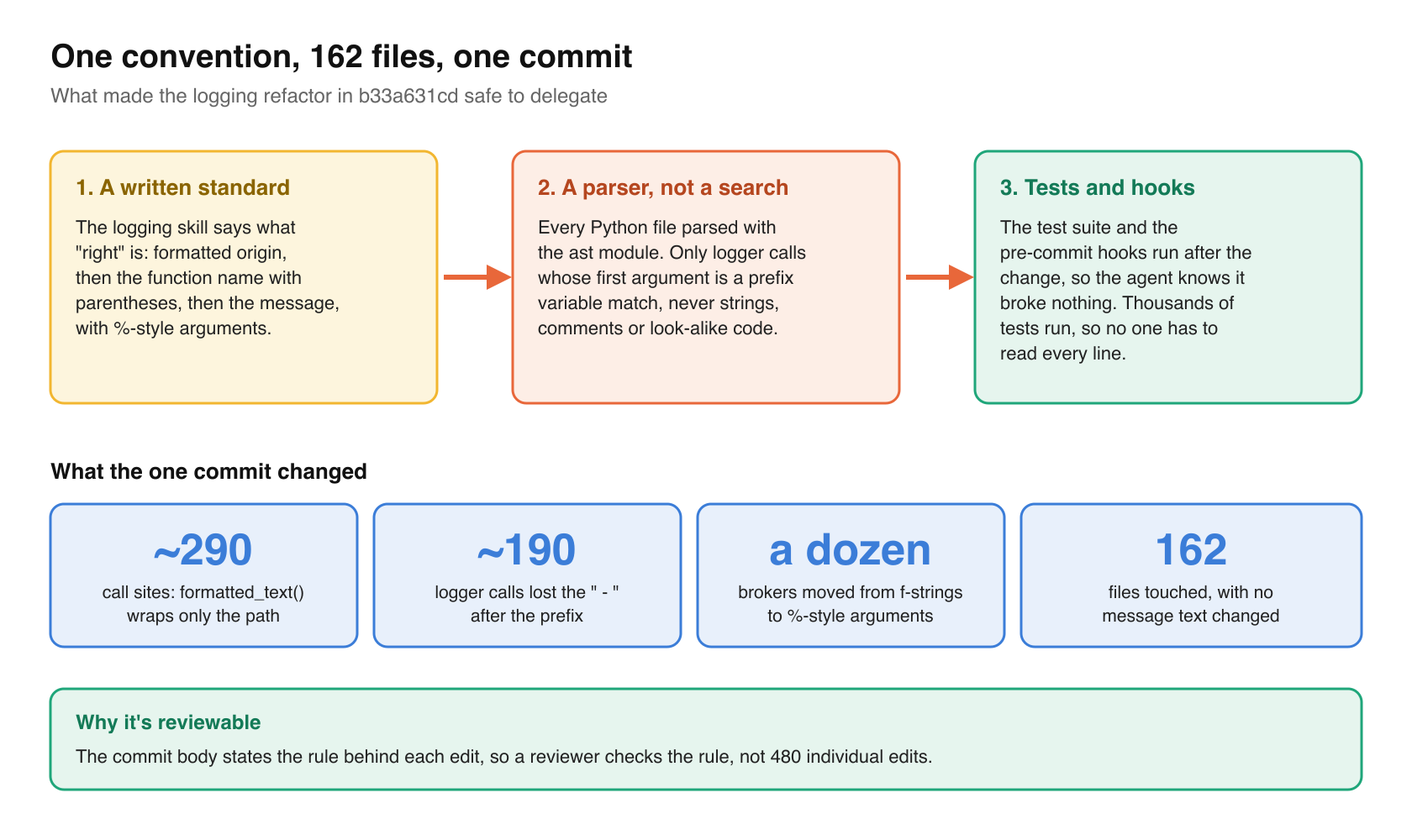
Smarter has a logging standard. Every message starts with its formatted origin, then the unformatted function name with parentheses, then the message, with %-style arguments. It’s written down in a logging skill. Applying a standard like that across a large codebase is exactly the kind of job an agent does well. In b33a631cd, one commit did the following.
- changed about 290 call sites so that
formatted_text()wraps only the module or class path; - dropped the
" - "after the prefix in about 190 logger calls; - switched a dozen brokers’ log messages from f-strings to %-style arguments;
- touched 162 files, with no message text changed.
Find the call sites with a parser
The commit body says the calls were “found with the ast module, not by text search.” Claude Code parsed every Python file and matched only logger calls whose first argument is a prefix variable. A text search would match strings, comments and code that only looks similar. A syntax tree matches what the code actually is. And because the commit body states the rule that made each edit, a reviewer checks the rule, not 480 individual edits.
What makes it safe
Three things make a refactor of that size safe to delegate. They are a written standard, so the agent knows what “right” is; a parser, so it changes only what it means to; and the test suite and pre-commit hooks, so it knows it broke nothing. A change to 162 files is reviewable because thousands of tests run after it, not because anyone reads every line.
The same approach works for structural refactors. Smarter’s 15 resource list apis share one base class, SmarterListApiView, and each list is a declaration of about a dozen lines. A fix to the base class reaches every list at once, and the shared tests check all of them.
4. Server log reviews
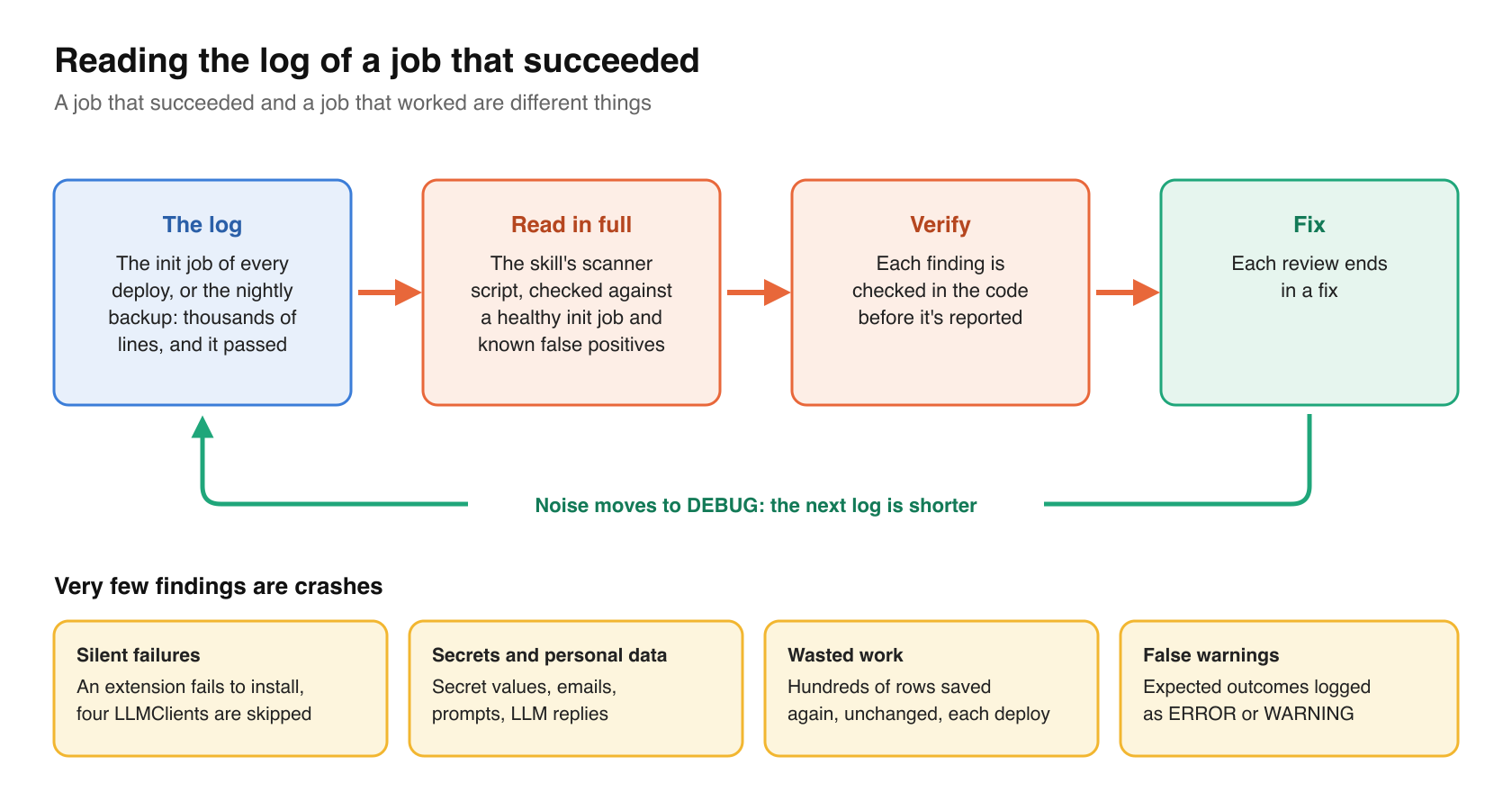
Every Smarter deployment runs a Kubernetes init job that migrates the database, initializes the platform, loads the example resources and deploys the built-in LLMClients. A nightly CronJob backs up the database. Their logs run to thousands of lines, and when a job succeeds, nobody reads them. That’s a mistake, because a job that succeeded and a job that worked are different things.
Claude Code reads them in full. A log review skill gives it a scanner script, a description of a healthy init job, and the known false positives and where they come from in the code. Each finding is verified in the code before it’s reported, and each review ends in a fix.
What a log review catches
| Kind of problem | Example |
|---|---|
| Silent failures in a successful job | A built-in extension that fails to install, so four LLMClients are skipped, while the job passes |
| Secrets and personal data in logs | Encrypted Secret values, users’ emails, prompts and full LLM replies, a new token’s first characters |
| Configuration errors | An LLMClient whose default model its provider doesn’t offer; a DNS check run in the wrong zone |
| Database problems | MariaDB rejecting an emoji because a database uses utf8mb3 |
| Wasted work | Hundreds of rows saved again, unchanged, on every deploy, each firing its signals |
| Lost data | A Redis log handler dropping records whenever the platform is busy |
| Security weaknesses in jobs | A database password passed on a command line; an unpinned, unverified tool download |
| Noise and false warnings | Expected outcomes logged as ERROR or WARNING, which hide the real ones |
Very few of those are crashes. They’re the problems a log shows only to someone who reads all of it, carefully, every time. A review also moves noise to DEBUG, so the next log is shorter and the next review sees more.
5. Language translations
The Smarter web console runs in English, Latin American Spanish, French and Brazilian Portuguese. Each language has about 2,250 entries in its message catalogs, from the Django templates and Python views and from the React apps.
Claude Code translates them and keeps them complete. When a change adds or edits a message, the same commit regenerates the catalogs and translates the new message into all three languages. A test fails if any message in any language is untranslated, so nothing ships in English only. A translations skill records the conventions.
- The Spanish uses the informal _tú_ and Latin American vocabulary. The French uses _vous_, with a space before colons and question marks. The Portuguese uses _você_.
- Product names and resource kinds stay in English (LLMClient, MCPClient, AuthToken). Common nouns are translated (Secret is _segredo_ in Portuguese).
- Messages that differ only by resource kind (“clone this …”, “… deleted”) are generated from one rule per pattern and a table of each kind’s noun and grammatical gender, so that Portuguese articles and endings agree.
- Every translation is checked automatically for the same
%(name)splaceholders, escapes and inline HTML tags as the English.
The translations haven’t been reviewed by native speakers yet. Automated checks catch broken placeholders, not awkward phrasing.
6. Front end design
The Smarter web console uses the Keen Bootstrap theme, and Claude Code designs new pages and dashboard widgets inside it, using Keen’s cards, icons, illustrations and spacing. Where the theme has no logo it needs, such as WordPress or Drupal, it uses CC0 Simple Icons in their brand colors. The dashboard’s informational widgets are one family with a shared layout (headline, underlined keyword, short lede, two buttons), each with its own colors.
- an SDKs widget with each SDK’s install command;
- a CLI widget drawn as a terminal window, with commands taken from the actual smarter-cli;
- a VS Code widget drawn as a mock editor, showing the extension flagging a misspelled manifest key;
- an Integrations widget with logo tiles for eight site builders and doc generators;
- an Instructors widget with two scrolling ribbons of the free course designs, which pause on hover and focus, stay still under
prefers-reduced-motion, and hide the duplicate copy from screen readers.
Every widget has Storybook stories and Vitest tests, so a design change is checked like any other change. The widgets that show no account data are also published as an npm package, @smarter.sh/ui-widgets, 18 kB gzipped, so the project’s website shows the same widgets as the console.
The trick is the design system. An agent asked to “make it look nice” produces something generic. An agent asked to build from a theme’s existing components produces something that looks like it belongs.
If you want the same gains
Here they are, in rough order of payoff.
- Make the tests runnable by the agent, locally, one app at a time, with fakes for real infrastructure, and tell it to run them after every change.
- Write your coverage bar into the agent’s instructions, so every change arrives with its tests.
- Have it write a full body for every commit, with a skill that says what goes in one. Your agent reads git history in most sessions.
- For big refactors, write the standard down first, and ask the agent to find the call sites with a parser and to state the rule in the commit.
- Have it read the logs of jobs that succeeded, with a skill that lists the known false positives.
- Add a test that fails on any untranslated message, and translations stay complete by themselves.
- For front end work, give it a design system to work inside.
Closing thoughts
Troubleshooting is work a team does anyway, because a bug forces it. The six uses in this post are work that a team knows it should do and usually doesn’t. That’s where an agent gives back the most, and test coverage is the one that makes the rest possible, because an agent that can check its own work can be trusted with more of it.
Happy Smartering!