
Smarter’s List Views: One Design for Queries, Caching, Pagination and Refresh

A list page looks like the easiest screen in any web application. It’s a table with a search box, column headers you can click, and page numbers at the bottom. But a list that is fast, correct and pleasant to use has to solve several hard problems at the same time. Those are expensive database queries, a cache that stays correct, invalidation that reaches every cached page, pagination that works with sorting and filtering, and a browser that paints at once without showing stale data.
Smarter‘s web console has 17 list pages, for LLMClients, Plugins, Guardrails, Secrets, Providers, Connections, MCPClients, Vector Stores and more, and each new resource kind adds another. So the design rule is that each of those problems is solved once, in one shared place, and every list inherits the solution. A new list is about a dozen lines of Python and a React component that renders a shared one.
This post walks through the design, each technical challenge, and the strategy that solves it, with the code.
The shape of a list page
The web console is a Django application whose pages are small React apps. Django renders a template with an empty root element and a few data- attributes (the api url, the CSRF cookie name, and so on), and the React app takes it from there. The smarter-django-react skill describes the arrangement.
A list page has two tabs, “owned” and “shared”, and asks a Django list api for one page of resources at a time.
/workbench/api/listview/all/?page=1&page_size=50&invalidate_cache=false
/workbench/api/listview/owned/?page=1&page_size=25&invalidate_cache=true
/workbench/api/listview/shared/?page=2&page_size=10&search=support&ordering=-name
/workbench/api/listview/all/?filter=pending
The response always has the same shape, {"user": ..., "admin": ..., "objects": [...], "pagination": {...}}.
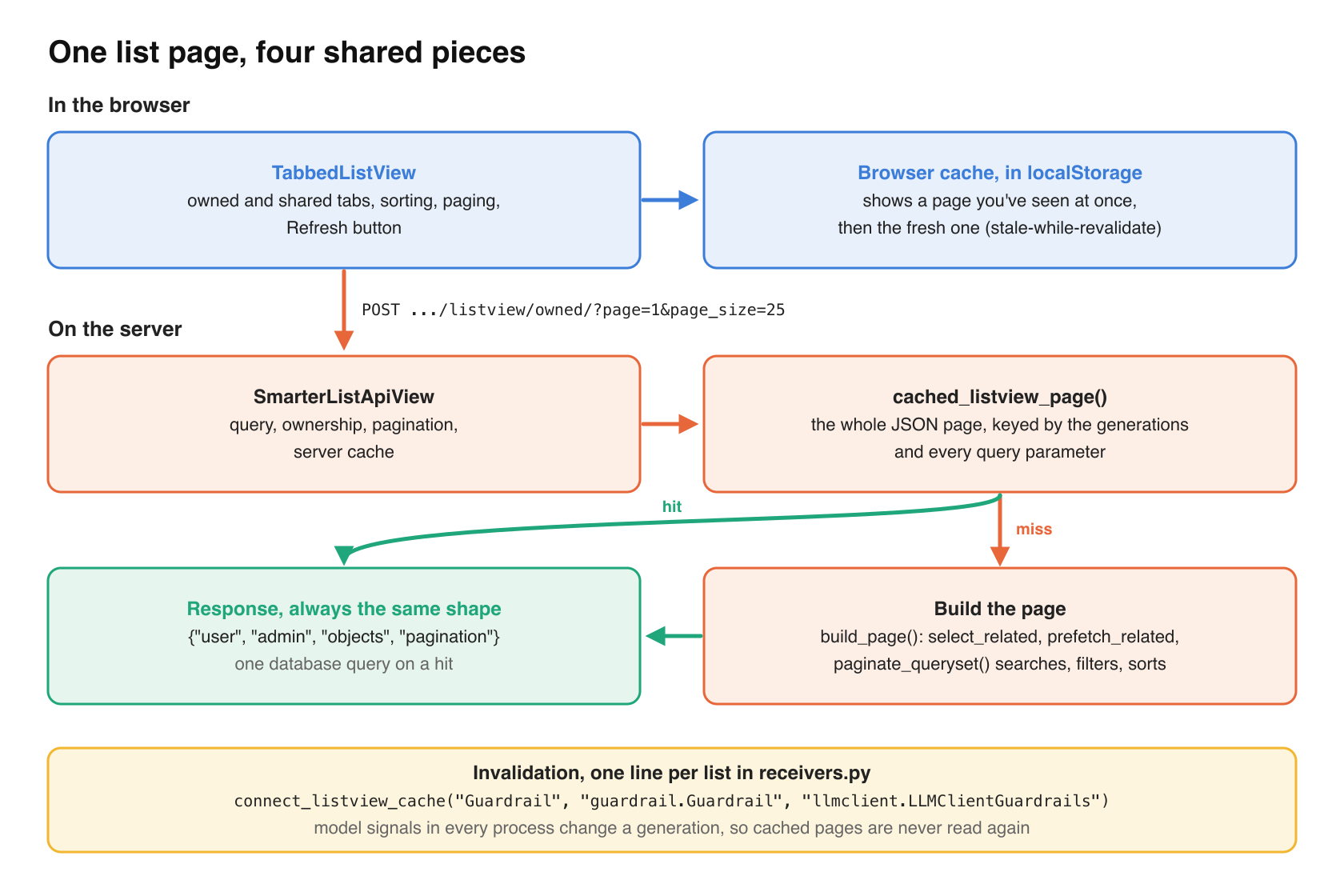
The design has four shared pieces.
| Piece | Where | What it does |
|---|---|---|
SmarterListApiView | smarter/lib/django/listview.py | Base class of every list api, with query, ownership, pagination and server cache |
connect_listview_cache() | smarter/lib/django/listview.py, called from receivers.py | Invalidates a list’s cached pages when a model it shows changes |
paginate_queryset() | smarter/lib/django/pagination.py | Paging, search, named filters and allow-listed sorting |
TabbedListView and cache | @smarter/common | The React list, with tabs, sorting, paging, browser cache and refresh |
As a result, every list api answers a cache hit with one database query, and a list you’ve seen before paints at once in the browser while the fresh page loads behind it.
Expensive database queries
A row in a list is rarely one row in a table. An LLMClient row shows its owner, account, tags, plugins, MCPClients, guardrails, api keys, custom domain, and whether the current user may delete it. Each of those is a different Django model. The ORM makes each one a one-line attribute access in a serializer, and each access is a query that runs once per row. That is the N+1 problem.
Declare the relations on the view
The cure for N+1 is select_related() for forward relations, which joins them into the main query, and prefetch_related() for reverse and many-to-many relations, which fetches them for the whole page in one query each. In Smarter they’re part of each list api’s declaration, next to the serializer that reads them. This is the whole LLMClient list api, from smarter/smarter/apps/prompt/views/listview/api.py.
class PromptListApiView(SmarterListApiView):
    model = LLMClient
    serializer_class = LLMClientSerializer
    listview_cache_kind = LLMCLIENT_LISTVIEW_CACHE_KIND
    sort_fields = SORT_FIELDS
    filters = FILTERS
    select_related = ("custom_domain",)
    prefetch_related = (
        "llmclientextensions_set__extension",
        "llmclientplugin_set__plugin_meta",
        "llmclientmcpclients_set__mcpclient",
        "llmclientguardrails_set__guardrail",
        "llmclientapikey_set__api_key",
    )
The base class always joins the owner (user_profile__user and user_profile__account) and prefetches tags when the model has them, so no list can forget those. A subclass names only what is particular to it.
A serializer is used in lists, where its relations are prefetched, and on its own, where they aren’t. The helper related_rows() in smarter.lib.django.serializers reads a relation from the prefetch cache when it’s there, and queries it otherwise.
def get_plugins(self, obj: LLMClient):
    rows = related_rows(obj, "llmclientplugin_set", LLMClientPlugin, "plugin_meta")
    return LLMClientPluginMiniSerializer(rows, many=True).data
Answer per-row questions once per page
Some columns are questions, not relations. The Delete button appears only if the user owns the resource and nothing else refers to it. You can’t delete a Guardrail that an LLMClient uses.
The ownership half is asked once per page. The serializer asks the database which rows of the page the user owns, and memoizes the set in the serializer context that every row shares (_owned_pks_of_page() in smarter/smarter/apps/account/serializers.py). The dependents half never builds the heavy manifest brokers. Each broker has a dependents() classmethod that returns lazy QuerySets of the rows that refer to an instance, and has_dependents() runs EXISTS on them one kind at a time, stopping at the first match.
Watch for per-row cost that isn’t a query
Anything done per row multiplies, including logging. A logger.debug() call evaluates its arguments even when debug logging is off, so list code never passes it anything expensive to compute. Waffle switch states are cached in-process for five seconds, rather than read from Redis on every gated log call, and the request mixin finds its caller with sys._getframe(1) instead of inspect.stack().
Test the shape of the cost
The tests in lib/django/tests/test_listview.py assert that a page’s query count doesn’t grow with its number of rows. That’s the test that catches an N+1 the day it’s written, rather than the day a user has enough data to notice.
Caching is easy to do wrong
The classic Django caching mistake is to cache a QuerySet. A QuerySet is lazy. It describes a query, and isn’t the result of one. Cache it, then call .order_by() or paginate it, and Django clones it and queries the database again. The code reads correctly, the tests pass, and the cache saves nothing.
Cache the finished response, keyed by everything that can change it
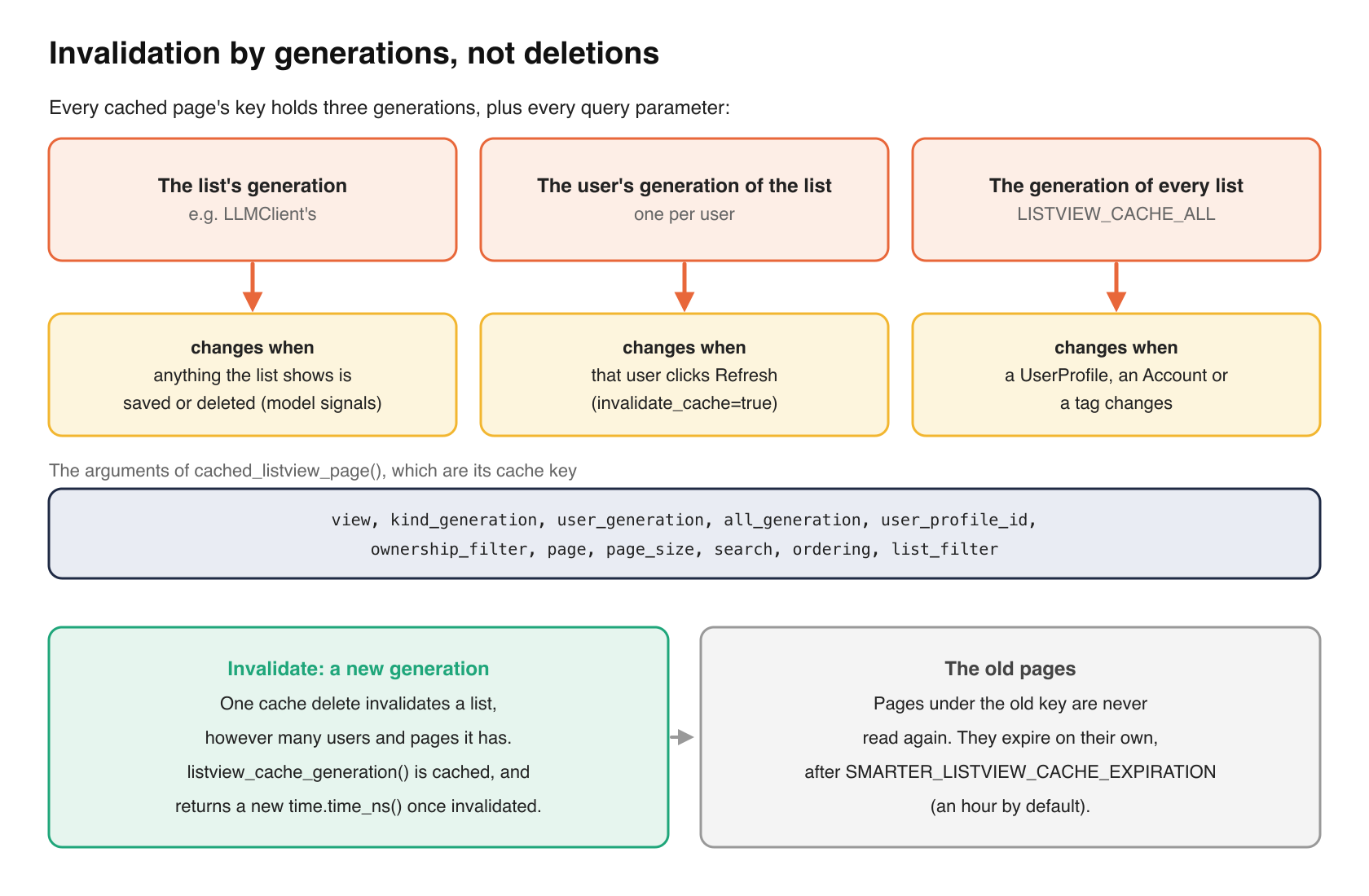
Smarter caches the whole JSON response of one page, as plain values. cached_listview_page() in smarter/smarter/lib/django/listview.py is the cached function, and its arguments are the cache key.
@cache_results(timeout=smarter_settings.listview_cache_expiration)
def cached_listview_page(
    view: str,
    kind_generation: int,
    user_generation: int,
    all_generation: int,
    user_profile_id: int,
    ownership_filter: str,
    page: Optional[str],
    page_size: Optional[str],
    search: str,
    ordering: str,
    list_filter: str,
) -> SmarterDictType:
Three decisions are packed in there.
First, the arguments are everything that can change the page and nothing else. The request isn’t one of them, because one cached page serves every request a user makes for it. So build_page() builds the page from those arguments alone.
Second, the response goes through json.dumps(..., cls=DjangoJSONEncoder) and back before it’s cached. DRF’s serializer.data is a ReturnDict that refers to its serializer, which doesn’t belong in Redis.
Third, the three *_generation arguments aren’t read by the function at all. They exist only to change the key. That’s the invalidation design, below.
If you build without a request, give the serializer a complete one
Serializers still need a request now and then. can_delete needs the user, and DRF’s FileField and ImageField turn a relative file url into an absolute one with request.build_absolute_uri(), which needs a host. So build_page() gives the serializer a small HttpRequest subclass that carries the user plus the platform’s own host and scheme.
class ListviewPageRequest(HttpRequest):
    def __init__(self, user: User):
        super().__init__()
        url = urlparse(smarter_settings.environment_url)
        self.user = user
        self.META["HTTP_HOST"] = url.netloc
        self._listview_scheme = url.scheme or "https"

    def _get_scheme(self) -> str:
        return self._listview_scheme
The host is the same for every user, so it’s safe to cache. Note that this only shows up where media urls are relative, e.g. local file storage. With a CDN, file urls are already absolute and Django never asks for the host, so test with the storage backend that CI uses.
Cache invalidation is complicated
One change can make many pages stale, for many users, and the change can come from anywhere. What the LLMClient list shows depends on the LLMClient, its plugins, guardrails, MCPClients, api keys, custom domain and DNS record, the user’s profile and account, and the tags on any resource. Those change through the list page’s own buttons, smarter apply on the command line, the manifest editor, the REST api, and Celery workers in other processes.
Generations, not deletions
Finding and deleting every cached page that a change affects would mean knowing every user, page number, sort order and search that’s cached. So nothing is deleted. Each page’s key includes three generations, where a generation is a number that changes when it’s invalidated.
@cache_results(timeout=smarter_settings.listview_cache_expiration)
def listview_cache_generation(kind: str, user_profile_id: Optional[int] = None) -> int:
    return time.time_ns()
That’s the whole function. It’s cached, so it returns the same number until it’s invalidated, and then the next call caches a new one. Every page’s key holds three of them.
- the list’s generation, e.g.
LLMClient‘s, which changes whenever anything the list shows is saved or deleted; - the user’s generation of the list, which changes when that user clicks Refresh;
- the generation of every list, which changes when something every list shows changes, such as a user profile, an account or a tag.
Invalidating a list is one cache delete, however many users and pages it has. Old pages are never read again and expire on their own, after SMARTER_LISTVIEW_CACHE_EXPIRATION (an hour by default). The expiration doesn’t decide how fresh a list is. It only bounds how long a change that sends no signal can go unnoticed.
Hang invalidation on model signals, in every process
Each app’s receivers.py names the models its list depends on, in one line.
connect_listview_cache("Guardrail", "guardrail.Guardrail", "llmclient.LLMClientGuardrails")
The second model is there because whether a Guardrail can be deleted depends on whether an LLMClient uses it. The account app connects the cross-cutting models to every list at once.
connect_listview_cache(LISTVIEW_CACHE_ALL, "account.UserProfile", "account.Account", "taggit.TaggedItem")
connect_listview_cache() handles four traps, each of which would quietly leave a list stale.
- Proxy models and multi-table children send signals as themselves, not as the model they extend. A
PluginMetaStaticsave is not aPluginMetasave topost_save. So every registered subclass of each model is connected too. - A many-to-many
add()orremove()saves no row. It sendsm2m_changed, withpre_andpost_actions, and only thepost_ones mean the change is done. - Celery workers save resources too.
receivers.pyis imported by each app’sAppConfig.ready(), so every process connects the receivers, not only the web server. QuerySet.update()sends no signal. Code that saves something a list shows that way callsinvalidate_listview_cache()itself, as the custom domain verification and MCPClient connection status do.
Wait for the commit
Suppose a request saves an LLMClient inside a transaction and the generation changes at once. Before the commit, another request reads the list, sees the old rows, and caches them under the new generation, for an hour. So invalidate_listview_cache() waits for transaction.on_commit(). Outside a transaction, it runs at once.
Pagination complicates caching and sorting
Pagination keeps a list page fast. It also makes sorting, filtering and caching harder.
Sort and filter on the server, across every page
Sorting rows in the browser is wrong for a paginated list. It sorts the 25 rows on screen while the other pages stay in their default order. So the list api sorts, as it pages and searches, and a click on a column header requests the list again in that order. Three rules make that correct.
- Only allow-listed columns sort. Each list api declares
sort_fields, mapping a column’s name in the response to the field that sorts it, e.g.{**DEFAULT_SORT_FIELDS, "stage": "stage", "category": "category"}, so a request can’t order by an arbitrary field or relation. The response reports which columns sort, and the React list makes only those headers clickable, so the backend is the one source of truth. - Ties break by primary key. Otherwise rows that share a value can come back in a different order on each request, and a row can appear on two pages, or on none.
- Empty values sort last, in both directions.
Named filters work the same way. A list declares them as Q objects (the LLMClient list offers pending), and an unknown name is ignored, as an unknown ordering is.
A shared test mixin, ResourceViewsTestMixin.test_list_api_sorts, requests every sortable column that each api reports, in both directions, so a misspelled field lookup fails a test instead of returning a 500.
Every query parameter is part of the key
Once a list can be sorted, filtered and searched, “page 2” doesn’t name one thing. So every parameter that arrives with the request (tab, page, page size, search, ordering and filter) is part of the server’s cache key, as cached_listview_page() shows above.
The browser cache makes a different choice for searches, because it never stores a searched page. Searches are open-ended and short-lived, and caching every prefix a user types would fill storage with pages nobody asks for again.
The browser should paint at once and refresh quietly
The front end caches only the api’s JSON responses, never markup. Its job is a feeling more than a number. When you come back to a list, it’s already there, and it becomes current without you doing anything.
Stale-while-revalidate, from localStorage
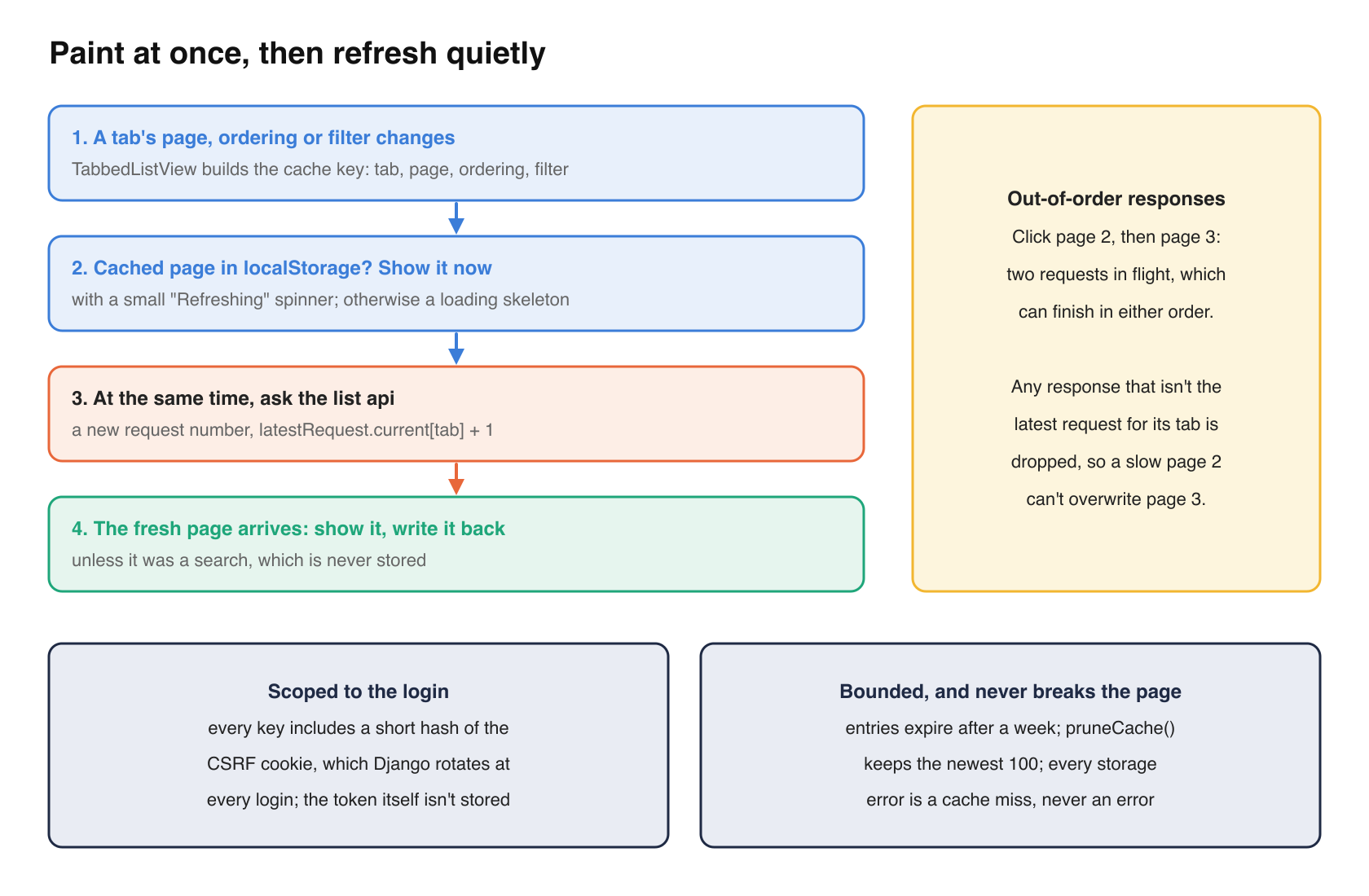
TabbedListView reads a cached page whenever a tab’s page, ordering or filter changes, shows it at once, and asks the api for a fresh page at the same time. When the fresh page arrives, it replaces the cached one and is written back. While a cached page is on screen, a small “Refreshing” spinner says so. From Component.tsx, trimmed.
const request = (latestRequest.current[tab] ?? 0) + 1;
latestRequest.current[tab] = request;
// show the page from the cache at once, if it holds it, and its loading skeleton otherwise.
const key = cacheKey(tab, page, tabOrdering, tabFilter);
const cached = tabSearch ? null : readCache<unknown>(key);
setLists((prev) => ({
  ...prev,
  [tab]: cached
    ? {
        objects: cached.objects,
        pagination: cached.pagination,
        isLoading: false,
        isRefreshing: true,
      }
    : { ...prev[tab], isLoading: true, isRefreshing: false },
}));
return load<unknown>(sessionContext, invalidateCache, tab, setErrorMessage, {
  page,
  search: tabSearch,
  ordering: tabOrdering,
  filter: tabFilter,
}).then(({ objects, pagination }) => {
  if (!isActive() || request !== latestRequest.current[tab]) return;
  setLists((prev) => ({
    ...prev,
    [tab]: { objects, isLoading: false, isRefreshing: false, pagination },
  }));
  if (!tabSearch && pagination) writeCache(key, objects, pagination);
});
Note the latestRequest counter. A user who clicks “page 2” then “page 3” quickly has two requests in flight, and they can finish in either order. The counter drops any response that isn’t the latest, so a slow page 2 can’t overwrite page 3.
The cache is in localStorage, not sessionStorage, so a new browser tab or tomorrow’s visit paints at once too. That raises two questions.
Scope the cache to the login, without storing the token
localStorage outlives the session. If one user logs out and another logs in on the same browser, the second must never see the first’s cached pages, even for the moment before the fresh page arrives. So every key in lib/cache.tsx includes a short hash of the CSRF cookie, which Django rotates at every login.
export const sessionScope = (
  sessionContext: Pick<SessionContext, "csrfCookieName" | "cookieDomain">,
): string => {
  const token = getCookie({
    name: sessionContext.csrfCookieName,
    domain: sessionContext.cookieDomain,
  });
  return token ? fnv1a(token) : "";
};
A new login makes a new scope, so the previous user’s pages are never read, and the hash keeps the token itself out of storage.
Bound it, and treat every storage error as a miss
Entries expire after a week, and pruneCache() keeps only the newest 100. Every storage access is wrapped in a try, so a private window, blocked site data or a full quota is a cache miss, never an error. The cache is an optimization, and it must never be able to break the page.
A Refresh button that bypasses both caches
Stale-while-revalidate covers the common case, but not “I just ran smarter apply in a terminal and want to see it now.” So TabbedListView has a Refresh button. It reloads every tab with invalidate_cache=true, which changes that user’s generation of the list on the server, and it keeps the current page, search, sort and filter. It’s throttled to once every two seconds, and disabled while a load or refresh is running, so it can’t start overlapping requests.
Other technical challenges
- Permissions are part of the data. The ownership filter is validated (
owned,sharedorall, and a 400 otherwise), and the server cache is per user, because two users looking at “page 1 of the Guardrails” are looking at different pages. - Some lists don’t fit the pattern. The Budget list and the infrastructure resource list have their own components and never-cached views. That’s fine as long as it’s a decision, and they get the same Refresh control.
- Every list api answers GET as well as POST. The React pages POST, and the base class’s
get()returns the same JSON, so a list api can be opened in a browser while debugging. - Lists are used on phones. The intro callout at the top of every list is hidden below 768 pixels, so the list itself is on the first screen. One shared component, one rule.
- Lists are translated. The console runs in English, Spanish, French and Brazilian Portuguese, so even the Refresh button’s tooltip goes through the message catalogs.
The general challenges
There are a lot of lists
With 17 list pages and more coming, any per-list decision is a decision made 17 times, and any mistake in one list is copied into the next, because copying the existing pattern is what a careful contributor, human or agent, is supposed to do. So the shared pieces carry all the logic, and a list carries only its declaration, which is the model, the serializer, its relations, its sortable columns, its filters, and one connect_listview_cache() line. The pattern is written down in the list view developer reference and the smarter-django-react skill, so the next list starts from it.
Users have high expectations
Everyone who uses Smarter has used SharePoint, WordPress or SAP. Those systems have spent decades on their list views, and they work well. People compare your list page with the best list they used this week, which means the following.
- it’s there the moment you arrive, even before the data is fresh;
- sorting means the whole list, not the visible page;
- search, filters and sort survive paging and refreshing;
- it never shows you someone else’s data, and never shows you old data without saying so;
- a Delete button appears only when deleting is allowed;
- it works on a phone, and in your language.
None of those goes on a roadmap. All of them are noticed the moment they’re missing.
A checklist for your own list views
These are in rough order of payoff.
- Build one list api base class and one list component, and make every list a subclass or a user of them.
- Declare each list’s relations next to its serializer with
select_relatedandprefetch_related, and test that a page’s query count doesn’t grow with its rows. - Answer per-row questions once per page, such as permissions, “can delete”, counts.
- Never cache a QuerySet. Cache the finished response, as plain JSON values, keyed by every parameter that can change it.
- Invalidate with generations, not deletions, and let the expiration only bound changes that send no signal.
- Connect invalidation to model signals in every process, including proxy models, multi-table children,
m2m_changedand Celery workers, and invalidate by hand afterQuerySet.update(). - Invalidate on commit.
- Sort and filter on the server, from an allow-list, with a primary-key tiebreaker.
- In the browser, show the cached page and fetch the fresh one, drop out-of-order responses, scope the cache to the login, bound its size, and treat storage errors as misses.
- Give users a Refresh button that bypasses both caches.
- Write the pattern down where the next contributor will find it.
Closing thoughts
None of these techniques is new. N+1 fixes, generational cache keys, stale-while-revalidate and on_commit hooks have been around for years. What makes a list view good is doing all of them, in one place, so that every list gets them and the next one gets them for free. A list view is a small problem that you have many times. Solve it once.
Happy Smartering!