Build a Slack Bot With a Smarter LLMClient

This is a how-to for a Slack bot that runs as a single pod on Kubernetes and answers questions with a Smarter LLMClient. The bot is about 200 lines of Python, it ships as an optional subchart of Smarter’s Helm chart, and it needs no Service, no Ingress, no DNS record, no TLS certificate and no Docker image of its own. Everything interesting, the model, the tools, the Guardrails, the chat history and the cost accounting, stays on the Smarter platform, where it already lives.
The Smarter Project now has a Slack workspace, and the obvious thing to put in it is smarter_developer, the LLMClient that answers questions about Smarter by searching and reading the project’s own code through the Smarter Project MCP Server. On a web page, you’d drop in the Smarter Chat embed script, the way the WordPress, Drupal and Shopify integrations do. Slack doesn’t host scripts, though. Reaching an LLM from Slack takes a bot, a small program that receives Slack’s events and passes them along.
The design below works for any deployed LLMClient, on any Smarter platform, in any Slack workspace. Most of what makes it simple is a handful of choices that are worth copying even if your bot talks to something other than Smarter.
The pieces
| Piece | Where it lives | What it does |
|---|---|---|
| The bot | helm/charts/slack-bot/files/bot.py | Listens to Slack with Socket Mode, and asks the LLMClient through its chat API |
| A ConfigMap | templates/configmap.yaml | Holds bot.py, so a stock Python image can run it |
| A Deployment | templates/deployment.yaml | One locked-down pod that installs Slack Bolt and runs the bot |
| The parent chart | helm/charts/smarter/Chart.yaml | Lists the bot as a dependency, off unless slackBot.enabled is true |
| The deploy pipeline | .github/actions/deploy/action.yml | Turns the bot on in the one environment whose GitHub settings name a Slack app |
| The tests | helm/charts/slack-bot/tests/test_bot.py | 26 tests that need nothing beyond the standard library |
Here’s how they fit together. The pod opens one connection to Slack and makes HTTPS calls to the LLMClient, and the Smarter platform does everything else.
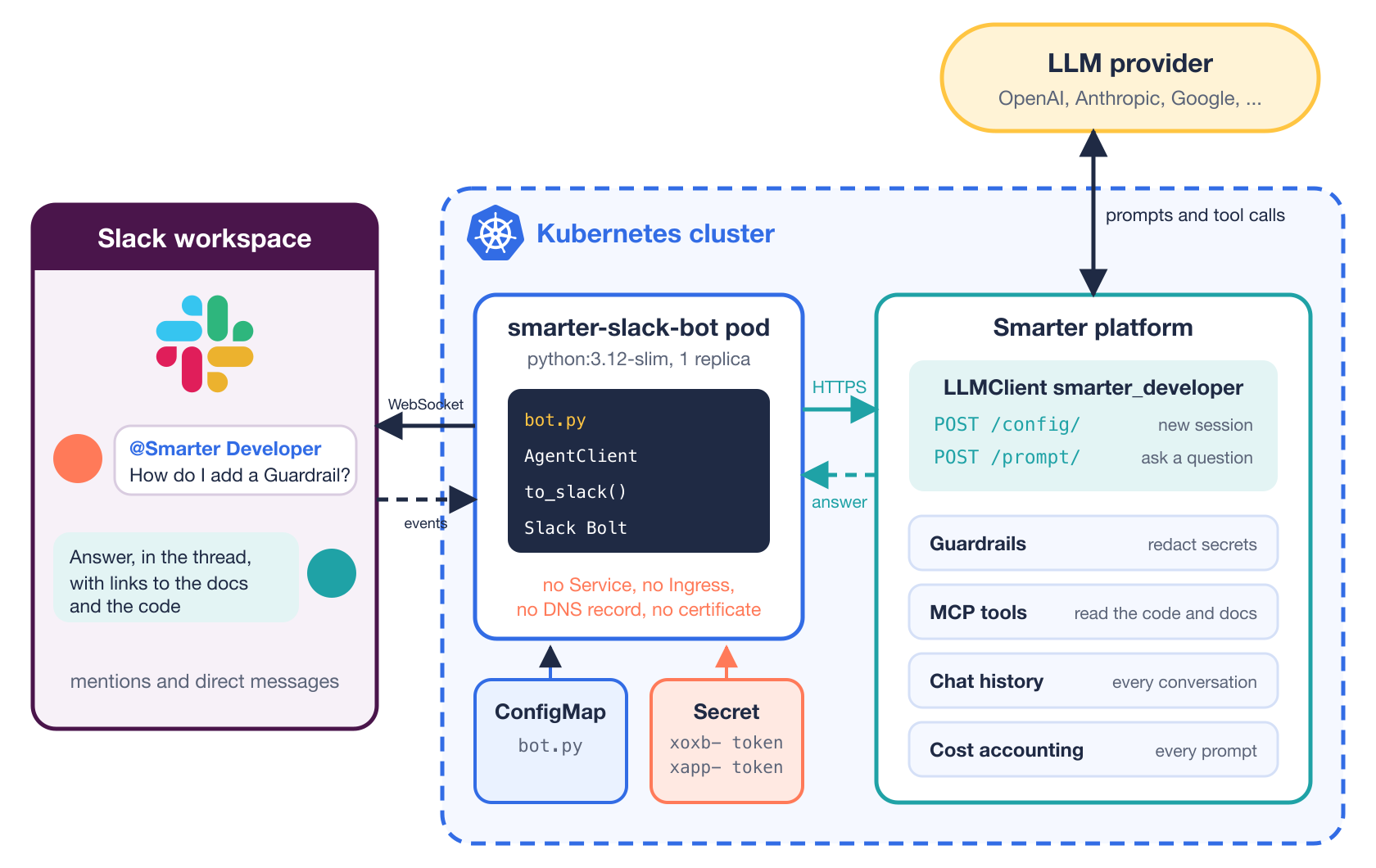
The rest of this post walks through the pieces in that order, then through setting up the Slack app.
Socket Mode means nothing connects to the bot
Slack can deliver events to a bot in two ways. With the Events API, Slack sends an HTTP request to a public URL that you provide, so you need a Service, an Ingress, a hostname, a DNS record and a certificate, plus request-signature checking in your code. With Socket Mode, the bot opens a WebSocket to Slack and receives its events over that connection.
For a bot that lives inside a Kubernetes cluster, Socket Mode removes the entire inbound half of the problem. The pod needs outbound HTTPS to Slack and to the LLMClient, and nothing else. There is no new attack surface on the cluster’s load balancer, and nothing to add to the cluster’s DNS automation. Slack Bolt for Python makes it two lines.
app = App(token=os.environ["SMARTER_SLACK_BOT_TOKEN"])
register(app, agent)
SocketModeHandler(app, os.environ["SMARTER_SLACK_APP_TOKEN"]).start()
The price is two tokens instead of one. The bot token (xoxb-...) posts messages, and the app-level token (xapp-..., with the connections:write scope) opens the socket. Both come from the Slack app’s settings, covered at the end.
The fewer things that point at your pod, the fewer things you have to secure.
Two calls to the LLMClient
A deployed Smarter LLMClient has its own host, such as https://smarter-developer.<account-number>.api.<root-domain>/, and that host serves the Smarter Chat API. The bot uses two of its routes.
POST <agentUrl>/config/starts a chat session and returns itssession_key.POST <agentUrl>/prompt/sends the conversation so far, with that key, and returns the LLMClient’s messages.
Here is one question’s round trip, from the moment someone mentions the bot in Slack to the answer appearing in their thread.
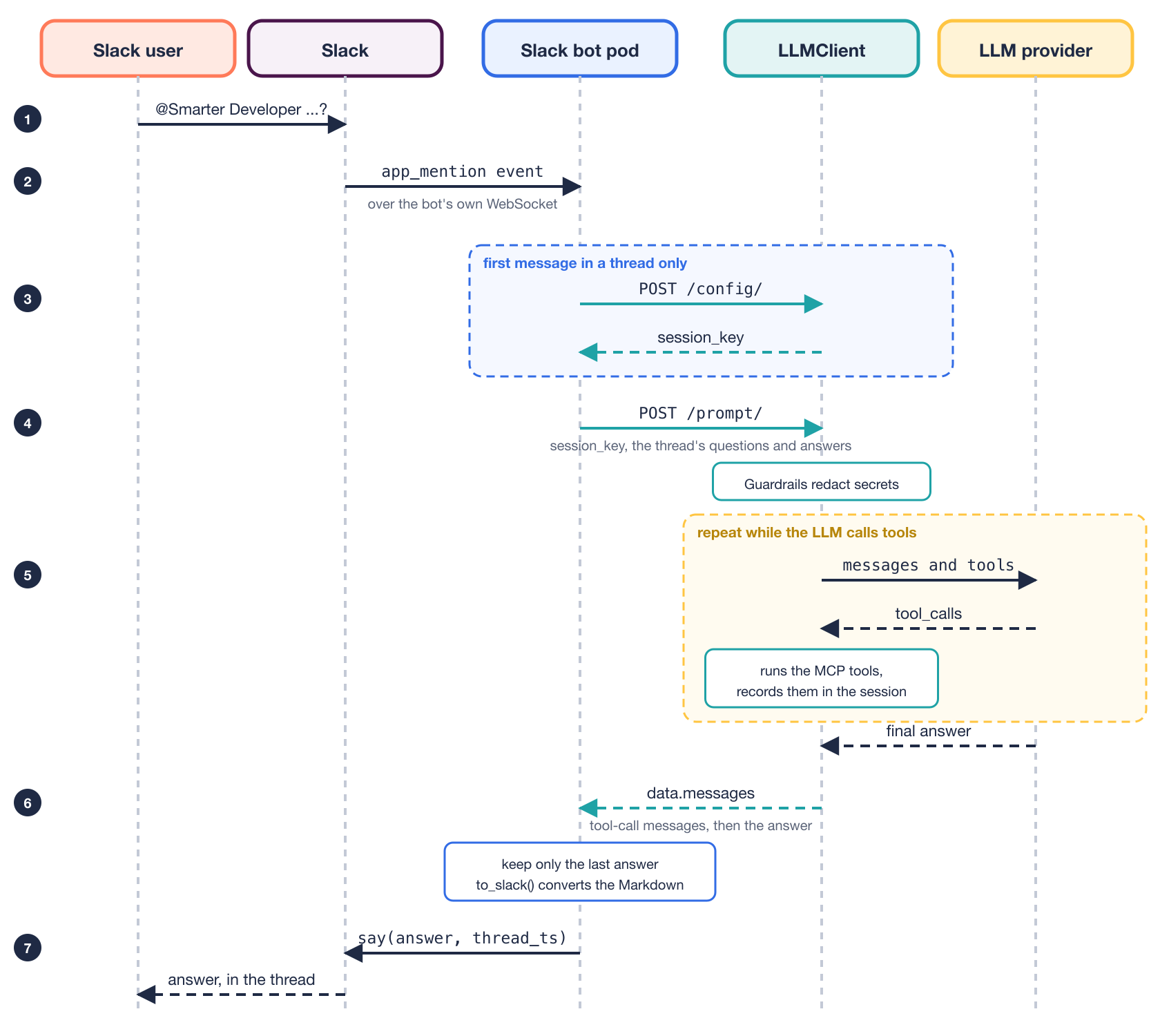
The bot takes part in steps 2, 3, 4, 6 and 7. Step 5, where the LLM calls tools until it has an answer, takes most of the time, and it happens entirely on the Smarter platform.
You can try the first one with curl before writing any code. If it answers without an API key, the bot can use that LLMClient.
curl -X POST -H "Content-Type: application/json" -d '{}' \
  https://smarter-developer.<account-number>.api.<root-domain>/config/
The bot calls both with nothing but urllib from the standard library. Here is AgentClient.ask(), trimmed.
def ask(self, thread_id: str, text: str) -> str:
    session = self._session(thread_id)
    messages = [*session["messages"], {"role": "user", "content": text}]
    response = self._post("prompt/", {"session_key": session["session_key"], "messages": messages})
    answers = [
        m["content"]
        for m in response.get("data", {}).get("messages", [])
        if m.get("role") == "assistant" and isinstance(m.get("content"), str) and m["content"].strip()
    ]
    answer = answers[-1] if answers else NO_ANSWER
    session["messages"] = [*messages, {"role": "assistant", "content": answer}]
    return answer
Because the prompt runs on the platform, the LLMClient behaves in Slack exactly as it does in the web chat. Its model, its system prompt, its MCP tools and its Guardrails all apply, and every Slack conversation shows up in the LLMClient’s chat history and cost accounting next to the web conversations. The bot doesn’t know or care which LLM provider is behind it.
A thin client in front of a full platform is easy to write because it has very little to decide.
Keep only the questions and the final answers
One /prompt/ response can hold several assistant messages. When smarter_developer searches the code, the response carries assistant messages with tool_calls and no content, then the tool results, then the answer. The list comprehension above keeps only the last assistant message that has text, and that is all the bot stores.
This matters on the next turn. If the bot sent the tool-call messages back without their matching tool results, the provider would reject the conversation. Sending them back with their results would make every prompt longer and more expensive for no benefit, since the platform already records the tool calls in its own copy of the session. So the bot’s copy of each conversation is the plain dialogue a person would see, user, assistant, user, assistant.
One Slack thread, one chat session
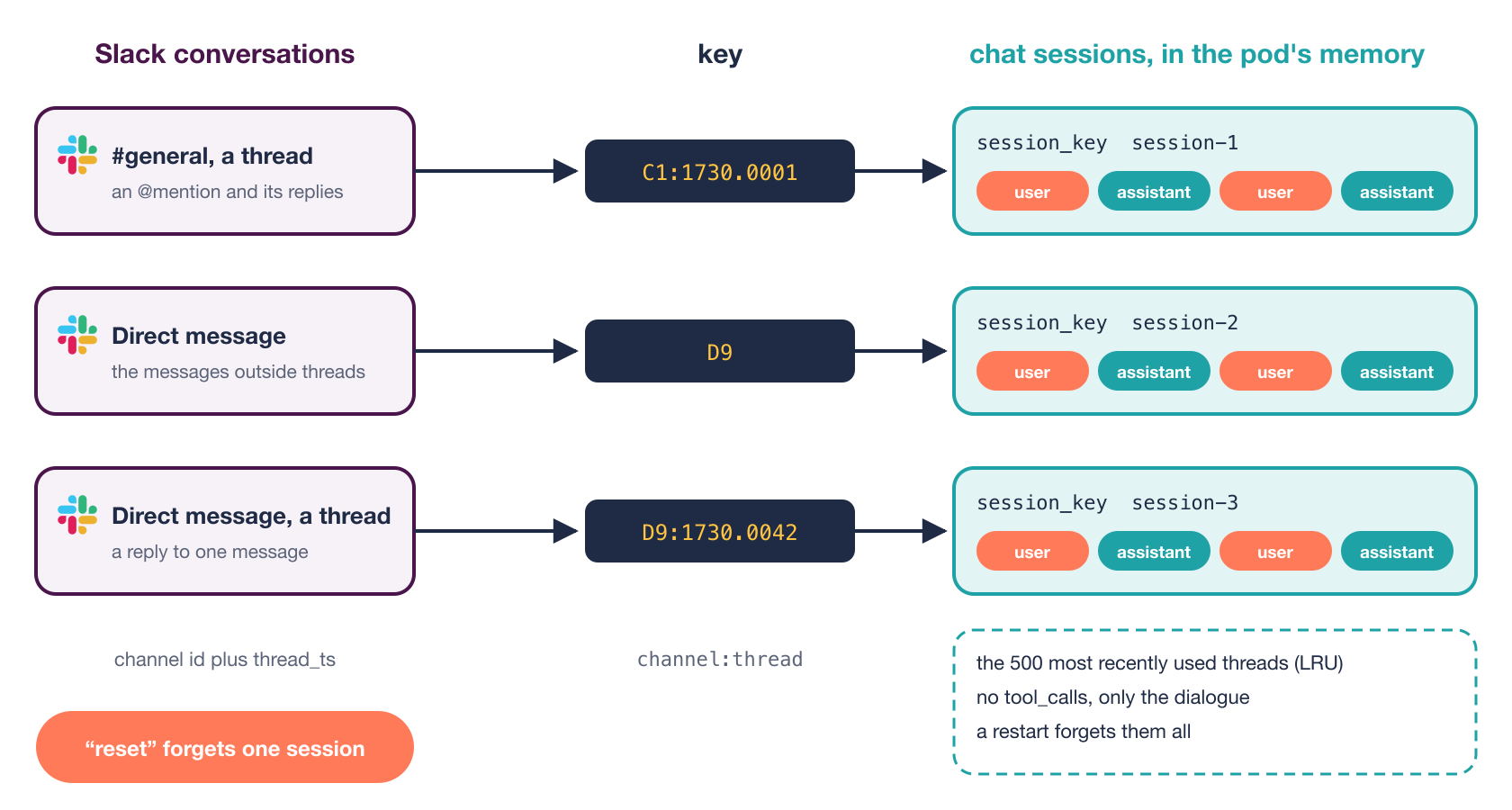
Slack has a natural unit of conversation, the thread, and the bot maps each one to one Smarter chat session. The key is the channel ID plus the thread’s timestamp.
@app.event("app_mention")
def on_mention(event, say):
    thread = event.get("thread_ts") or event["ts"]
    say(text=agent.reply(f"{event['channel']}:{thread}", event.get("text", "")), thread_ts=thread)
A mention in a channel is answered in that message’s thread, and every later mention in the thread continues the same conversation. A direct message works the same way, with one twist. The messages outside threads are one ongoing conversation, keyed by the channel alone, and each thread inside the direct message is a conversation of its own.
@app.event("message")
def on_message(event, say):
    if event.get("channel_type") != "im" or event.get("bot_id") or event.get("subtype"):
        return
    thread = event.get("thread_ts")
    if thread:
        say(text=agent.reply(f"{event['channel']}:{thread}", event.get("text", "")), thread_ts=thread)
    else:
        say(text=agent.reply(event["channel"], event.get("text", "")))
So there are three kinds of conversation, and each one gets its own key and its own chat session.
The guard on the first line matters more than it looks. Without the bot_id check, the bot’s own replies arrive as message events, and it would happily answer itself forever. 😱
There’s one behavior that surprises people in channels. A bot with only the app_mentions:read scope receives a channel message only when it’s mentioned, so a follow-up in a thread has to mention the bot again. That’s a feature rather than a bug, since it lets the people in a thread talk among themselves, and the user guide says so up front.
Sessions live in memory, with a limit
The sessions are a dictionary in the pod’s memory, an OrderedDict used as a least-recently-used cache of 500 threads, behind a lock because Slack Bolt runs listeners on several threads.
config = self._post("config/", {})["data"]
session = {"session_key": config["session_key"], "messages": []}
with self._lock:
    self._sessions[thread_id] = session
    while len(self._sessions) > self.max_sessions:
        self._sessions.popitem(last=False)
A restart forgets every conversation. For a help bot, that’s an acceptable trade for having no database, no Redis and no persistent volume. Someone whose thread was forgotten repeats what the bot needs to know, and the conversation carries on.
A word to start over
A direct message’s main conversation never ends on its own, so it grows, and each prompt gets slower and more expensive. A message that is only new, reset, start over or new conversation forgets the thread’s session.
if question.lower().strip(" .!") in RESET_WORDS:
    self.forget(thread_id)
    return NEW_CONVERSATION
The match is on the whole message, ignoring case, a mention and trailing punctuation, so “How do I reset my password?” is still a question.
Markdown in, mrkdwn out
LLMs write Markdown, and Slack speaks its own dialect, called mrkdwn. Left alone, a Markdown link shows up in Slack as literal brackets and parentheses, and smarter_developer cites a docs link in nearly every answer. Four regular expressions cover the differences that matter.
def to_slack(text: str) -> str:
    text = re.sub(r"!\[([^\]]*)\]\((https?://[^)\s]+)\)", lambda m: f"<{m[2]}|{m[1] or 'image'}>", text)
    text = re.sub(r"\[([^\]]+)\]\((https?://[^)\s]+)\)", r"<\2|\1>", text)
    text = re.sub(r"\*\*(.+?)\*\*", r"*\1*", text)
    return re.sub(r"(?m)^#{1,6}\s+(.+)$", r"*\1*", text)
Images become links, links become Slack’s <url|text>, bold goes from two asterisks to one, and headings become bold lines. Code blocks, inline code and bullet lists are the same in both dialects. Tables and diagrams stay plain text, and the user guide points people to the web chat when they want those.
The order of the first two lines matters. The image pattern runs first, because the link pattern would otherwise match the inside of an image and leave a stray exclamation mark in front of it.
The Helm subchart
The bot is a subchart, helm/charts/slack-bot, with a ConfigMap, a Deployment and a short values.yaml.
No image to build
The bot’s program goes into a ConfigMap with Helm’s .Files.Get, and the Deployment mounts it into a stock python:3.12-slim container.
data:
  bot.py: |
    {{- .Files.Get "files/bot.py" | nindent 4 }}
The container installs a pinned Slack Bolt into an emptyDir when it starts, then runs the program.
command:
  - /bin/sh
  - -c
  - |
      set -e
      pip install --no-cache-dir --disable-pip-version-check --quiet \
        --target /opt/deps "slack_bolt=={{ .Values.slackBoltVersion }}"
      exec python -u /app/bot.py
There’s no Dockerfile, no registry, no image tag to bump and no build step in CI. A ConfigMap doesn’t restart a pod when it changes, so the pod template carries a checksum of the program, and a new bot.py rolls the pod on the next helm upgrade.
annotations:
  checksum/code: "{{ .Files.Get "files/bot.py" | sha256sum }}"
The trade-off is a few seconds of pip install on each start, and a dependency on PyPI being reachable. For a single-file bot with one dependency, that’s a bargain. For anything larger, build an image.
One replica, replaced with Recreate
spec:
  replicas: 1
  strategy:
    type: Recreate
Slack spreads Socket Mode events across every open connection for the same app. Two pods would each receive part of a thread’s messages, and each would hold half of its conversation in memory. A rolling update briefly runs two pods, so the strategy is Recreate, which stops the old pod before starting the new one. For the same reason, the deploy pipeline enables the bot in one environment only.
Locked down
The pod has nothing to do with the Kubernetes API, so it doesn’t get a service account token, and it doesn’t get much else.
automountServiceAccountToken: false
securityContext:
  runAsNonRoot: true
  runAsUser: 1000
  seccompProfile:
    type: RuntimeDefault
containers:
  - name: slack-bot
    securityContext:
      allowPrivilegeEscalation: false
      readOnlyRootFilesystem: true
      capabilities:
        drop:
          - ALL
The read-only root file system is why Slack Bolt goes into an emptyDir at /opt/deps, with PYTHONPATH pointing at it, and why HOME is /tmp, another emptyDir. Its requests are 50m of CPU and 128Mi of memory, since the bot spends nearly all its time waiting on the network.
The pod receives exactly two secrets, the Slack tokens, read from the Smarter chart’s existing environment Secret, and one required value, the LLMClient’s URL.
- name: SMARTER_SLACK_BOT_AGENT_URL
  value: {{ required "slackBot.agentUrl is required" .Values.agentUrl | quote }}
- name: SMARTER_SLACK_BOT_TOKEN
  valueFrom:
    secretKeyRef:
      name: "{{ .Values.global.appName }}-env"
      key: SMARTER_SLACK_BOT_TOKEN
A pod that can’t do much can’t be made to do much.
Wiring it into the parent chart
The parent chart lists the subchart the same way it lists its other optional pieces, such as Grafana and Loki, with an alias and a condition.
dependencies:
  - name: slack-bot
    alias: slackBot
    version: 0.1.0
    repository: file://../slack-bot
    condition: slackBot.enabled
helm dependency update packages a file:// dependency into the parent chart, so the published Smarter chart carries the bot, and installing it by hand is a few --set flags.
helm upgrade --install smarter ./helm/charts/smarter/ \
  --set slackBot.enabled=true \
  --set slackBot.agentUrl=https://smarter-developer.<account-number>.api.<root-domain>/ \
  --set env.SMARTER_SLACK_BOT_TOKEN=xoxb-... \
  --set env.SMARTER_SLACK_APP_TOKEN=xapp-...
Turning it on from GitHub
Smarter deploys with GitHub Actions, with a GitHub environment for each deployment, such as alpha and prod. The deploy action takes three new inputs, which deploy.yml fills from the environment’s secrets SLACK_BOT_TOKEN and SLACK_APP_TOKEN and its variable SLACK_BOT_AGENT_URL. The helm upgrade turns the bot on only when all three are set.
--set slackBot.enabled=${{ inputs.slack-bot-token != '' && inputs.slack-app-token != '' && inputs.slack-bot-agent-url != '' }} \
--set slackBot.agentUrl="${{ inputs.slack-bot-agent-url }}" \
So the decision of where the bot runs is made in GitHub’s settings, not in the code. Set the three in the prod environment, and production runs the bot while every other environment doesn’t. The URL is a variable rather than a secret, because an LLMClient’s URL is public, and it isn’t hard-coded in the chart, so each installation of Smarter can point its bot at its own LLMClient.
Testing without Slack
The bot imports Slack Bolt inside main(), not at the top of the module.
def main() -> None:
    from slack_bolt import App
    from slack_bolt.adapter.socket_mode import SocketModeHandler
That one choice makes everything else testable with the standard library alone. The tests load bot.py by path, replace the LLMClient’s API with a fake that hands out session keys and queued responses, and replace Slack Bolt’s App with a fake that records the event listeners. They cover the Markdown conversion, the session per thread, keeping only final answers, the LRU limit, the reset words, the apology when the LLMClient fails, the direct-message threads, the bot ignoring its own messages, and main()‘s wiring. There are 26 of them, and they cover 99% of bot.py.
python -m unittest discover -s helm/charts/slack-bot/tests
The bot runs outside Django, so Smarter’s Python test shards don’t see it. A separate slack-bot job in the Tests workflow runs them on Python 3.12 in a few seconds.
Setting up the Slack app
The Slack side is a one-time setup at api.slack.com/apps. Create an app from scratch in your workspace, then do the following.
- Under Socket Mode, enable it and create an app-level token with the
connections:writescope. That’s thexapp-...token. - Under OAuth & Permissions, add the bot scopes
app_mentions:read,chat:writeandim:history. - Under Event Subscriptions, subscribe to the bot events
app_mentionandmessage.im. - Under App Home, enable the Messages tab, so people can send the bot direct messages.
- Install the app to the workspace. That gives you the
xoxb-...token.
Put the two tokens and the LLMClient’s URL in your GitHub environment, deploy, and invite the bot to a channel with /invite @<bot name>. The operator’s guide has the same steps and the full list of values.
Things to know before you turn it on
Every Slack message the bot answers is a prompt, billed by the LLMClient’s LLM provider, and anyone in the workspace can send one. Pick an LLMClient whose model and budget suit that. A Smarter Budget on the LLMClient puts a ceiling on it.
Answers take time. An answer with several tool calls takes 10 to 20 seconds, and Slack shows nothing while the bot waits. The bot’s own timeout is 240 seconds, after which it apologizes in the thread and logs the error.
kubectl logs -n <namespace> deploy/smarter-slack-bot
People need to know how to talk to the bot, especially that a follow-up in a channel thread needs a fresh mention. Smarter’s user guide for the workspace covers that, the reset words, what the bot can and can’t do, privacy, and a troubleshooting table matched to each of the bot’s replies. Write one for yours. It’s the page you’ll link to most.
Takeaways
- Use Socket Mode for a bot inside a cluster. It removes the Service, the Ingress, the DNS record, the certificate and the signature checks.
- Keep the bot thin. Let the platform own the model, the tools, the Guardrails and the history, and the bot becomes a translator between two chat APIs.
- Map Slack threads to chat sessions, and store only the dialogue a person would see, not the tool calls.
- Run one replica with
Recreatewhenever state lives in memory and the event source spreads events across connections. - Ship a small script in a ConfigMap on a stock image, with a checksum annotation, before you reach for a Dockerfile.
- Decide where it runs in configuration. Three settings in one GitHub environment turn it on there and nowhere else.
- Import the SDK inside
main()so the rest of the module tests with the standard library.
Closing thoughts
What I like about this design is how little of it there is. A Slack bot that talks to an LLM sounds like a project, with a database for conversations, a public endpoint, an image pipeline, maybe a queue. Here, the platform already does the hard parts, and the bot is a single Python file, a ConfigMap, a Deployment and three settings in GitHub. ✨
If you run Smarter, you can run this bot in your own workspace, with any LLMClient you’ve deployed. If you don’t, the same shape works in front of any chat API.