
Helm, cosign and Amazon ECR: What Smarter’s Supply Chain Verifies, and What It Takes on Trust

Smarter publishes its Helm chart to GitHub’s container registry signed with cosign, scans its container images in Amazon ECR when they are pushed, publishes its npm packages with provenance, and installs the AWS CLI for its database backups only after checking the download against the AWS CLI team’s PGP signature. This post goes through each of those controls, what each one actually proves, and the places where Smarter’s build still takes its inputs on trust.
A supply-chain attack doesn’t break into your system. It gets your own build or your own deployment to run something it shouldn’t, such as a tampered chart in a registry, a compromised base image, a tool binary swapped on a download server, a dependency that ships a malicious release, or a leaked CI credential that pushes an image of its own. The application’s own security doesn’t help, because the code that runs isn’t the code that was reviewed. That is why I think the topic deserves an honest inventory rather than a list of badges.
The Helm chart is signed by digest and verified against a committed key
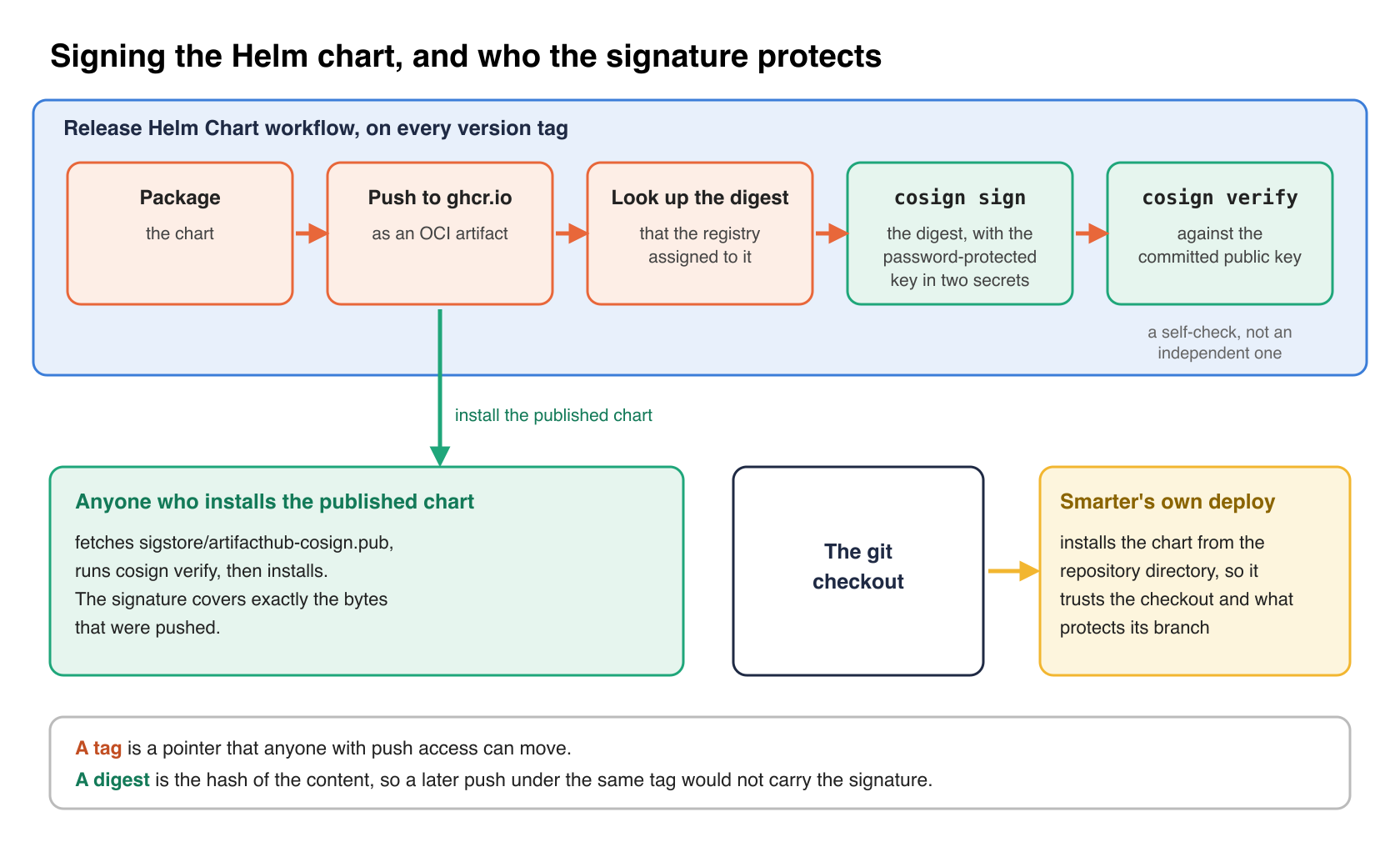
The Release Helm Chart workflow runs on every version tag. It packages the chart, pushes it to ghcr.io as an OCI artifact, looks up the digest that the registry assigned to it, and signs that digest.
- name: Sign OCI Helm Chart with Cosign
  env:
    COSIGN_PASSWORD: ${{ secrets.COSIGN_PASSWORD }}
  run: |
    echo "${{ secrets.COSIGN_KEY }}" > cosign.key
    CHART_REF="ghcr.io/${{ github.repository_owner }}/charts/smarter@${{ steps.chart_digest.outputs.digest }}"
    cosign sign --yes --key cosign.key $CHART_REF

- name: Verify OCI Helm Chart Signature
  run: |
    cosign verify --key sigstore/artifacthub-cosign.pub ghcr.io/${{ github.repository_owner }}/charts/smarter:${{ steps.chart_version.outputs.version }}
Signing the digest rather than the tag matters. A tag is a pointer that anyone with push access can move. A digest is the hash of the content, so the signature covers exactly the bytes that were pushed, and a later push under the same tag would not carry it.
The private key is a password-protected cosign key stored as two GitHub Actions secrets. The public half is committed at sigstore/artifacthub-cosign.pub, and Chart.yaml advertises it, with its fingerprint, in the artifacthub.io.signKey annotation, which is how Artifact Hub knows to show the chart as signed.
Anyone who installs the published chart can check it before installing.
curl -fsSLO https://github.com/smarter-sh/smarter/raw/main/sigstore/artifacthub-cosign.pub
cosign verify --key artifacthub-cosign.pub ghcr.io/smarter-sh/charts/smarter:<version>
Two limits are worth stating plainly. The verify step in the workflow runs in the same job that just signed, so it proves that a signature was attached and matches the committed public key; it is a self-check, not an independent one. And Smarter’s own deploy action installs the chart from the checked-out repository directory, not from the registry, so the signature protects people who consume the published chart. Smarter’s own environments trust the git checkout instead, and whatever protects the branch it was checked out from.
Container images are non-root, read-only and scanned on push
The Dockerfile creates an unprivileged smarter_user, switches to it before installing the Python environment, and serves the application as that user. A late stage, run as root only to set permissions, then strips the image down for every environment except local development.
find /home/smarter_user/ -type f -exec chmod 400 {} + && \
find /home/smarter_user/ -type d -exec chmod 500 {} + && \
find /home/smarter_user/venv/bin/ -type f -exec chmod 500 {} + && \
Application files become read-only and directories traversable only by their owner, with a short, commented list of exceptions that genuinely need writing, such as the data directory and the cache. The comment above it calls the goal “a no-trust permissions model”. It is worth being precise about what it achieves. The files still belong to smarter_user, so a process running as that user could change the modes back. The permissions stop accidental writes and keep group and world readers out. They aren’t a barrier against code that is already executing as the application user. Root-owned files would be the stronger form.
The CI build pushes the image to a private Amazon ECR repository that the smarter-infrastructure Terraform creates with scanning on push.
resource "aws_ecr_repository" "smarter" {
  name                 = local.ecr_repository_name
  image_tag_mutability = "MUTABLE"

  image_scanning_configuration {
    scan_on_push = true
  }
}
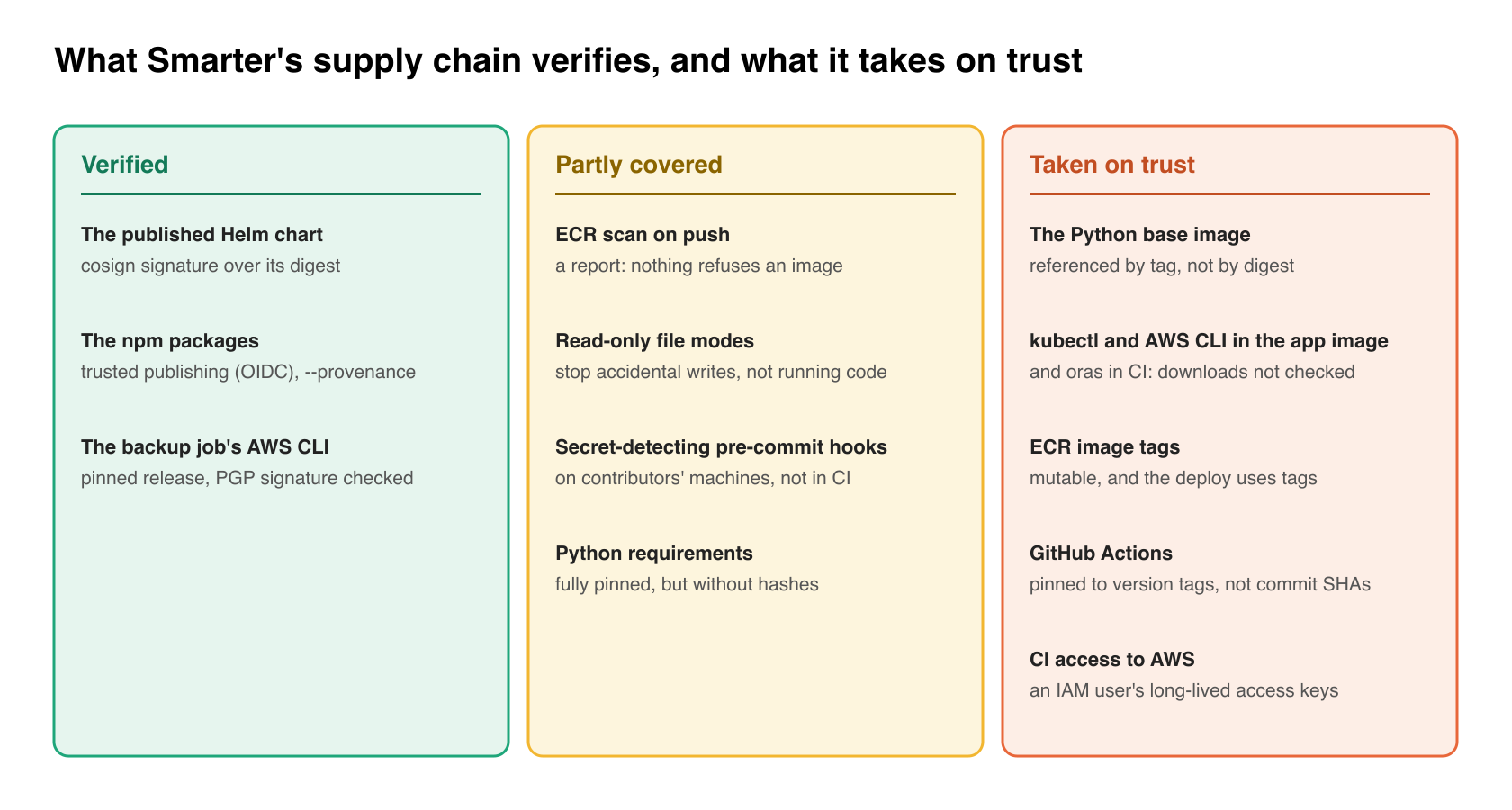
Every pushed image gets a list of known vulnerabilities in its operating system packages. That list is information, not a gate, because nothing in the deploy reads the findings and refuses an image. The tags are also mutable, which keeps the release tagging simple, and means the deploy identifies an image by tag rather than by digest. Immutable tags, or deploying by digest, would close that gap.
The Python base image comes from the ECR Public Gallery’s copy of Docker’s official python image, pulled with authenticated requests in the Build workflow. That choice is about availability, so that Docker Hub’s rate limits and token service can’t fail a build. It is not an integrity control, since the base image is referenced by tag, not by digest.
One tool download verified, a few still trusted
The best example of tool verification in the repository is the setup script that the nightly MariaDB backup job runs, in configmap-debian-setup.yaml. It pins the AWS CLI release, downloads the archive and its detached signature, imports the AWS CLI team’s public key from the script itself, checks that the key has the fingerprint AWS documents, and only then verifies the archive.
AWS_CLI_VERSION="${AWS_CLI_VERSION:-2.37.9}"
AWS_CLI_KEY_FINGERPRINT="FB5DB77FD5C118B80511ADA8A6310ACC4672475C"

gpg --batch --quiet --import "${WORK_DIR}/aws-cli.asc" 2> /dev/null
if ! gpg --batch --with-colons --fingerprint | grep -q "^fpr:::::::::${AWS_CLI_KEY_FINGERPRINT}:"; then
  echo "FAILED: the embedded AWS CLI public key does not have the fingerprint ${AWS_CLI_KEY_FINGERPRINT}"
  exit 1
fi
if ! gpg --batch --quiet --verify "${WORK_DIR}/awscliv2.zip.sig" "${WORK_DIR}/awscliv2.zip" 2> /dev/null; then
  echo "FAILED: ${AWS_CLI_ZIP_URL} does not match the AWS CLI team's signature"
  exit 1
fi
This job handles the whole database and holds credentials to write to S3, which is why it gets the most care. It also uses a throwaway GNUPGHOME, so the check doesn’t depend on, or pollute, any keyring on the machine. The pin is deliberate too, so that a new CLI release can’t change the backup without a chart change.
The application image doesn’t hold itself to the same standard yet. Its Dockerfile downloads kubectl from whatever the current stable release is and installs the AWS CLI without checking either against a checksum or signature, and the CI workflows download a few tools, such as oras, the same way. Each download is over HTTPS from the vendor, so the exposure is a compromise of the vendor’s distribution, not of the network path. The backup script shows the pattern to copy, and these are the obvious next candidates for it.
Packages and dependencies
The two npm packages that the repository publishes, the embeddable chat widget and the console widgets, use npm’s trusted publishing. The workflow authenticates to npm with a short-lived OIDC token from GitHub, so no npm token is stored in the repository, and each version is published with --provenance, a signed statement that ties the package to the workflow run and commit that built it.
Python dependencies are compiled with pip-compile into fully pinned requirements files, without hashes. Dependabot opens monthly pull requests for the npm workspace and the GitHub Actions, and quarterly ones for the Helm chart’s dependencies. The actions are pinned to version tags rather than commit SHAs, which is the common practice and also the weaker one, since a tag on a third-party action can be moved.
The pre-commit hooks include bandit, which flags insecure Python patterns at medium severity and above, and two hooks from pre-commit-hooks, detect-aws-credentials and detect-private-key, which refuse a commit that contains an AWS key or a private key block. They run on contributors’ machines. The CI test workflow doesn’t run the Python hooks, so they catch mistakes rather than enforce a policy.
CI credentials
The Build and Deploy workflows authenticate to AWS with an IAM user’s access keys stored as GitHub secrets. They work, but they are long-lived, and a leaked pair stays valid until someone rotates it. The npm publishing above already shows the alternative, and AWS supports the same thing with GitHub’s OIDC provider and a role that each workflow assumes for the length of the job. Moving Build and Deploy to it is the single change in this list with the largest payoff.
How much it matters, and what it costs
I’d rate supply-chain integrity an 8 out of 10 for a platform like this one. The attack surface is everything that runs in the cluster and everything with credentials to change it, and a successful attack bypasses every control in the application. Smarter covers part of that surface well (the published chart, the npm packages, the backup’s tooling), and part of it only with good intentions (base images by tag, unverified tool downloads, findings that nothing reads, static CI keys).
The costs are modest. Signing adds two steps to one workflow and one key pair to rotate. Scan on push is included in ECR’s pricing for basic scanning. Verifying a download costs a few lines of shell and the discipline to bump a pinned version by hand, which is the only recurring chore. None of it affects users of the platform at all, and a build that refuses an unverified download fails loudly and early, which helps stability rather than hurting it. The one real tradeoff is pinning. Pinned versions don’t pick up fixes on their own, so they need Dependabot or a monthly habit to keep current.
My verdict is to adopt all of it, in roughly this order. First comes OIDC instead of static CI keys, then digests instead of tags for base images and deploys, signature or checksum checks on every downloaded binary, signing whatever you publish, and a gate on scan findings once the noise is under control.
Takeaways
- Sign what you publish by digest, and publish the public key where users can find it.
- Know which of your deploys actually verify a signature, and which trust a git checkout or a mutable tag instead.
- Verify every downloaded binary against its vendor’s signature or checksum, with the key’s fingerprint pinned in your own code.
- Treat image scanning as a gate only when something reads the results; otherwise call it a report.
- Replace long-lived CI cloud keys with OIDC role assumption.
Closing
Supply-chain security is mostly bookkeeping, knowing which artifacts are checked, by whom, against what. Smarter’s chart and npm packages are in good shape, its backup tooling is the model to copy, and the image build and CI credentials are where the next work is.