
Kubernetes Bastion Pod: Administering Smarter Without SSH

Smarter‘s Helm chart includes a bastion that is a Kubernetes pod rather than a server. An administrator opens a shell in it with kubectl exec, through the Kubernetes API, and from there reaches the MariaDB database, Redis and S3. It has no SSH server, no open port, no Service and no public IP address. This post describes how that pod is built, what it holds, and why a shell behind the Kubernetes API is a better front door for administration than SSH.
A bastion exists because something has to be reachable by a person and not by the internet. In Smarter’s case that’s MariaDB, which runs as a pod in the application’s namespace, on nodes in private subnets, behind a Service with no external address, and in production behind Calico network policies that admit only labelled pods. That’s the right place for a database. It also means that an operator who needs to run a query, restore a dump or check a migration needs a way in, and every way in is an attack surface.
Two kinds of bastion
| EC2 bastion with SSH | Bastion pod with kubectl exec | |
|---|---|---|
| Listens on | Port 22, on a public IP | Nothing |
| Who decides access | SSH keys on the host, plus a security group | IAM, then Kubernetes RBAC |
| Revoking someone | Remove their key from every host | Remove their IAM mapping or role binding |
| Patching | Its own OS, on its own schedule | Rebuilt with the platform’s image on every deploy |
| Audit trail | The host’s own logs, if kept | The EKS control plane’s audit log, per exec |
| Network position | Inside the VPC, outside the cluster | Inside the namespace, under its network policies |
| Running cost | An EC2 instance and an Elastic IP | A small pod on an existing node |
The left column is the traditional answer, and smarter-infrastructure’s VPC module still builds one. The right column is what the Helm chart ships, and it does the same job without anything listening.
How you get in
The whole access path is one command, quoted in the template’s own header.
kubectl exec -it -n <namespace> deploy/smarter-bastion -- bash
That request goes to the EKS API server, not to the pod. The API server authenticates it as an IAM identity, maps that identity to Kubernetes users and groups through the cluster’s access entries, and checks that they may create the pods/exec subresource in that namespace. Only then does the kubelet on the pod’s node open a stream into the container. kubectl port-forward, which an administrator can use to point a local database client at MariaDB, takes the same path and passes the same checks.
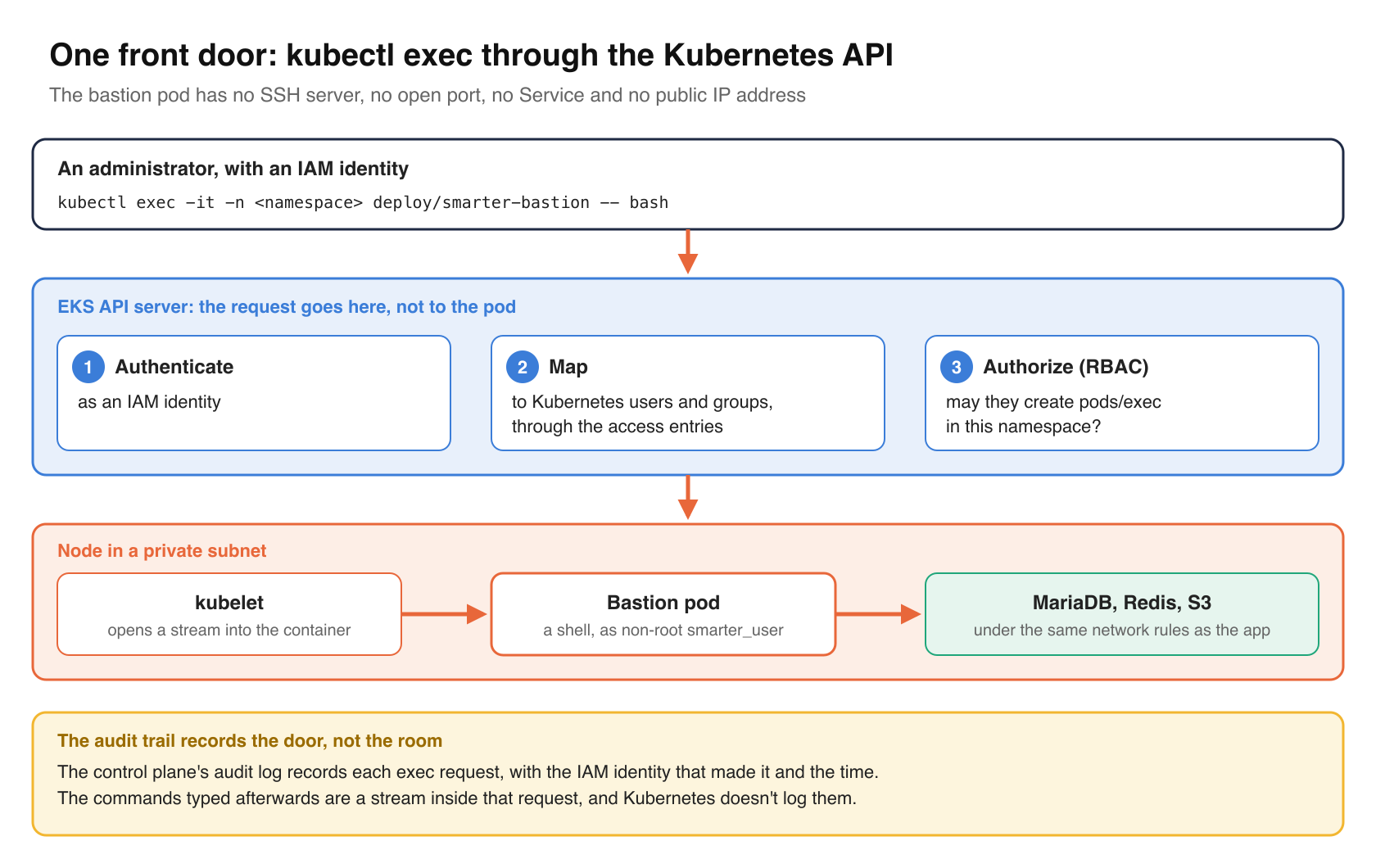
So there is one front door for administration, and it’s the same one the deploy workflow, Helm and every other operator already use. There’s no second credential system to keep in sync, no SSH key to rotate when someone leaves, and no port for a scanner to find. The same IAM policy that decides who can deploy Smarter decides who can open a shell next to its database.
What the pod is
The Deployment lives in helm/charts/smarter/templates/deployment-bastion.yaml. Its header lists its hardening, and the rest of the template does what the header says.
# hardening:
# -------------------------------------
# - runs the platform's own image, at the same pinned release tag as the app.
#   The image already holds the MariaDB client, the AWS CLI, curl, jq and git,
#   so nothing is installed when the pod starts.
# - runs as the image's non-root smarter_user (uid 1000), with no privilege
#   escalation, no Linux capabilities and the runtime's default seccomp profile.
# - receives only the environment variables that its administrative tasks need:
#   the database, its accounts, the S3 location and the AWS credentials. The
#   platform's other secrets (SECRET_KEY, LLM provider keys, SMTP and so on) are
#   not passed in.
# - mounts no Kubernetes service account token, so a shell in the pod can't call
#   the Kubernetes API.
Each of those lines answers a specific risk.
The platform’s own image
The bastion runs the same image as the web server and the workers, at the same release tag.
image: '{{ .Values.env.SMARTER_DOCKER_IMAGE | default (printf "%s:%s" .Values.global.image.repository .Values.global.image.tag) }}'
A bastion built on a general-purpose image with a latest tag, which installs its tools with apt-get every time it starts, is a different piece of software after every restart, and it pulls from package mirrors on each one. The platform image is pinned, scanned on push to ECR, and already contains everything an administrator needs, which is the MariaDB client, the AWS CLI and redis-cli. Nothing is installed at startup, so the bastion that starts after a node replacement is byte for byte the one that was reviewed.
Non-root, no capabilities, no token
automountServiceAccountToken: false
securityContext:
  runAsNonRoot: true
  runAsUser: 1000
  runAsGroup: 1000
  seccompProfile:
    type: RuntimeDefault
...
securityContext:
  allowPrivilegeEscalation: false
  capabilities:
    drop:
      - ALL
runAsNonRoot with a numeric UID makes the kubelet refuse to start the container as root, even if the image changes. Dropping every Linux capability and forbidding privilege escalation means a shell in the pod can’t load kernel modules, change file ownership, bind low ports or sudo its way back to root. The default seccomp profile blocks the rarer system calls that container escapes tend to use.
automountServiceAccountToken: false is the line that matters most here. By default, Kubernetes mounts a token for the pod’s service account into every container. In a bastion, that token would let anyone with a shell call the Kubernetes API as the pod, without their own IAM identity, and any permissions later granted to that service account would quietly become theirs. Without the token, a shell in the bastion can talk to the database, Redis and S3, and nothing else in the cluster’s control plane.
Only the secrets it needs
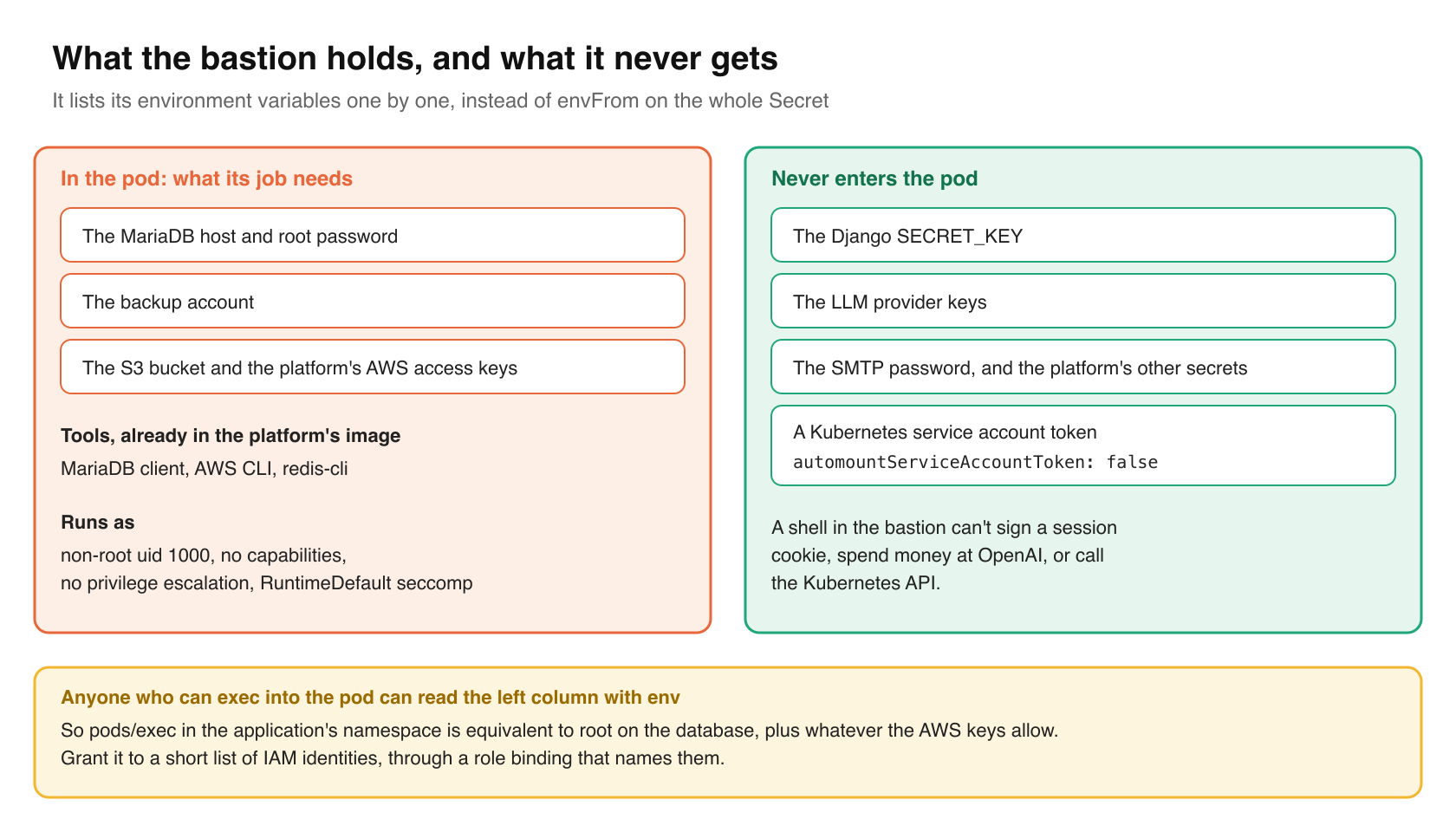
The app’s pods read every setting from one Kubernetes Secret with envFrom. The bastion doesn’t. It lists the variables it receives, one by one, and reads the sensitive ones from that Secret by key.
env:
  - name: SMARTER_MYSQL_HOST
    value: {{ .Values.env.SMARTER_MYSQL_HOST | quote }}
  - name: SMARTER_MYSQL_ROOT_USERNAME
    value: {{ .Values.env.SMARTER_MYSQL_ROOT_USERNAME | quote }}
  - name: SMARTER_MYSQL_ROOT_PASSWORD
    valueFrom:
      secretKeyRef:
        name: "{{ $.Values.global.appName }}-env"
        key: SMARTER_MYSQL_ROOT_PASSWORD
        optional: true
  ...
  - name: SMARTER_S3_BUCKET
    value: {{ .Values.env.SMARTER_S3_BUCKET | default "" | quote }}
  - name: AWS_ACCESS_KEY_ID
    valueFrom:
      secretKeyRef:
        name: "{{ $.Values.global.appName }}-env"
        key: AWS_ACCESS_KEY_ID
        optional: true
The Django SECRET_KEY, the LLM provider keys, the SMTP password and the rest of the platform’s secrets never enter the pod. A shell in the bastion can’t sign a session cookie or spend money at OpenAI.
The label that lets it reach the database
labels:
  app.kubernetes.io/name: "{{ .Values.global.appName }}-bastion"
  app.kubernetes.io/application-group: "{{ .Values.global.appName }}"
With smarter-infrastructure’s enhanced security on, the production namespace denies all traffic by default, and MariaDB and Redis accept connections only from pods that carry the app.kubernetes.io/application-group label. The bastion carries it, so it follows exactly the same network rules as the app, plus one policy of its own that allows outbound HTTP and HTTPS. It isn’t a privileged network position. It’s a member of the application.
What the shell holds
This is the part to be clear-eyed about. The bastion’s job is database administration and backups, so it holds the MariaDB root password, the backup account and the platform’s AWS access keys, which the backup script uses to upload to S3. Anyone who can exec into the pod can read them with env.
That makes the pods/exec permission in the application’s namespace equivalent to root on the database and to whatever those AWS keys allow. It should be granted like that, to a short list of IAM identities, through a role binding that names them, and never through a broad group that also deploys or reads logs. This isn’t specific to the bastion. Exec into the app pod would expose more. But the bastion is where people actually type, so it’s where the policy shows.
Two consequences of exec-based access are worth knowing before adopting it.
First, the audit trail records the door, not the room. The EKS module’s defaults turn on the control plane’s audit log, and each exec request appears there with the IAM identity that made it and the time. The commands typed afterwards are a stream inside that request, and Kubernetes doesn’t log them. An SSH bastion with session recording sees more. An organization that needs keystroke-level records needs a session-recording proxy in front of kubectl, whatever kind of bastion it runs.
Second, the shell is disposable. The pod is replaced on every release, when its image tag changes, whenever the platform’s Secret changes (its template carries a checksum of it), and on every node replacement. Files left in it disappear. That’s mostly a feature, since nobody accumulates a hand-maintained toolbox on a server that becomes impossible to rebuild, but a large dump should be written to S3, or copied out with kubectl cp, before the next deploy.
Cost, burden and stability
I rate this a 7 out of 10 in importance. The surface it covers is narrow, administrative access to the data tier, but it’s the most valuable surface on the platform, and the usual alternative, an SSH host with a public address, is one of the most common ways into a cloud network.
- Administration. Lower than an SSH bastion. There’s no host to patch and no key list to maintain. Access changes are IAM and RBAC changes, which happen anyway. The one ongoing job is reviewing who holds
pods/exec. - Cost. A request of 50 millicores and 128 MiB on a node that already exists, against an EC2 instance, its volume and an Elastic IP.
- User experience. Slightly worse at first. Administrators need
kubectland an IAM identity mapped to the cluster, rather than an SSH key. The shell is non-root, so there’s noapt-get installfor a missing tool, and nothing persists. In exchange, the welcome banner prints copy-paste commands for the database client, the AWS CLI and a manual backup. - Stability. Neutral to positive. The pod has a CPU and memory limit, so a runaway query client can’t starve the app on the same node, and it restarts itself like anything else in the cluster.
The verdict is that it’s worth it, and easy to adopt. Any Kubernetes platform with a database inside the cluster can ship a bastion Deployment like this one, with the application’s image, a non-root security context, no service account token, an explicit list of environment variables, and the label your network policies require. Then retire the SSH host.
Takeaways
- Put administrative access behind the Kubernetes API, where IAM and RBAC already decide who can do what, rather than behind a second login system on its own port.
- Build the bastion from the application’s own pinned image, so it carries the right client tools and is rebuilt with every release.
- Set
automountServiceAccountToken: false. A bastion shell should not be a Kubernetes API client. - List the bastion’s environment variables explicitly.
envFromon a whole Secret hands every credential to whoever opens a shell. - Treat
pods/execin the application’s namespace as a privileged grant, and know that the audit log records who opened a shell, not what they did in it.
Closing thoughts
The best property of this bastion is how little of it there is. It doesn’t listen, it doesn’t install anything, it holds only what its job needs, and the decision about who can use it lives in the same IAM and RBAC configuration as every other decision about the cluster. It’s the platform’s own image with a different command, which is how Smarter runs everything else, too.