
Why We Added Calico to Smarter’s Kubernetes Cluster

Calico went in because the cluster had become shared, and in a shared, flat network the most valuable thing in it, the database, was protected by a password and nothing else. Calico is an open-source tool that decides which of the programs running in a Kubernetes cluster may talk to each other over the network, and since March it does that job for Smarter’s production cluster. Before then, nothing decided it. Like every Kubernetes cluster out of the box, ours let any program connect to any other program, on any port, whoever owned it. This post explains what Calico is and what it does, why that open-door default stopped being acceptable, why I picked Calico over the alternatives, and what it costs to run.
A few terms first
You don’t need to know Kubernetes to follow this post, but it uses a handful of its words. Here they are, in plain terms.
| Term | What it means |
|---|---|
| Kubernetes | Software that runs applications in containers across a group of servers, restarting and moving them as needed |
| Cluster | One Kubernetes installation, meaning its servers plus everything running on them |
| Node | One server (here, an Amazon EC2 virtual machine) in the cluster |
| Pod | The smallest thing Kubernetes runs, one or a few containers that share an IP address. Smarter’s web app, each background worker and its database each run in their own pods |
| Namespace | A named folder inside the cluster that groups related pods. Smarter’s pods share one; other applications have their own |
| Label | A name tag on a pod, such as app.kubernetes.io/name=mariadb, that other parts of Kubernetes use to find it |
| Ingress and egress | Traffic coming into a pod, and traffic going out of it |
| Port | A numbered door on an IP address. MariaDB listens on 3306, web servers on 80 and 443 |
| Amazon EKS | Amazon’s managed Kubernetes service, which Smarter runs on |
| CNI plugin | The component that connects pods to the network. It gives each pod an IP address and carries packets between nodes |
| Security group | AWS’s firewall, attached to a server’s network interface |
| NetworkPolicy | Kubernetes’ standard way to write “these pods may talk to those pods, on this port” |
| Terraform and Helm | Tools that install infrastructure and Kubernetes software from files kept in Git, so every change is reviewed and repeatable |
Four weeks, start to finish
The change lives in smarter-infrastructure, the Terraform code that builds a Smarter environment on AWS. It took four weeks, from the commit that installed Calico to the last port the platform turned out to need.
| Date | Commit | What changed |
|---|---|---|
| March 20 | cf7c7e9 | Calico installed; the database, the cache and the app refuse incoming traffic unless a rule allows it |
| April 5–7 | 7f07bbb and others | Everything refused by default, in both directions; an explicit list of allowed outbound ports |
| April 7 | 9b96af9 | The whole layer behind one on/off switch |
| April 15 | c1acce3 | Outbound email through Amazon SES allowed |
| April 15 | 03876b2 | Outbound web traffic allowed for the administration pod |
| April 16 | 53ef4a3 | Outbound plain HTTP allowed for API plugins |
Most of what follows is about the reasoning behind that table. The last three rows are about its cost.
What Calico is, and what it does
Calico is an open-source networking and network security project for Kubernetes, released under the Apache 2.0 license and maintained by the company Tigera. It can do two jobs, and a cluster can use it for either one or both.
The first job is networking. As a CNI plugin, Calico gives each new pod its IP address and carries packets between pods on different nodes. Many clusters that people run on their own hardware use Calico this way, as their only network plugin.
The second job is enforcing rules. Kubernetes lets you write NetworkPolicies, such as “only the web app may connect to the database, and only on port 3306”, but Kubernetes itself only stores them. Something else has to read them and block the traffic they don’t allow. Calico is one of the tools that does that, and it also offers its own, more detailed rule types for cases the standard doesn’t cover. Enforcement is the job Smarter uses it for.
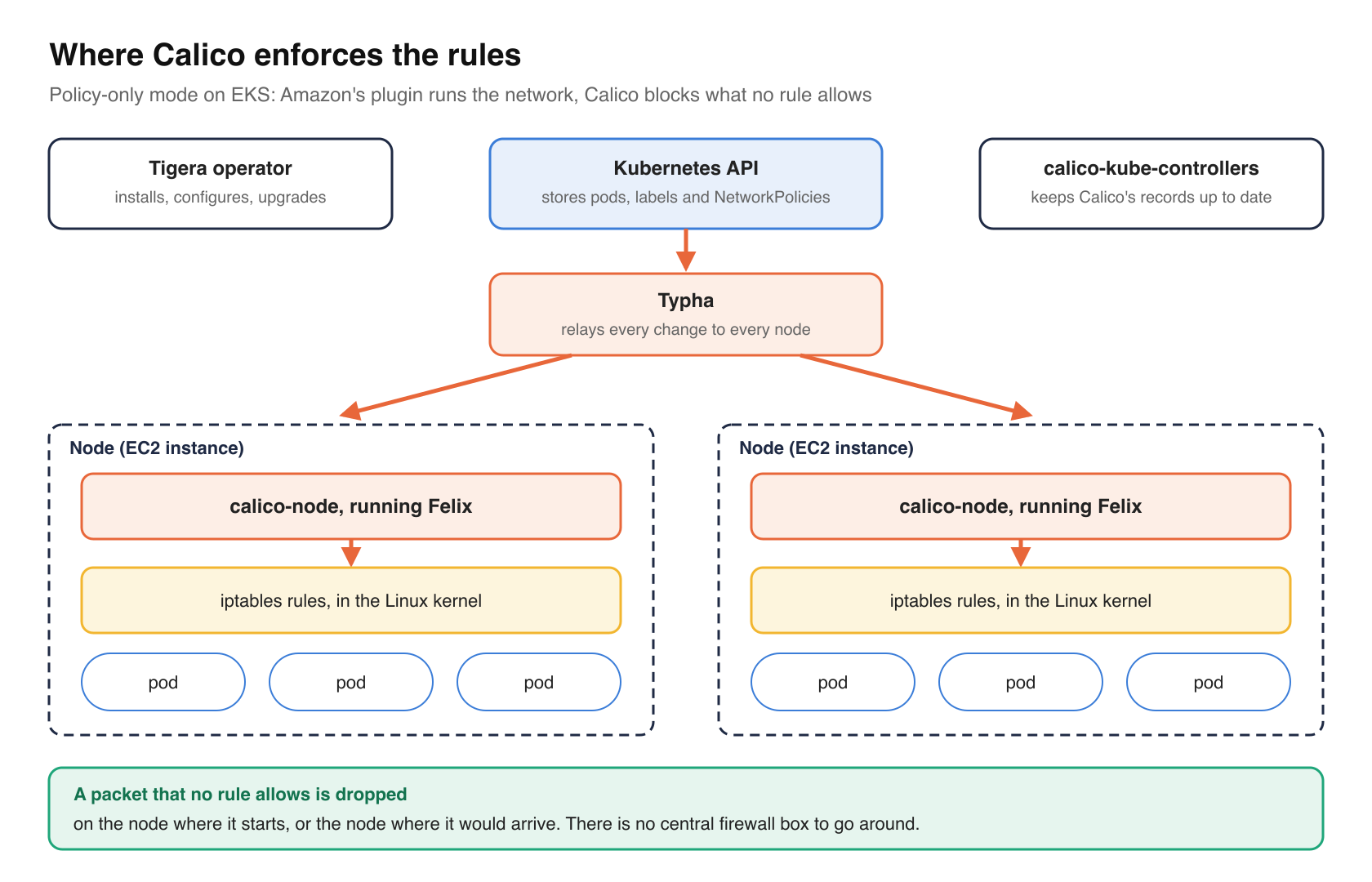
Calico is made of a few pieces, which all run inside the cluster as pods.
| Piece | How many | What it does |
|---|---|---|
calico-node | One on every node | Watches the cluster’s pods and rules, and turns them into firewall rules on its own node. Its main program is called Felix |
| Typha | A couple | Relays changes from Kubernetes to every calico-node, so Kubernetes doesn’t have to send each change to every node itself |
calico-kube-controllers | One | Keeps Calico’s records up to date, for example when a pod or node goes away |
| The Tigera operator | One | Installs, configures and upgrades the other pieces |
The blocking happens on each node, in the Linux kernel’s own firewall. Felix writes the rules with whichever firewall system the cluster uses (iptables in Smarter’s case; nftables and eBPF are the alternatives) and applies them to the network connection of every pod on that node. A packet that no rule allows is simply dropped, on the node where it starts or the node where it would arrive. There’s no central firewall box for traffic to go around, and none to slow everything down.
An open network with a database in it
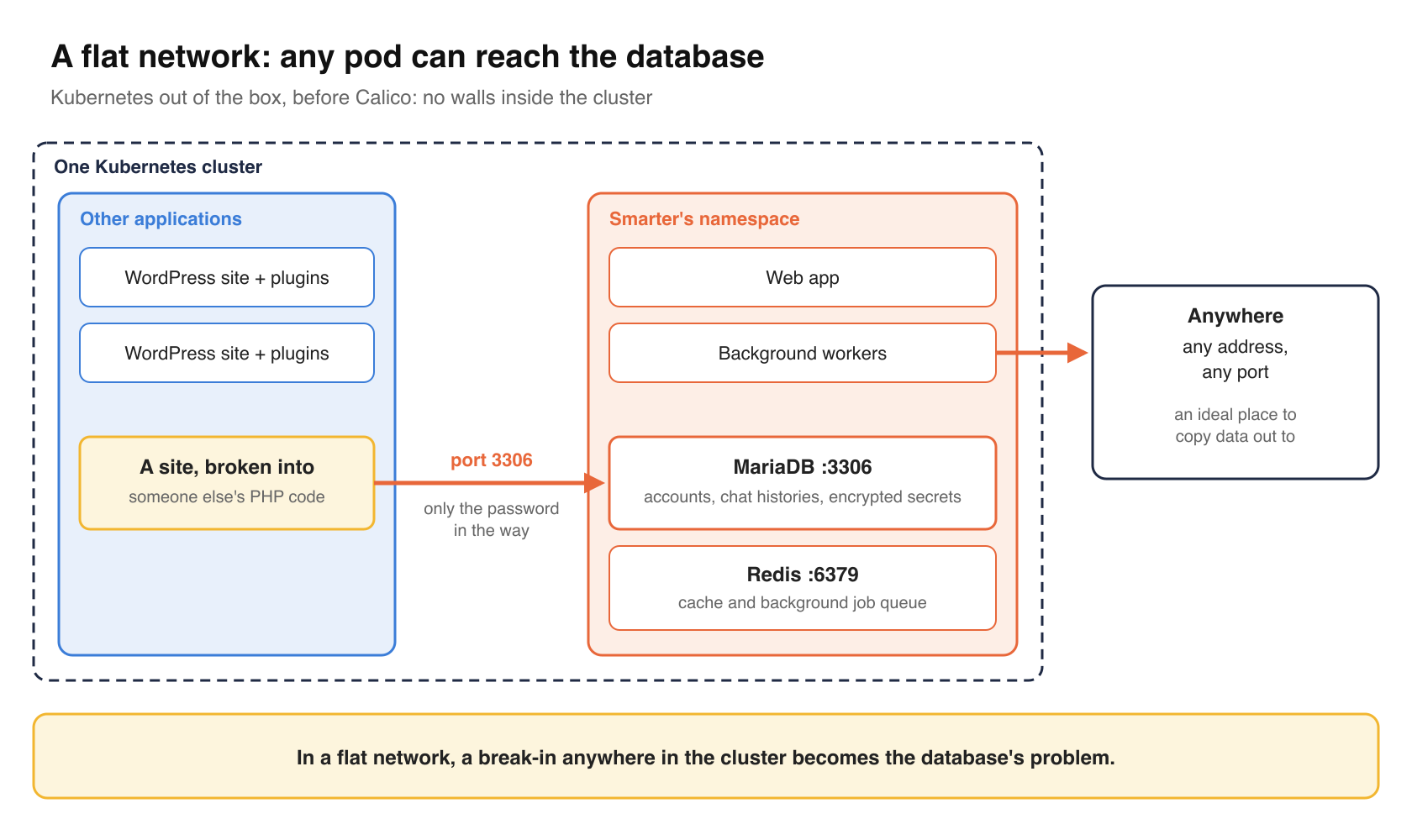
Kubernetes is designed so that every pod can reach every other pod directly, by IP address. That’s a good default for getting an application running, because nothing is blocked. It’s a poor default for a cluster that holds data you care about. People call this a “flat” network, one with no walls inside it.
Smarter’s namespace holds MariaDB, the database that stores every account, every chat history and every encrypted secret, and Redis, which holds Smarter’s cache and the queue of background jobs. The cluster isn’t only Smarter, either. It also runs unrelated applications, among them several WordPress sites, each with its own plugins. A WordPress plugin is someone else’s PHP code running on your servers. If one of those sites were broken into, the attacker’s pod could connect to MariaDB on port 3306, and the database password would be the only thing left in the way.
The outbound side worries me more. Smarter makes network calls on behalf of its users. It calls LLM providers such as OpenAI, it runs API plugins that call web addresses written in a user’s configuration, and it runs SQL plugins that connect to users’ own databases. That’s the feature set. It also means that if someone took over a Smarter pod, and that pod could send traffic anywhere, on any port, it would be an ideal place to copy data out from.
In a flat network, a break-in anywhere in the cluster becomes the database’s problem.
Why AWS’s firewall doesn’t reach far enough
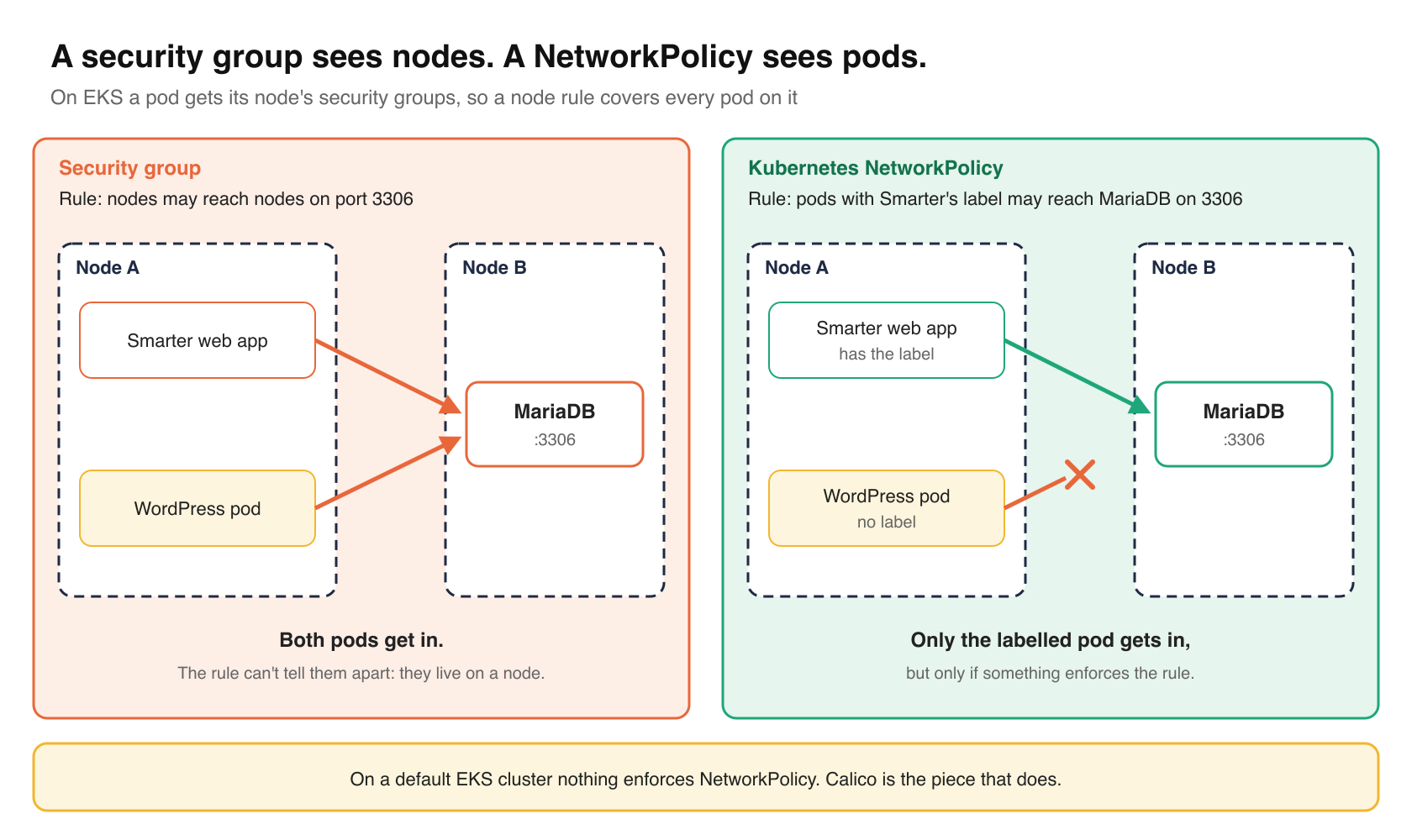
On AWS the usual answer is a security group. It doesn’t help much here, because a security group sees servers, not pods. On EKS, a pod’s IP address belongs to the network interface of the node it runs on, so the pod gets that node’s security groups. A security group can say “nodes may reach nodes on port 3306”, but every pod lives on a node, so that rule lets in every pod in the cluster. EKS has an optional feature that gives individual pods their own security groups, but its rules are written in AWS’s terms rather than Kubernetes’, and it does nothing for a Smarter installation in someone else’s cloud.
The layer that can tell pods apart is Kubernetes NetworkPolicy, because it picks pods by their labels. The catch, as above, is that a NetworkPolicy is only a written rule. On a default EKS cluster, nothing enforces it. You can apply a policy that blocks everything, Kubernetes will list it as if it were working, and every packet will flow exactly as before.
So the question wasn’t really whether to write network policies. It was which tool would enforce them.
Why Calico
There were three reasonable candidates.
| Option | What it changes | Where it runs |
|---|---|---|
| The AWS VPC CNI’s own policy feature | Turns on enforcement in the network plugin EKS already uses | EKS only |
| Cilium | Usually replaces the cluster’s network plugin entirely | Any Kubernetes |
| Calico in policy-only mode | Adds enforcement; EKS’s own plugin keeps handling the network | Any Kubernetes |
Calico won on two counts.
First, it was the smallest change to a cluster that was already serving users. On EKS, Calico detects that Amazon’s network plugin (the VPC CNI) is already in place and runs in “policy-only” mode, where it enforces rules and leaves everything else alone. Pods keep getting their IP addresses from Amazon’s network, so the load balancer, AWS’s network logs and every address an administrator would recognize stay the same. The only new thing on each node is the calico-node pod and its firewall rules. Replacing the network plugin, which is how Cilium is usually set up, means rebuilding how the whole cluster communicates. That’s a fine project for a new cluster, and a risky one for a running one.
Second, it goes wherever Smarter goes. Smarter is open source and gets installed in other people’s clusters, not all of them on AWS. Amazon’s policy feature exists only on EKS. Calico works the same way on Amazon, Google and Microsoft’s Kubernetes services, on a cluster you build yourself, or on a laptop. And Smarter’s rules don’t depend on Calico at all. They’re written as standard Kubernetes NetworkPolicies, not in Calico’s own format, so any tool that enforces the standard can apply them. Choosing the enforcer and writing the rules are separate decisions, and keeping them separate means the enforcer can change later without anyone rewriting the rules.
The installation is one Helm release of the Tigera operator, trimmed here from aws/terraform/kubernetes/network_policy.tf.
resource "helm_release" "calico" {
  count            = var.enable_enhanced_security ? 1 : 0
  name             = "calico"
  repository       = "https://docs.tigera.io/calico/charts"
  chart            = "tigera-operator"
  version          = "v3.31.4"
  namespace        = "tigera-operator"
  create_namespace = true

  values = [
    yamlencode({
      installation = {
        kubernetesProvider = "EKS"
        cni = {
          type = "AmazonVPC"
        }
        calicoNetwork = {
          bgp = "Disabled"
          ipPools = [
            {
              blockSize     = 26
              cidr          = data.aws_vpc.smarter_vpc.cidr_block
              encapsulation = "None"
              natOutgoing   = "Enabled"
              nodeSelector  = "all()"
            }
          ]
        }
      }
    })
  ]
}
Two settings say “policy-only” out loud, kubernetesProvider = "EKS" and a cni type of AmazonVPC, which tells Calico that Amazon’s plugin hands out the addresses and runs the network. The operator would work that out by itself, from the fact that it’s on EKS and Amazon’s plugin is already installed, but writing it down means nobody reading the file has to know that. The IP pool sets encapsulation = "None" because, with Amazon’s plugin carrying the traffic, Calico doesn’t wrap packets between nodes at all.
One detail is worth knowing if you copy Calico settings from elsewhere. encapsulation, the setting that chooses how packets are wrapped, belongs to each IP pool, not to calicoNetwork itself. Put it one level too high and Kubernetes quietly throws it away, with no error, because the field doesn’t exist there. Smarter’s first version did exactly that, asking for VXLAN wrapping that never happened. It did no harm, since policy-only mode needs no wrapping, but the file said one thing and the cluster did another. When in doubt, compare your values with what the operator reports, kubectl get installation default -o yaml, and with kubectl explain installation.spec.calicoNetwork, which lists the fields that really exist.
One switch, two directions
Every resource in network_policy.tf, from the Calico installation to the last rule, begins with the same line.
count = var.enable_enhanced_security ? 1 : 0
In Terraform that line means “create this only if enable_enhanced_security is true”. The setting is made once per environment, in aws/stack/stack.hcl, and the switch arrived on April 7, once the rules had settled. The same switch also replaces the default security group rules for the nodes with a narrower set of my own. So an environment has the whole layer or none of it. When a rule blocks something the platform needs, which happens, turning the layer off is a one-line, reviewed change rather than a hunt through a dozen resources.
The March commit locked down incoming traffic. MariaDB, Redis and Smarter’s own pods would refuse connections unless a rule allowed them, and MariaDB and Redis allowed only pods carrying Smarter’s label, on their own port. Outgoing traffic was still unrestricted.
The April work added a rule that refuses everything for every pod in the namespace, in both directions.
resource "kubernetes_network_policy_v1" "default_deny_all" {
  metadata {
    name      = "default-deny-all"
    namespace = var.namespace
  }

  spec {
    pod_selector {}
    policy_types = ["Ingress", "Egress"]
  }
}
The empty pod_selector {} means “every pod in this namespace”, and naming Ingress and Egress without listing anything allowed means “allow nothing in, and nothing out”. NetworkPolicies add up, so a connection goes through if any policy that covers the pod allows it. So once this rule exists, every other rule is a deliberate permission, and a new pod in the namespace starts with no network access at all.
Then Smarter’s pods got their outgoing access back, one port at a time.
| Destination | Port | What in Smarter needs it | Allowed since |
|---|---|---|---|
| MariaDB pods | 3306 | The database | April 7 |
| Redis pods | 6379 | The cache and the background job queue | April 7 |
| The cluster’s DNS service | 53 | Looking up host names | April 7 |
| Anywhere | 443 (HTTPS) | LLM providers, AWS services, API plugins | April 7 |
| Anywhere | 3306 | SQL plugins that connect to users’ databases | April 7 |
| Anywhere | 465 and 587 | Sending email through Amazon SES | April 15 |
| Anywhere | 80 (plain HTTP) | API plugins on plain HTTP, the weather function | April 16 |
The bastion pod, which administrators log into to manage the platform, gets ports 80 and 443 for installing software updates, and nothing else.
That table turned out to be the most useful thing the work produced. It’s a list of every outside service the platform depends on, and writing it meant answering “what uses this?” for each port. Before April, nobody had written that list down, because nothing required it.
The label is the contract
Every permission picks pods by one label, app.kubernetes.io/application-group. Smarter’s Helm chart, the package that installs Smarter into Kubernetes, puts it on the web app, the background workers, the scheduler, the setup job and the bastion. The label is set in one repository and read in another, so both say so. The chart’s deployment file carries this warning.
# The app.kubernetes.io/application-group label is used to identify pods to Calico
# and kubernetes_network_policy_v1 resources in order to allow pod-level communication
# between backing services. If the label is missing then the network policies are
# assured to PREVENT communication.
That’s the failure I wanted. A pod that loses its label, through a typo or a change to the chart, can’t reach the database, can’t look up host names and can’t call out. It breaks on its first deployment, where someone will see it. The opposite design, where a missing label leaves a pod unrestricted, breaks silently and stays broken.
What it costs
Calico is free to use. It isn’t free to operate.
First, refusing everything by default finds the dependencies you forgot, and it finds them in production. The April 7 list covered what I knew the platform used. Over the next nine days, three more turned up, namely sending email through Amazon SES, software updates on the bastion, and API plugins that call plain-HTTP web addresses. Each was a one-rule fix, and each was something the platform couldn’t do until the rule went in. The same happened with incoming traffic, where a comment written on April 7, above the rule that lets Smarter’s pods reach each other, reads “this fixes workers”. If you turn on deny-by-default for outgoing traffic, plan for a week of this, and test the features that send mail and call outside services before you ship, not after.
Second, troubleshooting changes. A blocked connection doesn’t fail with a clear “connection refused” error. The packet is dropped, so the program waits until it gives up. When something in the namespace hangs on a network call, a rule is now one of the first suspects, and the first two things to check are the pod’s labels (kubectl get pod --show-labels) and the namespace’s rules (kubectl get networkpolicy -n <namespace>).
Third, the nodes’ security groups had to be relearned. Replacing the default rules meant finding out which ports the nodes really use to talk to each other. They are 10250 for the kubelet, Kubernetes’ agent on each node, plus the ports used by cert-manager, which issues TLS certificates, and by the cluster autoscaler, which adds and removes nodes. The April 7 commit also removed a rule that let nodes reach each other on every port, which had made the rest of the list pointless. A security group rule for port 4789, which Calico uses for VXLAN packet wrapping, came out too, once it was clear that policy-only mode doesn’t wrap packets.
Fourth, it’s one more system to keep up to date. The operator, calico-node on every node, Typha and Calico’s controller are now part of the cluster, and they need upgrading like anything else. The Helm release names an exact chart version, so a new environment gets the same Calico as the running ones, and an upgrade is a reviewed change rather than whatever Tigera published the day an environment was built.
Fifth, and this one is deliberate, a feature that needs a new outgoing port can’t ship until smarter-infrastructure allows it. That’s friction by design. A new port is a new way out of the cluster, and it deserves its own review.
Takeaways
- Find out whether your cluster enforces NetworkPolicy at all. On a default EKS cluster it doesn’t, and a rule that isn’t enforced looks exactly like one that is.
- Start from “refuse everything” in both directions. Incoming rules protect the database from strangers. Outgoing rules stop a pod that’s been taken over from sending your data elsewhere.
- Before you refuse outgoing traffic by default, try every feature that calls out, such as email, webhooks, plugins, software updates. The ones you skip will find you.
- Write standard Kubernetes NetworkPolicies, and choose the tool that enforces them separately. You can change the tool later without rewriting the rules.
- On an EKS cluster that’s already running, Calico’s policy-only mode adds enforcement without changing how pods get their addresses.
- Pick pods by a label your own installation controls, and document the label in both places that use it.
- Put the whole layer behind one switch, so turning it off is one reviewed change.
- Give every outgoing rule a reason. The list becomes your inventory of outside dependencies.
Closing thoughts
Seven months after Calico went in, the database is no longer guarded by a password alone. Smarter’s namespace lets in and out what it needs and nothing more, and every open port has a reason written next to it. The enforcer is Calico today. The rules are plain Kubernetes, and they’d work the same with something else.
Happy Smartering!