
Getting Started With smarter-api, the Smarter Python SDK

smarter-api is the official Python SDK of Smarter. It is to Smarter what the openai package is to the OpenAI api. One pip install gives your Python code typed access to your own Smarter platform, whether it runs on your laptop or on Kubernetes. It covers the same manifest api as the smarter cli, plus prompts, chat sessions and resource actions, and it returns Pydantic models and raises typed exceptions instead of printing JSON.
This article has two examples.
- Hello, Smarter connects, shows who you are, and prompts an LLMClient, in about ten lines.
- Apply a folder of manifests is a script that applies every Smarter manifest in a folder in dependency order, the way a CI/CD job would, using
SAMKinds.apply_order().
Before you start
You need Python 3.10 or later, a Smarter platform to connect to, and a Smarter api key. The platform can be your own laptop, because the Quick Start Guide runs one locally on http://localhost:9357. To create an api key, see API Keys.
Install the package from PyPI. It installs as smarter-api and imports as smarter.
pip install --upgrade smarter-api
The second example uses SAMKinds, which is in smarter-api 0.6.0 and later.
Then tell the SDK where your platform is and who you are.
export SMARTER_API_KEY="your 64-character Smarter api key"
export SMARTER_BASE_URL="http://localhost:9357"   # or https://platform.example.com
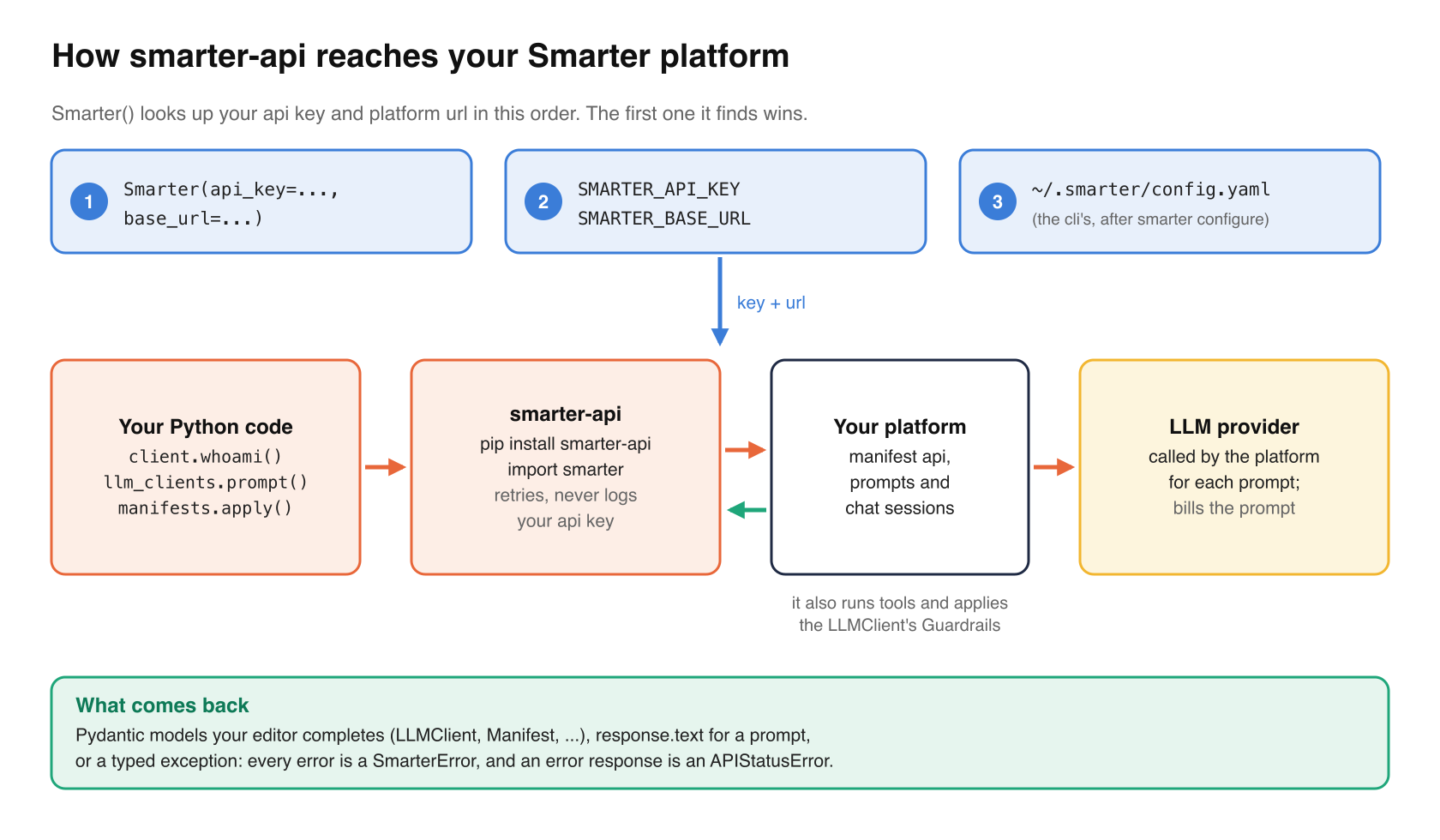
If you already use the smarter cli, skip this step. The SDK reads the cli’s ~/.smarter/config.yaml, so after smarter configure it needs no other setup. Arguments to Smarter(api_key=..., base_url=...) override both.
Hello, Smarter
Save this as hello_smarter.py.
from smarter import Smarter

client = Smarter()

me = client.whoami()
print(f"Hello, {me.user.username}!")
print(f"Smarter {client.version().api.version}, account {me.account.account_number}")

llmclients = client.llm_clients.list()
print("Your LLMClients:", ", ".join(c.name for c in llmclients))

response = client.llm_clients.prompt(llmclients[0].id, "Hello! What can you help me with?")
print(response.text)
And run it.
python hello_smarter.py
Here is what it does, line by line.
Smarter()finds your api key and platform url, from the environment variables or the cli’s configuration. It raisesSmarterConfigurationErrorif it can’t find a key.whoami()returns the key’s owner, meaning their user, their account and the platform’s environment. It’s the cheapest way to check that a key works.version()returns the platform’s version, and the versions of its main Python packages.llm_clients.list()returns every LLMClient that you may read, asLLMClientmodels. Your editor completes their fields, and your type checker knows them.llm_clients.prompt()runs a whole prompt on the platform. It calls the LLM, runs any tools that the LLM asks for, applies the LLMClient’s Guardrails, and returns the result..textis the LLM’s final reply. A prompt is billed by the LLMClient’s LLM provider, like any other.
If your account has no LLMClients yet, the last two lines have nothing to talk to. The second example creates one.
To hold a conversation instead of sending one prompt, open a chat session. It keeps the history on the platform, so each message has the context of the ones before it.
chat = client.llm_clients.chat(llmclients[0].id)
print(chat.send("What is 2 to the 10th power?").text)
print(chat.send("And divided by 4?").text)
When something goes wrong
Every exception that the SDK raises is a SmarterError. An error response from the platform is an APIStatusError, with a subclass for each common status, so you can catch exactly what you mean.
from smarter import NotFoundError, Smarter, SmarterError

client = Smarter()
try:
    client.manifests.describe("LLMClient", "no_such_client")
except NotFoundError as e:
    print(e.status_code, e.message)
except SmarterError as e:
    print("something else went wrong:", e)
The SDK retries rate limits, timeouts and transient gateway errors with backoff, twice by default (SMARTER_MAX_RETRIES), and never logs your api key. Set SMARTER_LOG=debug to see each request it sends.
Apply a folder of manifests
Every Smarter resource is declared in a YAML file, a Smarter Application Manifest (SAM). A real project has many of them, and the usual way to manage them is to keep them in a git repository, review changes in pull requests, and apply them from CI/CD. The SDK applies one manifest with one call.
client.manifests.apply("llm-clients/stackademy-sql.yaml")
The work in this example is applying all of them, in the right order.
Why order matters
Manifests refer to one another by name. Here is a folder from Stackademy, Smarter’s example project, whose AI course advisor answers students’ questions from a private course database.
course-advisor/
├── .yamllint.yaml
├── budgets/stackademy-project.yaml        # Budget
├── connections/sql/smarter-test-db.yaml   # SqlConnection
├── llm-clients/stackademy-sql.yaml        # LLMClient
├── plugins/sql/stackademy-sql.yaml        # SqlPlugin
└── secrets/smarter-test-db.yaml           # Secret
The resources form a chain.
- The SqlConnection connects to the database. Its
passwordis the name of a Secret, so the password itself never appears in the connection’s manifest. - The SqlPlugin is a tool that the LLM can call to query the database. Its
connectionnames the SqlConnection. - The LLMClient is the course advisor. Its
pluginslist names the SqlPlugin. - The Budget caps what the project can spend. Its
resourcesname the LLMClient and the SqlPlugin.
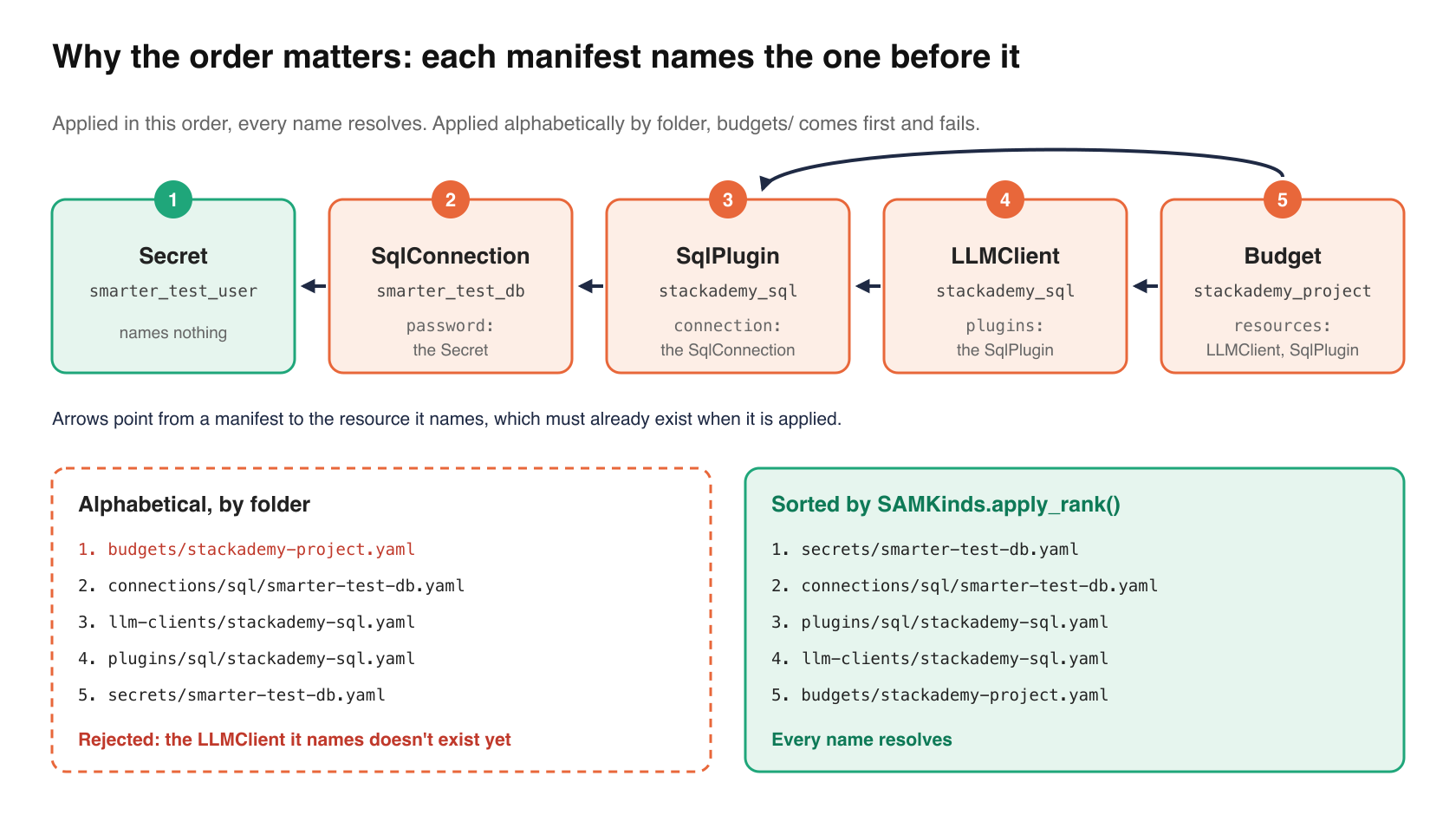
When the platform applies a manifest, it resolves each name in it, so every resource that a manifest names must already exist. Applied alphabetically, by folder, budgets/ comes first, and the platform rejects the Budget because the LLMClient that it names doesn’t exist yet. Applied in this order, every name resolves.
| Order | Kind | Names |
|---|---|---|
| 1 | Secret | nothing |
| 2 | SqlConnection | the Secret |
| 3 | SqlPlugin | the SqlConnection |
| 4 | LLMClient | the SqlPlugin |
| 5 | Budget | the LLMClient and SqlPlugin |
SAMKinds.apply_order()
You don’t need to work that order out for each project. Smarter defines it once, for every kind, in SAMKinds.apply_order(), and the platform uses it to load its own example projects. The SDK has the same class.
from smarter import SAMKinds

SAMKinds.apply_order()
# ('Account', 'User', 'SmarterAuthToken', 'Secret', 'Provider', 'Proxy',
#  'LLMHostCompute', 'LLMHost', 'SqlConnection', 'ApiConnection', 'Guardrail',
#  'Vectorstore', 'Vectorsearch', 'MCPClient', 'Plugin', 'SqlPlugin', 'ApiPlugin',
#  'SkillPlugin', 'WebsearchPlugin', 'ImageSearchPlugin', 'CustomDomain',
#  'LLMClient', 'Prompt', 'Orchestrator', 'Budget')

SAMKinds.apply_rank("SqlConnection")   # 8: its position in that order
SAMKinds.apply_rank("NoSuchKind")      # 25: not a SAM kind, so it sorts last
Each kind comes after every kind that its manifests may name. Accounts and Users come first, because they own everything else. Secrets come next, because nearly every later kind may name one. Connections come before the plugins that use them, and the plugins, Guardrails, MCPClients and Custom Domains come before the LLMClients that name them. Budgets come last, because a Budget can name nearly any kind of resource. Kinds with nothing in common, such as the plugins among themselves, can go in any order.
So sorting a project’s manifests takes one line.
sorted(manifests, key=lambda m: SAMKinds.apply_rank(m.kind))
SAMKinds is also an enumeration of every kind, which is handy for comparisons that your editor can check, such as manifest.kind == SAMKinds.LLM_CLIENT.value.
The script
Save this as apply_manifests.py.
"""Apply every Smarter manifest in a folder, in dependency order."""

import argparse
import sys
from pathlib import Path

import yaml

from smarter import APIStatusError, Manifest, SAMKinds, Smarter


def find_manifests(folder: Path) -> list[tuple[Path, Manifest]]:
    """Every Smarter manifest under folder, sorted into the order to apply them."""
    found = []
    for path in sorted(folder.rglob("*.y*ml")):
        document = yaml.safe_load(path.read_text(encoding="utf-8"))
        # skip YAML that isn't a manifest, e.g. a .pre-commit-config.yaml
        if not isinstance(document, dict) or document.get("apiVersion") != "smarter.sh/v1":
            continue
        found.append((path, Manifest.model_validate(document)))

    unknown = {m.kind for _, m in found if m.kind not in SAMKinds.apply_order()}
    if unknown:
        sys.exit(f"Unknown kind(s): {', '.join(sorted(unknown))}")

    # sorted() is stable, so manifests of the same kind keep their file order
    return sorted(found, key=lambda item: SAMKinds.apply_rank(item[1].kind))


def describe(error) -> str:
    """A validation error as one line, e.g. 'spec.connection: Field required'."""
    if isinstance(error, dict) and "message" in error:
        field = ".".join(str(part) for part in error.get("loc", []))
        return f"{field}: {error['message']}" if field else error["message"]
    return str(error)


def main() -> None:
    parser = argparse.ArgumentParser(description=__doc__)
    parser.add_argument("folder", type=Path)
    parser.add_argument("--dry-run", action="store_true", help="validate, and print the plan, but apply nothing")
    args = parser.parse_args()

    manifests = find_manifests(args.folder)
    if not manifests:
        sys.exit(f"No Smarter manifests in {args.folder}")

    with Smarter() as client:
        # 1. validate them all, before changing anything
        failed = False
        for path, manifest in manifests:
            result = client.manifests.validate(manifest)
            if not result.valid:
                failed = True
                for error in result.errors:
                    print(f"{path}: {describe(error)}", file=sys.stderr)
        if failed:
            sys.exit("Nothing was applied.")

        # 2. apply them, in dependency order
        for number, (path, manifest) in enumerate(manifests, start=1):
            label = f"{number:>2}. {manifest.kind:<14} {manifest.metadata.name:<24} {path}"
            if args.dry_run:
                print(label)
                continue
            try:
                response = client.manifests.apply(manifest)
            except APIStatusError as e:
                sys.exit(f"{label}\n    failed: {e.status_code} {e.message}")
            print(f"{label}\n    {response.message}")


if __name__ == "__main__":
    main()
How it works
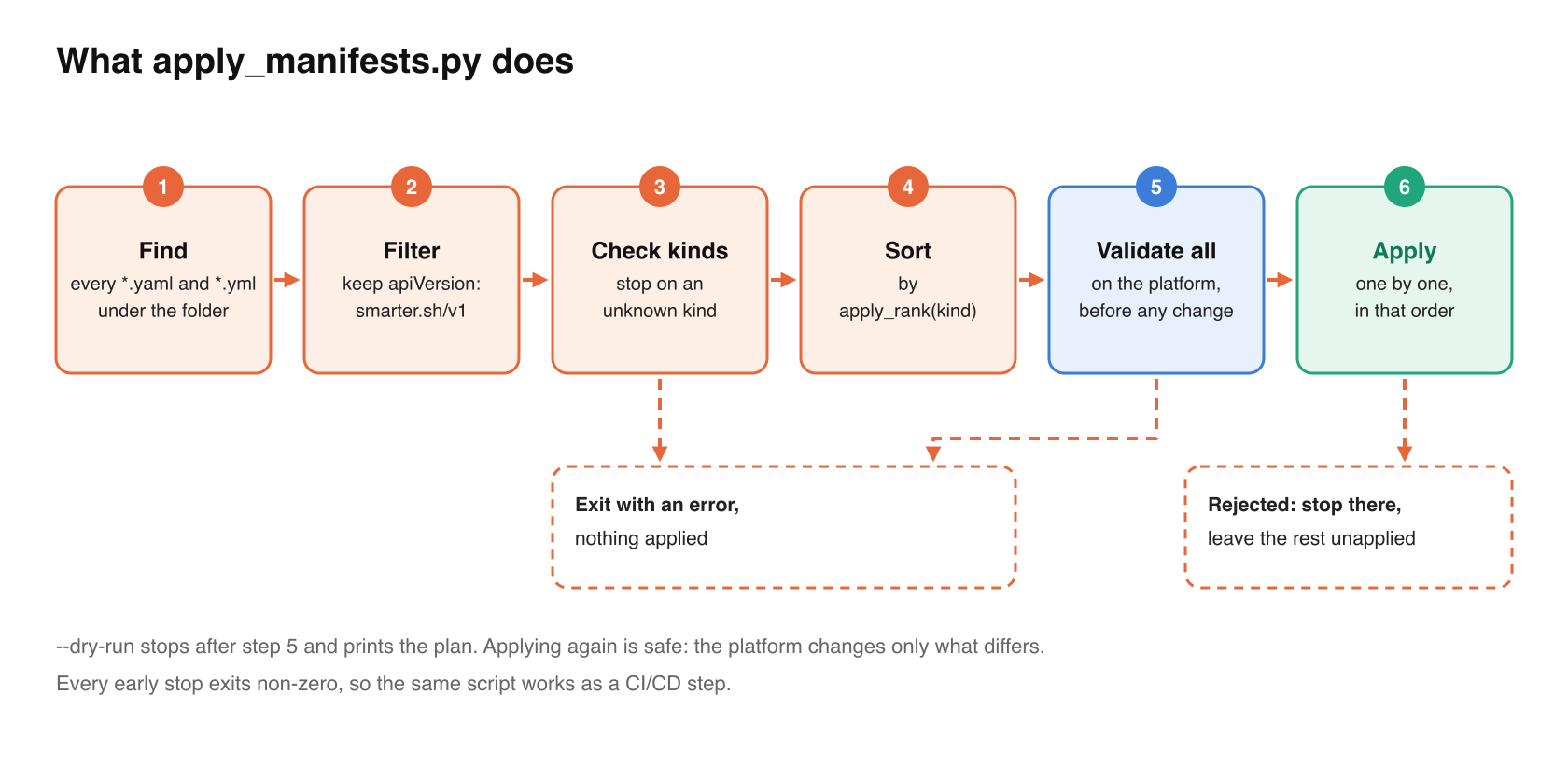
Finding the manifests. rglob("*.y*ml") finds every .yaml and .yml file under the folder, at any depth, so you can organize the folder however you like. A repository also holds YAML that isn’t a manifest (linter settings, CI workflows), so the script keeps only the documents whose apiVersion is smarter.sh/v1. Each becomes a Manifest, the SDK’s model of a manifest’s apiVersion, kind, metadata and spec.
Refusing unknown kinds. A misspelled kind, such as LlmClient, would rank last and fail only after everything else was applied. The script stops before it sends anything.
Sorting. SAMKinds.apply_rank() gives each manifest its kind’s position in apply_order(). Python’s sort is stable, and the files were found in path order, so two Secrets are always applied in the same order, which keeps runs repeatable.
Validating first. client.manifests.validate() asks the platform to check a manifest against its kind’s model without saving it. It is the same check that apply does first, so a typo three files down stops the run before the first file changes anything. Each error names the field and the problem, and describe() prints it on one line, such as spec.connection: Field required. Validation checks each manifest’s own fields. Names are resolved when a manifest is applied, which is why the order still matters.
Applying. client.manifests.apply() sends each manifest to the platform’s manifest api, exactly as smarter apply -f does. The platform compares it with the resource’s current state and makes only the changes that the difference requires, so running the script again is safe. If the platform rejects a manifest, the script stops there and reports why, and leaves the manifests after it unapplied, because they may name the one that failed.
Running it
Start with a dry run. It validates every manifest on the platform and prints the plan, but applies nothing.
python apply_manifests.py course-advisor --dry-run
 1. Secret         smarter_test_user        course-advisor/secrets/smarter-test-db.yaml
 2. SqlConnection  smarter_test_db          course-advisor/connections/sql/smarter-test-db.yaml
 3. SqlPlugin      stackademy_sql           course-advisor/plugins/sql/stackademy-sql.yaml
 4. LLMClient      stackademy_sql           course-advisor/llm-clients/stackademy-sql.yaml
 5. Budget         stackademy_project       course-advisor/budgets/stackademy-project.yaml
.yamllint.yaml isn’t in the plan, and the Budget, first in the folder, is last in the plan. When the plan looks right, drop --dry-run to apply it. Then run the first example again. stackademy_sql is now one of your LLMClients, and you can ask it whether Stackademy has a course on machine learning for under $1,000.
In CI/CD
The script exits with a non-zero status whenever it stops early, so it works as a CI/CD step as it is. Run it with --dry-run on each pull request, so that reviewers see the plan and invalid manifests fail the check. Run it without --dry-run when the pull request is merged. Give the job its own api key, stored as a CI secret in SMARTER_API_KEY, and set SMARTER_BASE_URL to the platform it deploys to.
Stackademy’s own repository works this way. Its checks validate every manifest on each pull request, and the platform loads it, in SAMKinds.apply_order(), with manage.py load_from_github. That loader also fills in manifest templates and runs setup scripts. The script in this article sticks to plain manifests.
Where to go next
The SDK covers much more of the platform than these two examples, including streaming a prompt’s progress (its LLM calls, tool calls and MCP calls) as it runs, evaluating Guardrails, calling MCP servers’ tools, adding documents to and searching vectorstores, and planning and deploying self-hosted LLMs. Every SAM kind also has a typed Pydantic model, so client.llm_clients.describe("stackademy_sql").to_sam() gives you a SAMLLMClient whose every field your editor knows. It’s all in the SDK’s documentation.
Happy coding!