
MariaDB Backups on Kubernetes: Least Privilege for the Job That Copies Everything

Smarter’s nightly MariaDB backup runs as a Kubernetes CronJob that dumps the database with a read-only account, receives only the environment variables it needs, installs only the tools it needs and verifies them, checks that the dump is complete before uploading it to a private, encrypted, versioned S3 bucket, and emails the result. This post walks through each of those choices, the failure or attack each one guards against, and what the whole arrangement costs to run.
Smarter is a Django platform for building and running LLM applications. Its database holds user accounts, chat histories, the manifests that define every chatbot, plugin and guardrail, and the encrypted Secrets that users store. A backup is a complete copy of all of it. That makes the backup job an unusual piece of software. It runs unattended, every night, with read access to everything, and its output is the single most valuable file the platform produces. It deserves the same scrutiny as the web server, and usually gets much less.
Two ways a backup goes wrong
There are two separate concerns here, and they pull in different directions.
The first is security. The backup job is a privileged path into the database that nobody watches. If its credentials leak, or the image it runs on is compromised, or the tool it downloads has been tampered with, whatever privileges the job holds are now someone else’s. If the dump lands somewhere readable, the whole database is someone else’s.
The second is reliability. A backup that fails silently, or succeeds with a truncated file, is worse than no backup, because it gives false confidence. The time you find out is the day you need it.
Least privilege answers the first concern. Verification and reporting answer the second. Smarter’s backup tries to do both without making either harder to operate.
A read-only account
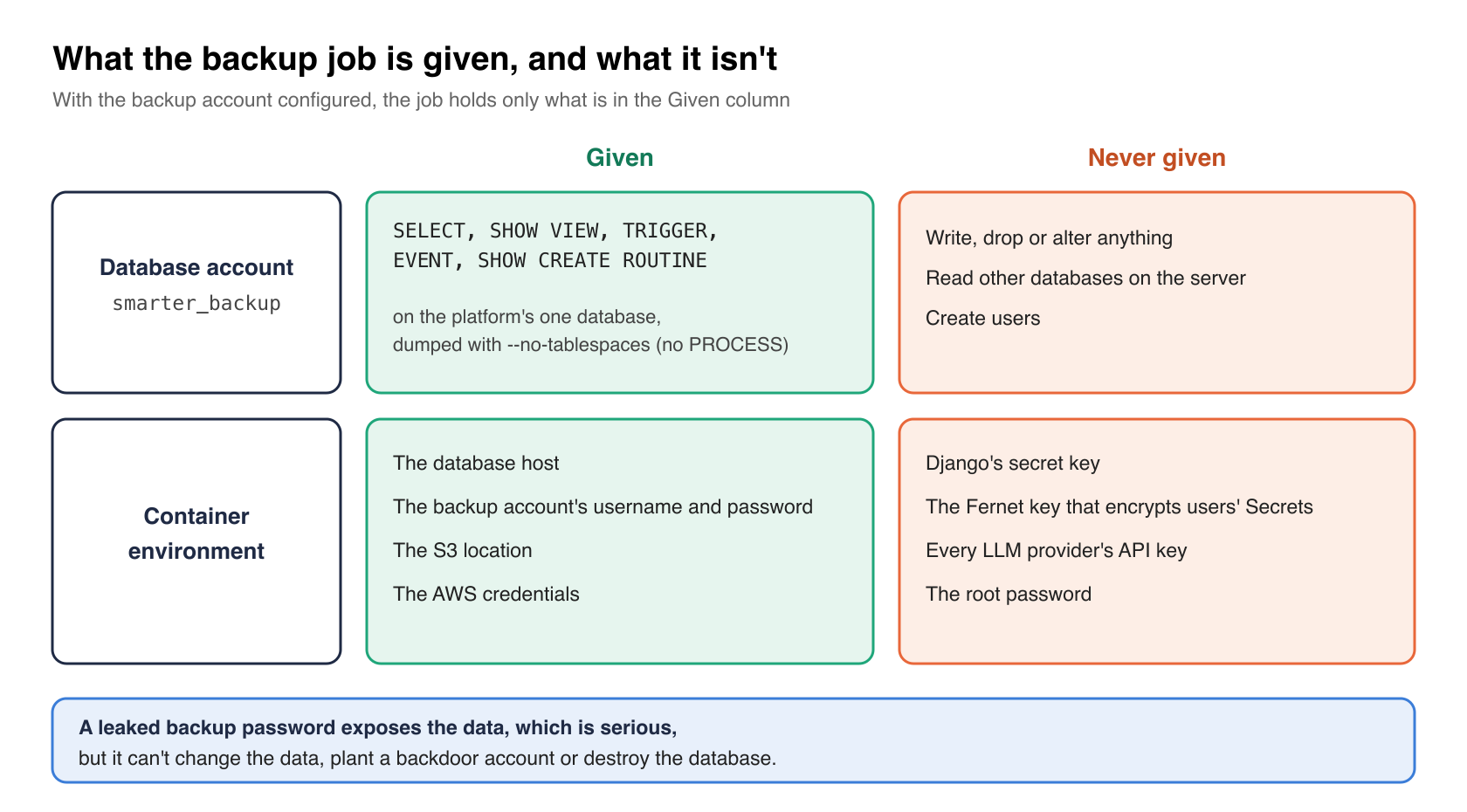
The dump runs as smarter_backup, an account that can read the platform’s database and nothing else. The chart’s init Job, which runs on every Helm upgrade, creates the account or resets its password, and grants it exactly what mariadb-dump needs.
# helm/charts/smarter/templates/job-init.yaml (trimmed)
backup_user="${SMARTER_MYSQL_BACKUP_USERNAME:-smarter_backup}"
db "CREATE USER IF NOT EXISTS '$backup_user'@'%' IDENTIFIED BY '$SMARTER_MYSQL_BACKUP_PASSWORD';" || status=1
db "ALTER USER '$backup_user'@'%' IDENTIFIED BY '$SMARTER_MYSQL_BACKUP_PASSWORD';" || status=1
db "GRANT SELECT, SHOW VIEW, TRIGGER, EVENT, SHOW CREATE ROUTINE ON $SMARTER_MYSQL_DATABASE.* TO '$backup_user'@'%';" \
  || { echo "This server has no SHOW CREATE ROUTINE privilege. Granting $backup_user the rest."; db "GRANT SELECT, SHOW VIEW, TRIGGER, EVENT ON $SMARTER_MYSQL_DATABASE.* TO '$backup_user'@'%';"; } \
  || status=1
SELECT reads the rows, SHOW VIEW and TRIGGER read the definitions of views and triggers, EVENT reads scheduled events, and SHOW CREATE ROUTINE reads stored procedures. SHOW CREATE ROUTINE exists only in MariaDB 11.3 and later, so on an older server the job grants the rest and says so in its log, rather than failing the deploy. The dump itself runs with --no-tablespaces, so the account doesn’t also need the server-wide PROCESS privilege.
What the account can’t do matters more than what it can. It can’t write, drop or alter anything, it can’t read other databases on the server, and it can’t create users. A leaked backup password exposes the data, which is serious, but it can’t be used to change the data, plant a backdoor account or destroy the database.
The account’s password comes from a GitHub secret that the deploy workflow passes to the chart. A deployment without that password falls back to dumping as the root account. That’s a deliberate choice, so that a fresh install of the chart backs up something on its first night, and the backup’s log says so in plain words when it happens. If you install the chart yourself, set SMARTER_MYSQL_BACKUP_PASSWORD.
Only the environment it needs
The platform’s other pods read a shared Kubernetes Secret that holds the whole environment, including Django’s secret key, the Fernet key that encrypts users’ Secrets, every LLM provider’s API key. The backup container doesn’t. It lists its variables one by one, and reads the sensitive ones from that Secret by key.
# helm/charts/smarter/templates/job-mysql-backup.yaml (trimmed)
# only what the backup needs: the database, the backup account, the S3 location
# and the AWS credentials, not the platform's other secrets. The root account is
# passed only when no backup account is configured (SMARTER_MYSQL_BACKUP_PASSWORD).
env:
  - name: SMARTER_MYSQL_HOST
    value: {{ .Values.env.SMARTER_MYSQL_HOST | quote }}
  {{- if $useBackupAccount }}
  - name: SMARTER_MYSQL_BACKUP_USERNAME
    value: {{ .Values.env.SMARTER_MYSQL_BACKUP_USERNAME | default "smarter_backup" | quote }}
  - name: SMARTER_MYSQL_BACKUP_PASSWORD
    valueFrom:
      secretKeyRef:
        name: "{{ $.Values.global.appName }}-env"
        key: SMARTER_MYSQL_BACKUP_PASSWORD
        optional: true
  {{- else }}
  - name: SMARTER_MYSQL_ROOT_USERNAME
    value: {{ .Values.env.SMARTER_MYSQL_ROOT_USERNAME | quote }}
  {{- end }}
When the backup account is configured, the root password is not in the container at all. The script never reads it, because there’s nothing to read. If anything in this container misbehaves, from a compromised package to a bug in the script, the damage is bounded by what the container was given.
Only the tools it needs, verified
The backup runs on a plain Debian image, and installs what it needs each night, which is the MariaDB client and the AWS CLI, plus the few packages needed to fetch and check them. The AWS CLI is pinned to a release, and its download is checked against the AWS CLI team’s PGP signature before it’s unpacked.
# helm/charts/smarter/templates/configmap-debian-setup.yaml (trimmed)
AWS_CLI_VERSION="${AWS_CLI_VERSION:-2.37.9}"
AWS_CLI_KEY_FINGERPRINT="FB5DB77FD5C118B80511ADA8A6310ACC4672475C"

gpg --batch --quiet --import "${WORK_DIR}/aws-cli.asc" 2> /dev/null
if ! gpg --batch --with-colons --fingerprint | grep -q "^fpr:::::::::${AWS_CLI_KEY_FINGERPRINT}:"; then
  echo "FAILED: the embedded AWS CLI public key does not have the fingerprint ${AWS_CLI_KEY_FINGERPRINT}"
  exit 1
fi
if ! gpg --batch --quiet --verify "${WORK_DIR}/awscliv2.zip.sig" "${WORK_DIR}/awscliv2.zip" 2> /dev/null; then
  echo "FAILED: ${AWS_CLI_ZIP_URL} does not match the AWS CLI team's signature"
  exit 1
fi
The public key is embedded in the script, and the script checks its fingerprint against the one AWS publishes in its install guide. The commit that added this, c9982d0d3, tested it by pairing one release’s zip with the previous release’s signature, and the install refused. Pinning matters for a second reason, too. A new AWS CLI release can’t change how the backup behaves without a change to the chart, where it’s reviewed.
The password, off the command line
A password passed to mariadb-dump as -p<password> is visible to every process in the container through /proc, and turns up in shell traces and error output. The backup script writes the connection settings to a temporary option file instead, readable only by its own user, and removes it on exit.
# helm/charts/smarter/templates/configmap-backup-script.yaml (trimmed)
OPTION_FILE="$(mktemp)"
trap 'rm -f "${OPTION_FILE}"' EXIT
chmod 600 "${OPTION_FILE}"
ESCAPED_PASSWORD="${BACKUP_PASSWORD//\\/\\\\}"
ESCAPED_PASSWORD="${ESCAPED_PASSWORD//\"/\\\"}"
cat > "${OPTION_FILE}" <<OPTIONS
[client]
host=${SMARTER_MYSQL_HOST}
port=${SMARTER_MYSQL_PORT:-3306}
user=${BACKUP_USERNAME}
password="${ESCAPED_PASSWORD}"
OPTIONS

mariadb-dump --defaults-extra-file="${OPTION_FILE}" --databases "${SMARTER_MYSQL_DATABASE}" \
  --add-drop-database --add-drop-table --routines --events --triggers \
  --single-transaction --quick --lock-tables=false --no-tablespaces > "${BACKUP_FILENAME}.sql"
The escaping is there because an option file treats backslashes and quotes inside a quoted value as special. A password with a double quote in it would otherwise end the value early, and the dump would fail with an authentication error that has nothing to do with the password being wrong.
A bucket of its own
The archive goes to an S3 bucket that holds backups and nothing else. Smarter’s infrastructure code in smarter-infrastructure creates it with the community terraform-aws-modules/s3-bucket module.
# aws/terraform/smarter/s3.tf (smarter-infrastructure, trimmed)
module "backup_storage" {
  source  = "terraform-aws-modules/s3-bucket/aws"
  version = "~> 4.10"

  bucket = local.s3_backup_bucket_name

  block_public_acls       = true
  block_public_policy     = true
  ignore_public_acls      = true
  restrict_public_buckets = true

  control_object_ownership = true
  object_ownership         = "BucketOwnerEnforced"

  # refuse any request that isn't made over TLS
  attach_deny_insecure_transport_policy = true

  server_side_encryption_configuration = {
    rule = {
      apply_server_side_encryption_by_default = {
        sse_algorithm = "AES256"
      }
    }
  }

  versioning = {
    enabled = true
  }
}
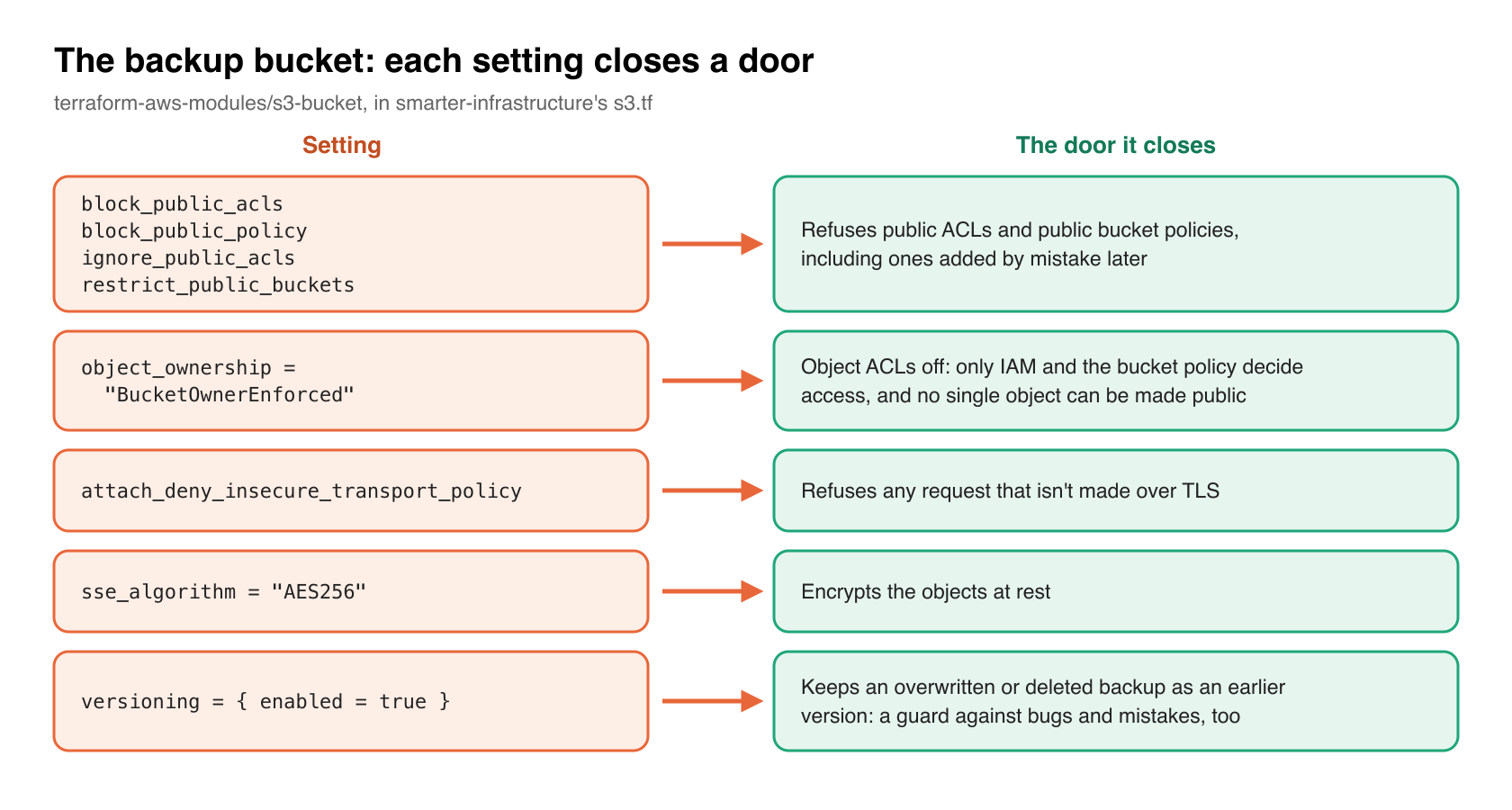
Each setting closes a specific door. The four public access block settings make the bucket refuse public ACLs and public bucket policies, including ones added by mistake later. BucketOwnerEnforced turns off object ACLs altogether, so access is decided by IAM and the bucket policy alone, and an individual object can’t be made public on its own. The deny-insecure-transport policy refuses any request that isn’t made over TLS. Server-side encryption covers the objects at rest. And versioning means that an overwritten or deleted backup is kept as an earlier version, which protects against a script bug or a mistaken command as much as against an attacker.
Keeping backups in a dedicated bucket, rather than under a prefix of a bucket that serves anything else, keeps the policy simple. Everything in it is private, always, and nobody has to reason about which prefixes are which. The deploy points the chart’s databaseScheduledBackup.s3Uri at this bucket. If you run the chart yourself, set s3Uri to a private bucket of your own.
On the AWS side, the next step toward least privilege is the identity the job uploads with. The ideal is an IAM role, through IRSA or EKS Pod Identity, that may write to the backup bucket and do nothing else, so that the backup pod holds no long-lived AWS keys at all.
Proof that it worked
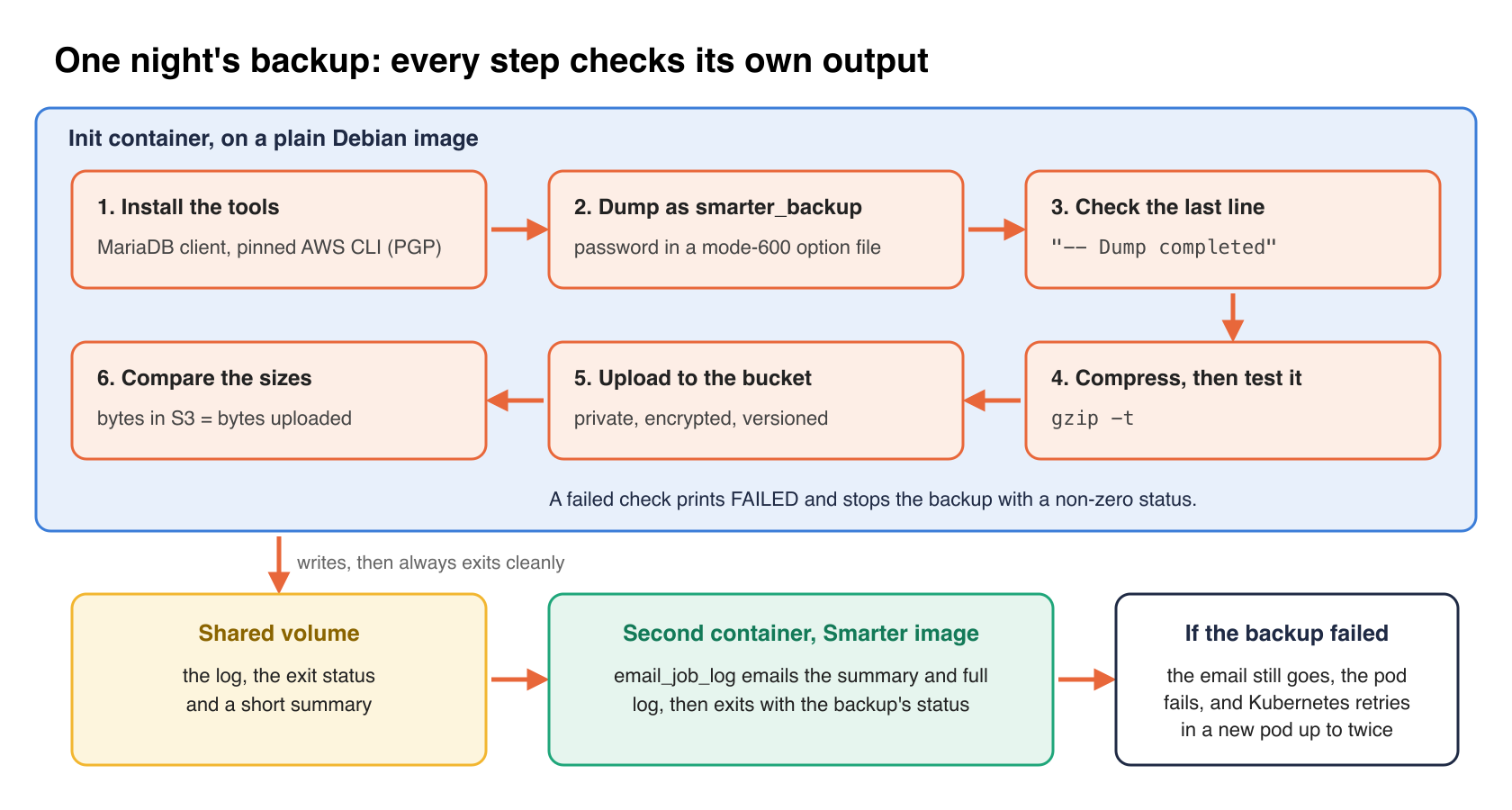
The backup checks its own output at each step before it reports success.
# helm/charts/smarter/templates/configmap-backup-script.yaml (trimmed)
# mariadb-dump writes this line last, so a dump without it was cut short.
if [[ "$(tail -n 1 "${BACKUP_FILENAME}.sql")" != "-- Dump completed"* ]]; then
  echo "FAILED: ${BACKUP_FILENAME}.sql does not end with '-- Dump completed', so the dump is incomplete."
  exit 1
fi
...
if ! gzip -t "${BACKUP_FILE}"; then
  echo "FAILED: ${BACKUP_FILE} is not a valid gzip archive."
  exit 1
fi
...
S3_BYTES=$(aws s3 ls "${BACKUP_URI}" | awk '{print $3}')
if [ "${S3_BYTES}" != "${BACKUP_BYTES}" ]; then
  echo "FAILED: ${BACKUP_URI} is ${S3_BYTES:-missing} bytes in S3, but ${BACKUP_BYTES} bytes were uploaded."
  exit 1
fi
A dump that was killed halfway, an archive that didn’t compress cleanly, and an upload that didn’t arrive in full all fail the job instead of passing it.
Then the job reports. The backup runs in an init container on the Debian image, which writes its log, its exit status and a short summary to a shared volume and always exits cleanly. A second container, from the Smarter image, which has Django, emails that summary and the full log to an administrator with the platform’s own email_job_log command, and then exits with the backup’s status. So a failed backup still sends an email, and still fails the pod. Kubernetes retries a failed backup in a new pod up to twice, and every attempt emails. A successful night’s email names the file, its size and where it was saved.
These checks prove that the file is complete and intact. They don’t prove it restores. Only a restore proves that, and it belongs on a calendar, not in a script that runs at two in the morning.
How important is it?
I’d rate it 7 out of 10. The attack surface is narrow, one job and one bucket, but what sits behind it is everything. A database backup is the one artifact that contains every other secret the platform protects, including user data, chat history, and the ciphertext of every stored Secret. Most breaches of a database don’t go through the database. They go through its copies.
What it costs
In money, very little. The job requests a fraction of a CPU core and runs for a few minutes a night. The bucket costs what its storage costs, and that’s where the one recurring decision lives. Versioning keeps every version of every backup until something removes it, so storage grows without bound unless the bucket has a lifecycle rule. Decide how long you need backups for, and add a rule that expires older ones and old noncurrent versions. That’s a retention policy, which is a business decision as much as a technical one, so it’s worth making on purpose.
The administrative burden is small, and most of it is reading. There’s one extra secret to create, the backup account’s password, and a nightly email that someone should actually read. The init Job keeps the account and its grants correct on every deploy, so they don’t drift. Installing the tools fresh each night costs some seconds of run time, and buys a clean environment and a verified AWS CLI every time.
There’s no effect on users. --single-transaction takes a consistent snapshot of InnoDB tables without locking them, and --quick streams rows instead of buffering whole tables in memory, so the platform keeps serving requests while the dump runs.
For stability, the job’s resource limits keep it from crowding the platform’s pods, and --lock-tables=false keeps it from blocking writes. A failure costs a retry and an email, not an outage.
The verdict
Do this. Every piece of it is cheap, and the alternative, a backup job that runs as root with the whole platform’s environment and writes wherever it’s pointed, is the default in more places than it should be. If you adopt only three things, make them a dedicated read-only database account, a dedicated private bucket with versioning and public access blocked, and a check that the dump completed before the job reports success. Then schedule a restore.
Takeaways
- Dump with an account that has
SELECT,SHOW VIEW,TRIGGER,EVENTandSHOW CREATE ROUTINEon one database, and use--no-tablespacesso it doesn’t needPROCESS. - Let the deploy create and maintain that account, so its grants can’t drift.
- Give the backup container an explicit list of environment variables. Never hand it the platform’s whole environment.
- Pin the tools it installs, and verify their signatures.
- Pass the password in an option file with mode 600, never on the command line.
- Store backups in a bucket of their own, with public access blocked, ACLs disabled, TLS required, encrypted and versioned, with a lifecycle rule.
- Fail the job on an incomplete dump, a bad archive or a short upload, and email the result either way.
- Test a restore on a schedule.
Closing thoughts
A backup job is easy to write and easy to forget, which is exactly why it ends up with more privilege than anything else in the cluster. None of the measures here is new, and none is hard. Together they turn the job from the most powerful thing in the namespace into one of the least. It can read one database, write to one bucket, and tell you whether it worked.