Kubernetes Secrets and Helm envFrom: Store Every Credential Once

Smarter’s Helm chart puts the platform’s whole environment, including Django’s SECRET_KEY, the database passwords, the AWS keys and every LLM provider’s API key, into one Kubernetes Secret, and every pod reads it with envFrom. No credential is written into the spec of a Deployment, a Job or a CronJob. This post is about why that matters more than it looks, what it protects and what it doesn’t, and what it costs to run.
Smarter is a Django platform for building and running LLM applications. A deployment runs five Deployments (the web app, two Celery workers, Celery Beat and an administrative bastion), an init Job on every upgrade, and a nightly backup CronJob. Most of them need most of the configuration, and a lot of that configuration is secret. The question is where those values live once Helm has rendered the chart.
The problem with a value in a pod spec
The simplest way to give a container its configuration in Helm is a loop over a map in values.yaml, rendered as env entries with literal values. It works, and it’s in a great many charts. It also writes each password into the pod template of every workload that uses it, and from there into every Pod that the workload creates.
That matters because Kubernetes treats workloads and Secrets as different classes of object. The built-in view ClusterRole, the one you hand to a developer, an on-call engineer or a monitoring tool so they can look around, grants read access to Deployments, Jobs, CronJobs and Pods, and deliberately leaves out Secrets. A credential written into a pod spec is readable by everyone who holds view. It also shows up in kubectl describe pod, in dashboards, in cluster inventory tools, and in any audit or backup system that stores manifests. None of these were built to treat their contents as secret, and none of them should have to.
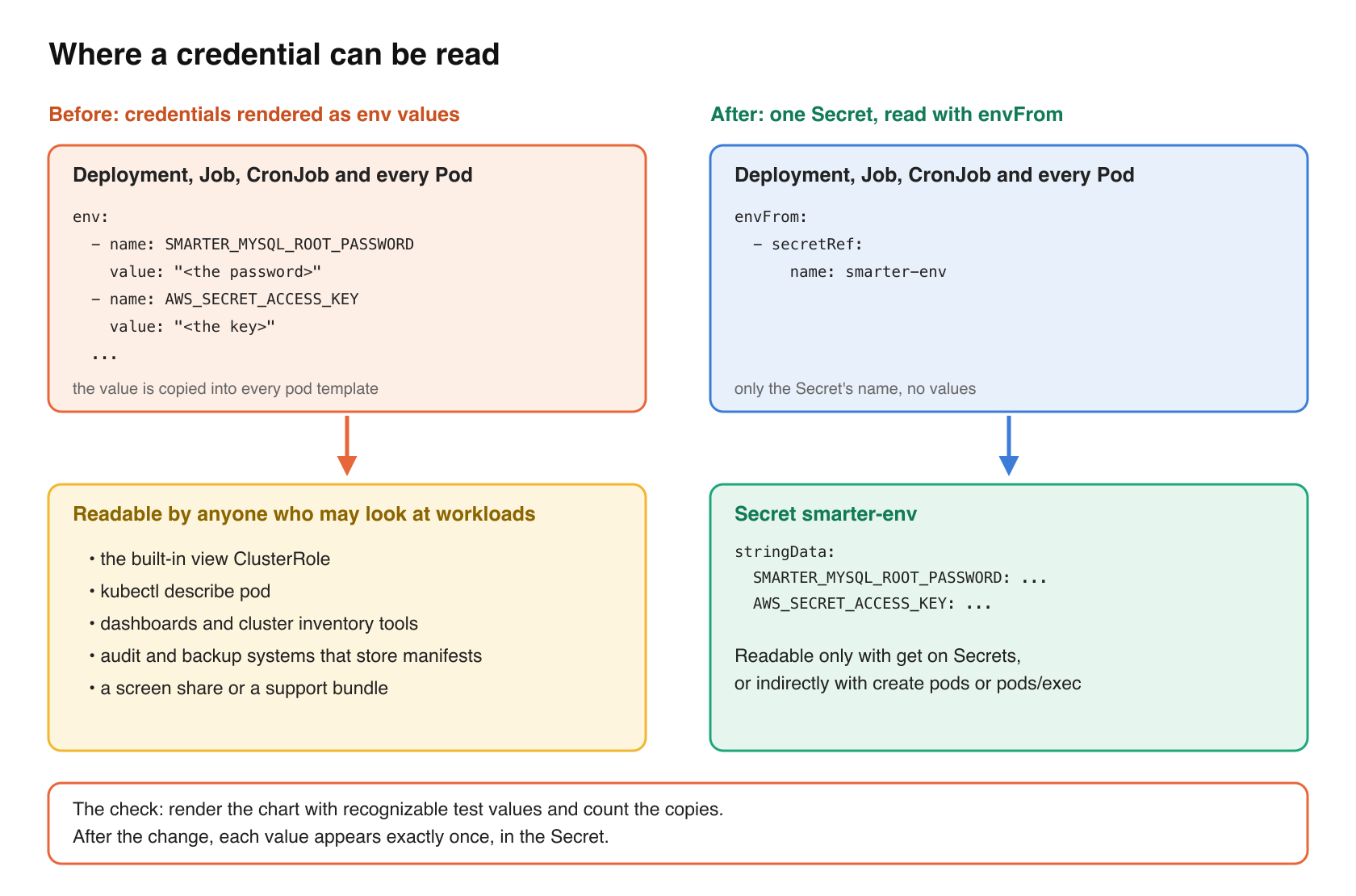
The attack this addresses is not exotic. It’s an over-broad read permission, a screen share, or a support bundle, and a credential that was readable through any of them. In Smarter’s case the values in question include the LLM providers’ API keys, which spend money, and the Fernet key that decrypts every Secret a user stores in the platform.
One Secret, read with envFrom
The chart’s template for the Secret is short. It renders .Values.env into stringData.
# helm/charts/smarter/templates/secret-env.yaml (trimmed)
apiVersion: v1
kind: Secret
metadata:
  name: "{{ .Values.global.appName }}-env"
  namespace: "{{ .Values.namespace }}"
type: Opaque
stringData:
  {{- range $key, $value := .Values.env }}
  {{ $key }}: {{ $value | quote }}
  {{- end }}
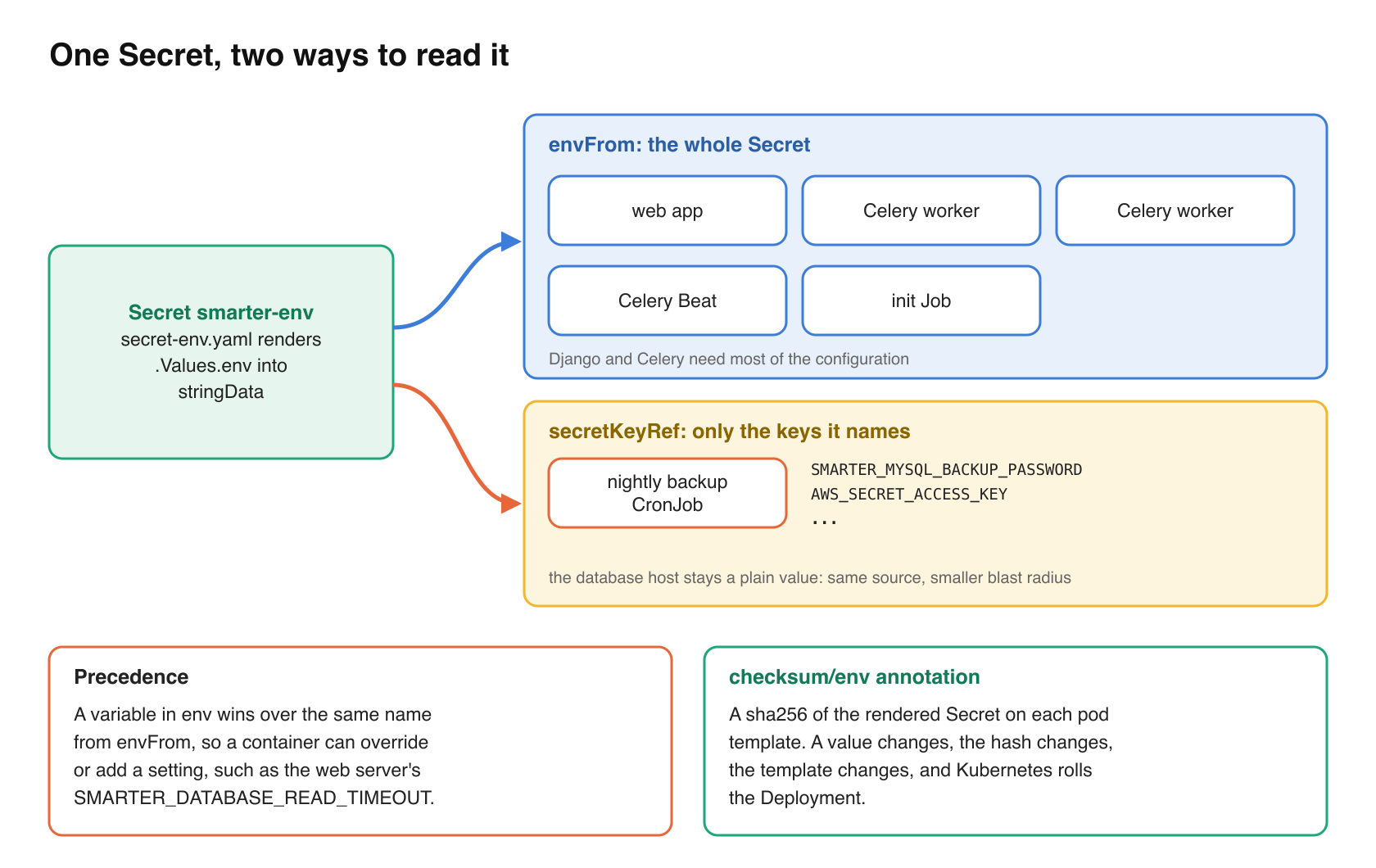
The web app, the two workers, Celery Beat and the init Job read the whole of it with envFrom, and keep their few container-specific values as ordinary env entries.
# helm/charts/smarter/templates/deployment-app.yaml (trimmed)
template:
  metadata:
    annotations:
      checksum/env: "{{ include (print $.Template.BasePath "/secret-env.yaml") . | sha256sum }}"
  spec:
    containers:
      - name: "{{ .Values.global.appName }}"
        # the platform's environment, from the Secret in secret-env.yaml
        envFrom:
          - secretRef:
              name: "{{ .Values.global.appName }}-env"
        env:
          {{- if .Values.app.databaseReadTimeout }}
          - name: SMARTER_DATABASE_READ_TIMEOUT
            value: {{ .Values.app.databaseReadTimeout | quote }}
          {{- end }}
Three details make this work in practice.
First, precedence. When a variable appears in both envFrom and env, Kubernetes uses the env entry. So a per-container setting, such as the web server’s database read timeout, can override or add to the shared environment without a second copy of the Secret.
Second, the checksum annotation. Environment variables are read when a container starts, so a changed Secret does nothing to pods that are already running. The checksum/env annotation is a hash of the rendered Secret. When a value changes, the hash changes, the pod template changes with it, and Kubernetes rolls the Deployment. This is the standard Helm idiom for config that pods read at startup, and it’s worth having even where something else already rolls the pods on every upgrade, as Smarter’s deployment timestamp label does, because it states the dependency in the template rather than leaving it to a side effect.
Third, the application doesn’t care. Smarter reads its configuration through a Pydantic Settings class, described in an earlier post, which only reads environment variables. Whether a variable came from a literal or from a Secret is invisible to it. The change was entirely in the chart.
The commit that made the change, 6c2d4212c, checked the result the simplest possible way. It rendered the chart with helm template and recognizable test values, then counted how many times each value appears. Each one now appears exactly once, in the Secret.
Pods that need only a few values
envFrom hands a container everything. For the long-running platform pods that’s appropriate, since Django and Celery really do need most of it. The nightly database backup is different. It needs a database account, an S3 location and AWS credentials, and nothing else, so it doesn’t use envFrom at all. It names the keys it needs with secretKeyRef.
# helm/charts/smarter/templates/job-mysql-backup.yaml (trimmed)
env:
  - name: SMARTER_MYSQL_HOST
    value: {{ .Values.env.SMARTER_MYSQL_HOST | quote }}
  - name: SMARTER_MYSQL_BACKUP_PASSWORD
    valueFrom:
      secretKeyRef:
        name: "{{ $.Values.global.appName }}-env"
        key: SMARTER_MYSQL_BACKUP_PASSWORD
        optional: true
  - name: AWS_SECRET_ACCESS_KEY
    valueFrom:
      secretKeyRef:
        name: "{{ $.Values.global.appName }}-env"
        key: AWS_SECRET_ACCESS_KEY
        optional: true
Non-secret values, such as the database host, stay as plain values, where they’re easy to read when debugging. The passwords and keys come from the one Secret by reference. Same source, smaller blast radius.
Off the command line, too
A pod spec isn’t the only place a password can leak inside a cluster. A shell command’s arguments are visible to every process in the container through /proc, and they end up in error messages and shell traces. Smarter’s init Job, which creates the database and its accounts on every upgrade, connects as the database’s root account. It passes that password through MYSQL_PWD, the environment variable that the MariaDB client reads, instead of -p on the command line.
# helm/charts/smarter/templates/job-init.yaml (trimmed)
# The credentials come from the environment, i.e. the Secret in secret-env.yaml, never from
# this template, so they aren't written into the Job's spec. The root password is passed
# in MYSQL_PWD, where the mariadb client reads it, which keeps it off the command line.
db() {
  MYSQL_PWD="$SMARTER_MYSQL_ROOT_PASSWORD" mariadb --default-character-set=utf8mb4 \
    -u "$SMARTER_MYSQL_ROOT_USERNAME" --host "$SMARTER_MYSQL_HOST" --port "${SMARTER_MYSQL_PORT:-3306}" -e "$1"
}
The backup script does the same with a temporary option file that only its user can read. The passwords that the init Job sets for the application and backup accounts are still part of the SQL statements it sends, which is a smaller exposure, limited to one short-lived, single-container pod, to a reader who would already have its environment.
What this does not protect against
It’s easy to overstate this pattern, so it’s worth being exact.
A Kubernetes Secret is not encryption. Its values are base64-encoded, and anyone who may get Secrets in the namespace reads them in plain text. Whether they are encrypted at rest in etcd is a property of the cluster, not the chart. On a managed cluster, envelope encryption with a key you control is a cluster setting that you turn on separately. Moving credentials into a Secret moves them behind a different RBAC permission. That is the whole benefit, and it’s a real one, but it’s only as good as the discipline with which you hand out get on Secrets.
Some permissions reach a Secret indirectly. Anyone who may create Pods in the namespace can create one that mounts the Secret, and anyone who may exec into a running pod can print its environment. Treat pods/exec and create pods as equivalent to reading Secrets when you design roles.
Helm keeps its own copy. Helm 3 stores each release, including the values it was installed with, in a Secret of type helm.sh/release.v1 in the release’s namespace. That copy sits behind the same permission as the chart’s own Secret, so it doesn’t widen access, but it does mean that “stored once” describes the chart’s rendered objects, not the cluster.
And the credentials exist upstream of the cluster. Smarter’s deploy workflow reads them from GitHub’s encrypted secrets, and passwords that infrastructure code generates also live in that code’s state. This change doesn’t touch either. If you adopt the pattern, apply the same thinking there. Ask who can read your CI secrets, and where your infrastructure state is stored and how it’s protected.
How much does it matter?
I’d put this at about a 6 out of 10. It doesn’t stop an attacker who is already inside a pod, and it does nothing at the network edge. What it closes is the widest and least-watched read path to a platform’s credentials, which is the ordinary, everyday permission to look at workloads, which many people and tools hold for good reasons. That path is large, and it’s quiet, because nothing logs a credential read out of a Deployment as anything other than a Deployment read.
What it costs
Nothing, in money. A Secret is an ordinary API object.
The ongoing burden is close to nothing too. There are no new components to run. Values are still set where they were, in the values file or with --set from the CI’s secret store, and the chart’s README says to keep the values file out of source control. The things to know are small. A Secret is limited to 1 MiB, and because variables are read at startup, a changed value reaches pods only when they restart, which the checksum annotation arranges for the Deployments.
There’s no user-facing effect. Nothing in the web console or the API changes.
For stability, the effect is positive. A pod whose envFrom names a Secret that doesn’t exist won’t start; it stays in CreateContainerConfigError instead of starting with half a configuration. Combined with a rolling update that waits for readiness, a broken Secret stops a deploy before it replaces healthy pods. And the checksum annotation makes configuration changes deterministic. Change a value, and exactly the pods that read it are replaced.
The alternatives are worth a sentence. An operator such as External Secrets, or the Secrets Store CSI driver, can keep credentials in a cloud secret manager and sync or mount them into the cluster, with rotation and audit logging on the manager’s side. Those are good tools, and the right step for a larger organization. They are also more components to install, upgrade and give cloud permissions to. A plain Secret read with envFrom is where to start, and nothing about it gets in the way of moving to one of those later, because the pods would read the same variables.
The verdict
Adopt it. If your chart renders credentials as env values, this is one of the cheapest security improvements available to you. It’s an afternoon’s work, with no new infrastructure, no change to your application, and a clear boundary between people who can see what’s running and people who can see its keys. Then do the two things it doesn’t do for you. Encrypt Secrets at rest in the cluster, and keep get on Secrets, pods/exec and create pods for the few who need them.
Takeaways
- Render credentials into one Secret and read it with
envFrom. Keep only non-secret, container-specific values as literalenventries. - Add a
checksum/<name>annotation of the rendered Secret to each pod template, so a changed value rolls the pods that read it. - Give narrow workloads, such as backups, only the keys they need with
secretKeyRef, not the whole Secret. - Keep passwords off command lines. Use the client’s environment variable or an option file with mode 600.
- Verify it. Render the chart with recognizable test values and count how many times each appears.
- Remember what a Secret isn’t. Turn on encryption at rest, and treat
pods/execandcreate podsas permission to read Secrets.
Closing thoughts
The pattern is common enough that it’s easy to assume every chart already follows it. Many don’t, because a loop over env values is the first thing that works, and nothing breaks when credentials sit in a pod spec. The cost of leaving them there only shows up when someone with an ordinary read permission looks in the wrong place. Rendering the chart and counting the copies takes a minute, and it’s worth doing on any chart you run.