
Django Configuration That Fails Closed, and Rate Limits Shared Through Redis

Smarter makes two security decisions in its Django configuration. Outside local development it refuses to start with a missing or published SECRET_KEY, and it counts every API rate limit in Redis, so that twenty pods enforce one limit rather than twenty. An earlier post, Pydantic Settings: How Smarter Validates and Manages Its Configuration, explains how Smarter’s settings are built and validated. This one takes the security angle, asking which failures should stop the process, which shouldn’t, and why a rate limit that lives in each pod’s memory isn’t really a limit.
Open or closed
A control fails open when, if it breaks or is misconfigured, it lets everything through. It fails closed when it stops. A door lock that opens in a power cut fails open. Neither is always right, since a fire exit should fail open. But for the key that Django signs things with, failing open means running with a key that someone else may know.
Configuration is where a platform most often fails open without anyone noticing. A variable is missing, so the code falls back to a default, and the default is fine on a laptop and wrong in production. Django itself does the right thing when SECRET_KEY is empty. It refuses to start. The trouble starts when application code helps.
A secret key that is missing, published or generated
Smarter’s Helm chart ships a values.yaml with placeholders where secrets go, so that an operator can see what to set.
env:
  DEBUG_MODE: "false"
  ENVIRONMENT: "prod"
  SECRET_KEY: "SET-ME-IN-helm/charts/smarter/values.yaml"
That placeholder is published on GitHub. A chart installed without overriding it would sign password reset tokens, signed cookies and everything else Django signs with a string anyone can read. A deployment that sets no key at all has a different problem. If each process generates a random key, each pod signs with its own. Django also uses the key to check the authentication hash stored in each session, so a user who logged in through one pod is logged out by the next, and nothing survives a restart. One failure is a security hole, and the other is an outage that looks like a login bug.
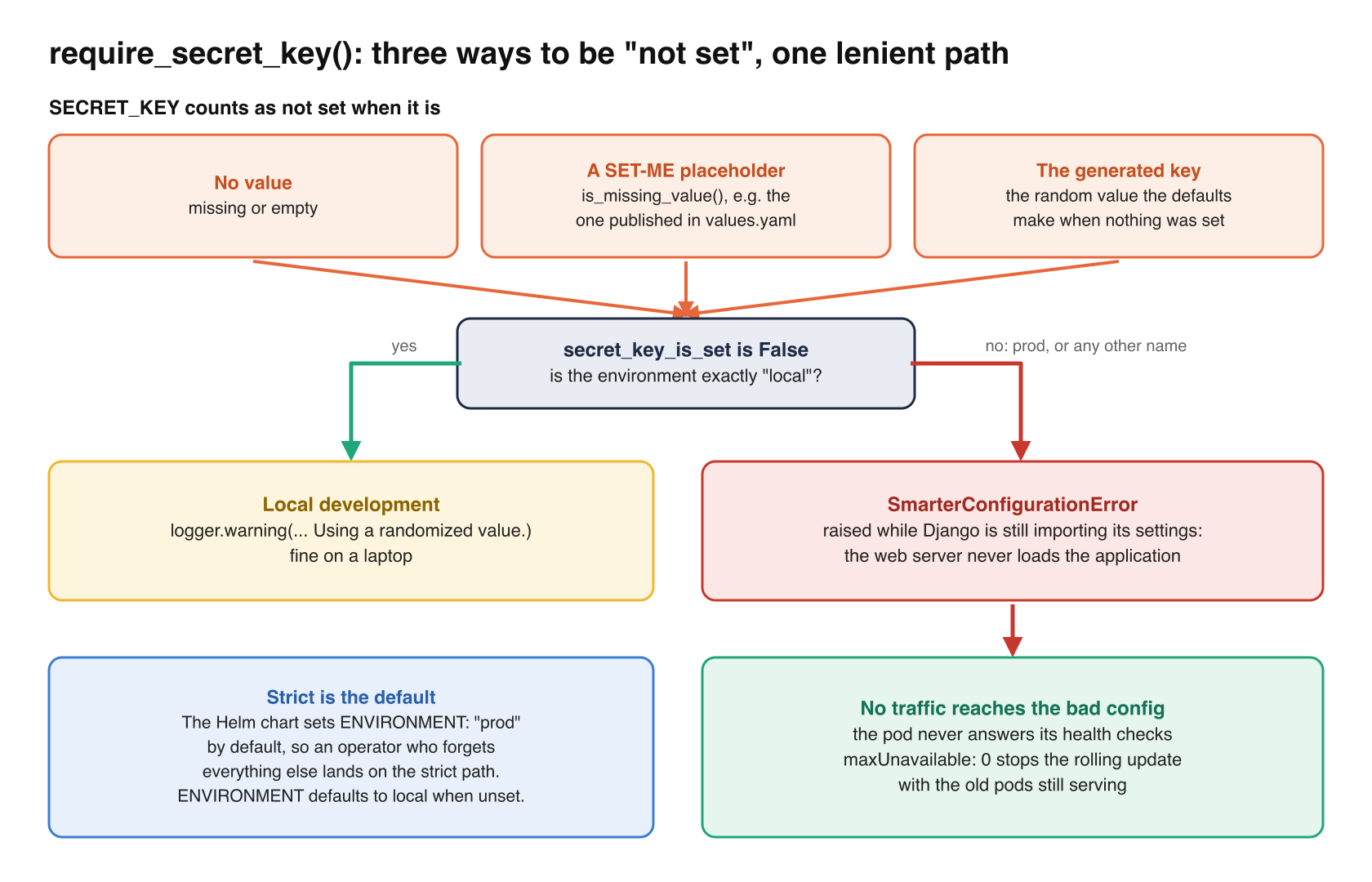
So the settings class treats three cases as “not set”, namely no value, a SET-ME placeholder, and the random key that the defaults generate when nothing was configured. This is from settings.py.
@property
def secret_key_is_set(self) -> bool:
    if is_missing_value(self.secret_key):
        return False
    if settings_defaults.SECRET_KEY_IS_GENERATED and self.secret_key is not None:
        generated = settings_defaults.SECRET_KEY.get_secret_value()
        return self.secret_key.get_secret_value() != generated
    return True

def require_secret_key(self) -> None:
    if self.secret_key_is_set:
        return
    if not self.environment_is_local:
        raise SmarterConfigurationError(
            f"SECRET_KEY is not set. It is required in the {self.environment} environment. "
            "Set SMARTER_SECRET_KEY to a long (50+ characters), random string that is the same for every pod."
        )
    logger.warning("%s SECRET_KEY is not set. Using a randomized value.", logger_prefix)
Django’s settings module calls smarter_settings.require_secret_key() as soon as it has read the key, so the error is raised while the process is still importing its settings. The web server never loads the application, and the pod never answers its health checks.
Two details decide whether a rule like this actually fails closed.
First, what counts as “local”. The strict branch runs whenever the environment is anything but local, including an environment name nobody anticipated. Only an exact match for local gets the lenient path. ENVIRONMENT itself defaults to local when it’s unset, which is right for a developer’s laptop, so the Helm chart sets ENVIRONMENT: "prod" by default. An operator who installs the chart and forgets everything else lands on the strict path, not the lenient one.
Second, placeholders. is_missing_value(), in env.py, treats any value that starts with SET-ME as missing. That one function is what keeps a published placeholder from ever being mistaken for a real secret, everywhere it’s used.
Refuse, don’t coerce
The same principle applies to values that aren’t secrets but control security. Smarter’s rate limits are settings, and a typo in one shouldn’t quietly switch it off. Here is the validator, from the same file.
THROTTLE_RATE_DISABLED = ("none", "off", "disabled")

def validate_throttle_rate(field_name: str, v: Optional[str], default: Optional[str]) -> Optional[str]:
    if isinstance(v, str) and v.strip().lower() in THROTTLE_RATE_DISABLED:
        return None
    if v is None or str(v).strip() in THE_EMPTY_SET:
        return default
    ...
    if not THROTTLE_RATE_PATTERN.match(value):
        raise SmarterConfigurationError(
            f"{field_name} {v} is not a throttle rate, e.g. 120/minute, or one of {THROTTLE_RATE_DISABLED}."
        )
    return value
There are three outcomes, and each is deliberate. An empty value gets the default, 120/minute for anonymous clients and 600/minute for users. Turning a limit off takes one of three explicit words. Anything else, 120/minuet for example, stops the process with a message that names the setting. Nothing in between is guessed.
The database settings follow the same rule on the alpha branch (6c2d4212c). Host, port, name, user and password are validated fields, and the password has a default only in the local environment. Elsewhere there is no fallback to the value published in docker-compose.yml, so a missing password is no password, and the connection fails.
Not everything should stop the process. A root domain still set to example.com, or AWS credentials that are neither a profile nor a key pair, print a red banner and a warning at startup instead. Those degrade features. A wrong secret key compromises every session. I draw the line at “could this let someone in, or quietly lose data?” If yes, it fails closed.
Rate limits that every pod shares
Smarter proxies billable LLM requests, and a deployed chatbot serves anonymous visitors on someone else’s web page. Without rate limits, anyone who finds a chatbot’s URL can run up its owner’s bill. So every API is limited, per user when the request is authenticated, and per IP address when it isn’t. These are the throttles, from lib/drf/throttling.py.
class SmarterAnonRateThrottle(AnonRateThrottle):
    cache = lazy_cache  # type: ignore[assignment]

    def get_rate(self) -> Optional[str]:
        return smarter_settings.throttle_rate_anon


class SmarterUserRateThrottle(UserRateThrottle):
    cache = lazy_cache  # type: ignore[assignment]

    def get_rate(self) -> Optional[str]:
        return smarter_settings.throttle_rate_user
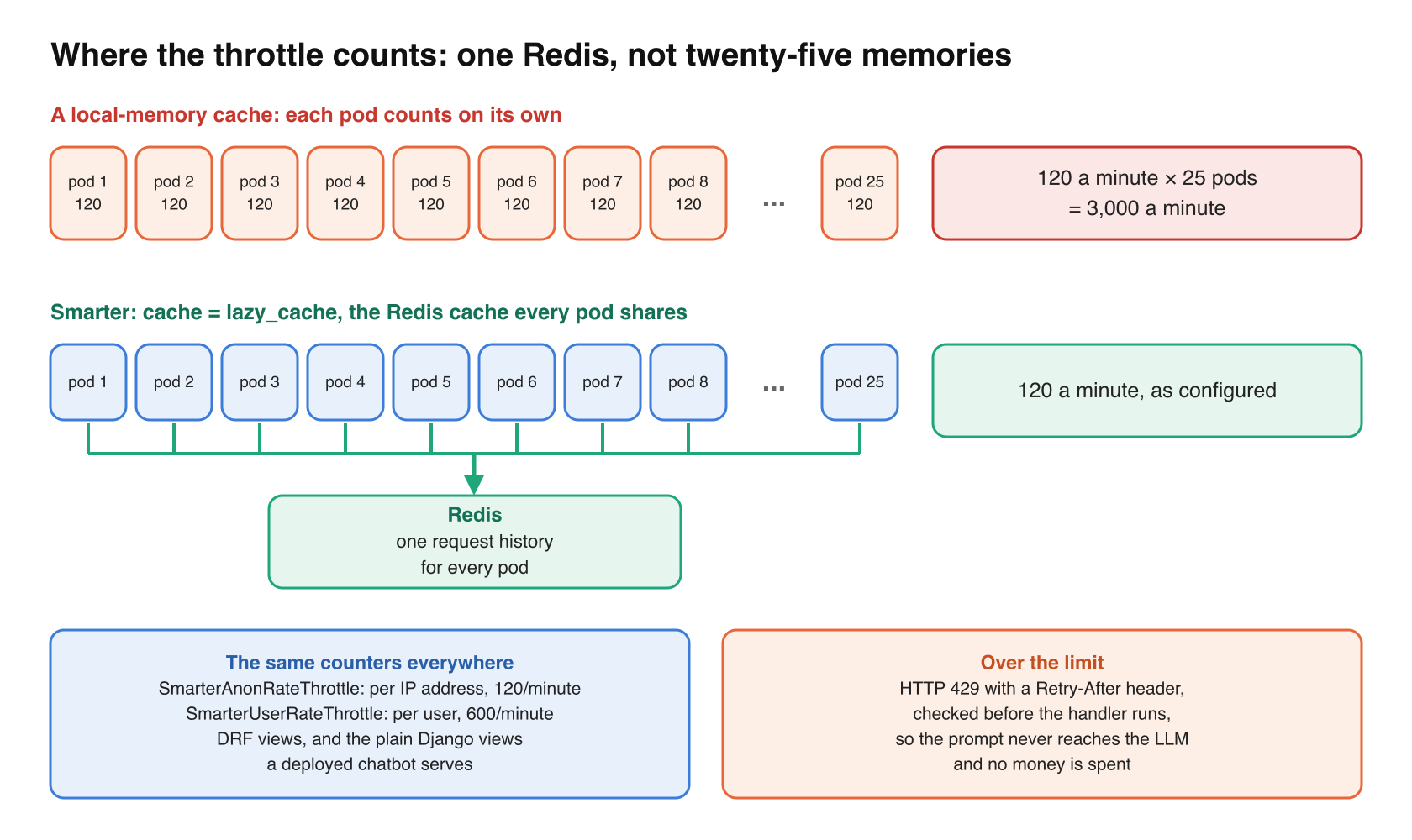
The interesting line is cache = lazy_cache. Django REST Framework keeps a throttle’s request history in a Django cache. If that cache is per process, as a local-memory cache is, each pod counts on its own, and the real limit is the configured rate times the number of pods. Smarter’s web server scales horizontally, up to 25 pods by default, so a limit of 120 a minute could become 3,000. lazy_cache is Smarter’s Redis cache, so every pod reads and writes the same history.
Plain Django views, too
Django REST Framework only throttles its own views. The APIs that a deployed chatbot serves, its configuration and its prompt endpoint, are plain Django views, so a DRF setting alone would leave the most expensive endpoint unlimited. Their base class, in lib/django/views.py, applies the same throttles, against the same counters, before the handler runs.
def dispatch(self, request: HttpRequest, *args, **kwargs):
    response = self.throttle(request)
    if response is None:
        response = super().dispatch(request, *args, **kwargs)
    patch_vary_headers(response, ["Cookie"])
    return response
A throttled request gets HTTP 429 with a Retry-After header, and the prompt never reaches the LLM. That’s the property that matters for cost, because the limit is checked before any money is spent.
Who is “an IP address”?
For anonymous clients, Django REST Framework identifies the client from X-Forwarded-For, falling back to REMOTE_ADDR. Smarter leaves DRF’s NUM_PROXIES setting at its default, so the identity is only as trustworthy as the proxy in front of Django. The edge must replace whatever X-Forwarded-For the client sent. In Smarter’s reference AWS deployment, Traefik accepts forwarded headers only from addresses inside the VPC. If you adopt this pattern behind a different ingress, check what your ingress does with that header, and set NUM_PROXIES to match your topology.
The costs
Attack surface and importance
I’d put the secret key rule at 8 out of 10. It protects everything Django signs with the key, and the session check that keeps users logged in across pods, and it costs about twenty lines. Shared rate limits I’d put at 7. The surface is every API, and the main threat is financial rather than a breach, but for a platform that spends money on every prompt, that threat is real.
Admin burden
Low. Failing closed moves work to install time. An operator who forgets the key finds out from a pod that won’t start, with a message that says which variable to set, rather than from users who can’t stay logged in. The rates are environment variables. Because smarter_settings is immutable, changing one takes a restart, which is a rolling update in Kubernetes.
Cost
Each request costs a Redis read and a write for the throttle that applies to it. Smarter already depends on Redis for sessions on every request, so there is no new service to run.
UX
For users, a 429 with a Retry-After header, in the same format as Django REST Framework’s own. The anonymous limit is per address, so visitors behind one shared office or campus address share it. The defaults leave room for that, and an operator can raise it.
Stability
Failing closed is safe in Kubernetes for a specific reason. A pod that raises during startup never becomes ready, and the web server’s Deployment uses maxUnavailable: 0, so a rolling update stops with the old pods still serving. The bad configuration is visible at once, and no traffic reaches it. One limit of DRF’s throttles is worth knowing. They read the history, then write it, without a lock. Under a burst spread across pods, a few requests over the limit can get through. For a cost control that’s acceptable. For a hard quota, use an atomic counter.
Takeaways
- Decide, per setting, whether a bad value should stop the process. Anything that signs, encrypts or authenticates should.
- Treat placeholders as missing, in one function, everywhere.
- Make the strict path the default for any environment you didn’t name, and have your deployment chart set the environment explicitly.
- Validate security-relevant values, such as rate limits, and require an explicit word to turn one off.
- Keep rate limit counters in a shared cache, and apply the same limits to views outside your API framework.
- Check what your ingress does with
X-Forwarded-Forbefore you trust it for per-IP limits.
Closing thoughts
A platform that refuses to start is annoying for about five minutes. A platform that starts with a published signing key, or with rate limits that quietly multiply by the number of pods, can be wrong for months before anyone notices. Smarter’s configuration is built so that the annoying failure is the one you get.